


- Posts: 1218
- Thank you received: 174
Kunena 7.0.4 Released
The Kunena team has announce the arrival of Kunena 7.0.4 [K 7.0.4] in stable which is now available for download as a native Joomla extension for J! 5.4.x/6.0.x. This version addresses most of the issues that were discovered in K 6.2 / K 6.3 / K 6.4 and issues discovered during the last development stages of K 7.0
Solved Cannot create topic
4 years 5 months ago #220151
by Leen
With kind regards
Leen
Replied by Leen on topic Cannot create topic
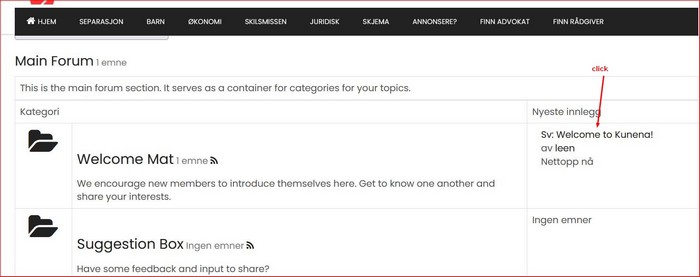
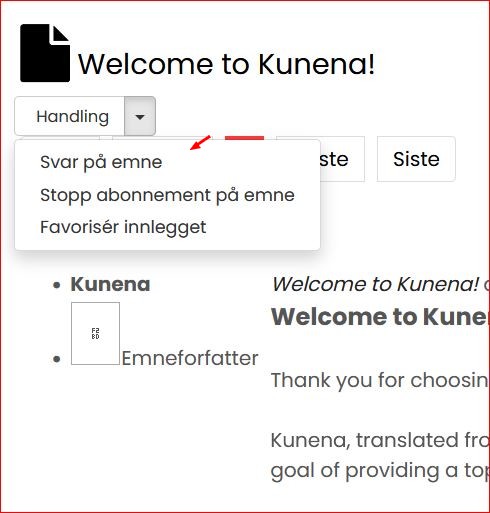
it looks like you haven't created a proper menu item for the forum in main menu yet.
so you could still do that and then set it to registered users.
because I clicked on the side of the list I was able to answer a topic so that probably went through kunena module or something
it is difficult for me to give a good answer because of language problem everything goes through google translate
so you could still do that and then set it to registered users.
because I clicked on the side of the list I was able to answer a topic so that probably went through kunena module or something
it is difficult for me to give a good answer because of language problem everything goes through google translate
With kind regards
Leen

The following user(s) said Thank You: nettemor
Please Log in or Create an account to join the conversation.
4 years 5 months ago #220152
by Leen
With kind regards
Leen
Replied by Leen on topic Cannot create topic
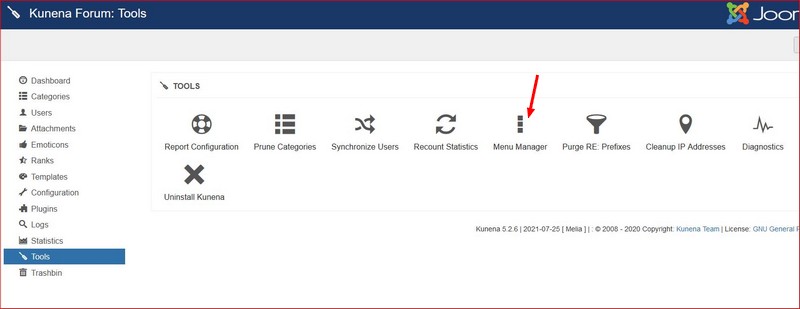
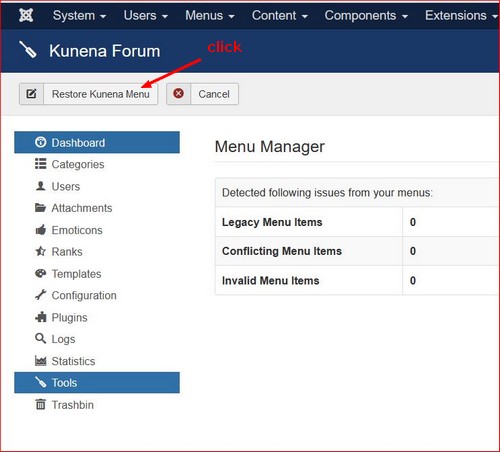
what else you can try go into
administrator > components > kunena forum > tools there click on menu manager and then on top on restore kunena menu
administrator > components > kunena forum > tools there click on menu manager and then on top on restore kunena menu
With kind regards
Leen
The following user(s) said Thank You: nettemor
Please Log in or Create an account to join the conversation.


4 years 5 months ago - 4 years 5 months ago #220153
by rich
Important! Always create a backup before you make any changes to your website!
Replied by rich on topic Cannot create topic
I have no idea how the Kunena installation and integration works with jsn_time2, but you have a mess in your routes.
I can't explain otherwise that you can create new topics via this URL but not via Kunena.
I can only recommend, uninstall Kunena completely (Kunena Dashboard - Tools) and remove all menu items that have anything to do with the forum. Then switch to the Joomla default template during the installation and reinstall Kunena from our download page.
Also deactivate your page optimization tools if you have.
Hint: In this case you would have a complete new Forum and all your configurations and posts are lost.
But maybe it helps already, if you remove all menu items that related to the forum and create new Kunena menu ( see here ).
I can't explain otherwise that you can create new topics via this URL but not via Kunena.
I can only recommend, uninstall Kunena completely (Kunena Dashboard - Tools) and remove all menu items that have anything to do with the forum. Then switch to the Joomla default template during the installation and reinstall Kunena from our download page.
Also deactivate your page optimization tools if you have.
Hint: In this case you would have a complete new Forum and all your configurations and posts are lost.
But maybe it helps already, if you remove all menu items that related to the forum and create new Kunena menu ( see here ).
Important! Always create a backup before you make any changes to your website!
Last edit: 4 years 5 months ago by rich.
Please Log in or Create an account to join the conversation.


4 years 5 months ago #220159
by nettemor
Replied by nettemor on topic Cannot create topic
You now what! THANK YOU Leen for your amazing help and patience.
I did this: administrator > components > kunena forum > tools there click on menu manager and then on top on restore kunena menu
AND IT SOLVED THE PROBLEM!
I am so happy!
Did i tell you i am so happy? /media/kunena/emoticons/
I am ever so thankful, THANK YOU!! My weekend is saved
I did this: administrator > components > kunena forum > tools there click on menu manager and then on top on restore kunena menu
AND IT SOLVED THE PROBLEM!
I am so happy!
Did i tell you i am so happy? /media/kunena/emoticons/
I am ever so thankful, THANK YOU!! My weekend is saved
Please Log in or Create an account to join the conversation.
4 years 5 months ago #220160
by nettemor
Replied by nettemor on topic Cannot create topic
Thank you Rich, i appreciate you helping out. I managed to get it fixed by the help of Leen here.
But i see you mention i have a mess in my routes.
But i see you mention i have a mess in my routes.
Please Log in or Create an account to join the conversation.
Time to create page: 0.211 seconds