


- Posts: 4
- Thank you received: 0
Kunena 7.0.11 & Kunena 6.4.16 – Security Updates Released and K7.1 in RC1 2
The Kunena team has announce the arrival of three simultaneous security release : K6.4.16, K7.0.11 and K7.1 RC2. Just a reminder K6.4.16 receives only securities fixes untill end of 2026, so it's advised for users to upgrade to K7.0.11. K7.0.11 is the last release of the K7.0 because it's replaced by K7.1 branch with the stable release in the corner. The translations for K7.1 on crowdin.com/project/kunena-forum-7-1 needs to be checked or improved becasue it has been generated by TM (Translation Machine).
Solved Infinite loop in libraries/kunena/error.php
10 years 6 months ago #173936
by stanimir
Infinite loop in libraries/kunena/error.php was created by stanimir
Steps to reproduce the issue
Open post that cannot be found. The kunena start executing error.php.
Expected result
libraries/kunena/error.php should not get into cycle.
Actual result
libraries/kunena/error.php should not exhaust the server resources.
System information (as much as possible)
Joomla version: 3.4.8
Kunena version: 4.0.10
Php version: 5.6.19
Database version:
cpsrvd 11.52.2.5
Database client version: libmysql - 5.1.73
PHP extension: mysqli
Additional comments
I have migrated the forum from Joomla 1.5.26 to 3.4.8, kunena 2.0.4 to 4.0.10. Basically, I recreate the tables from old version of kunena and missing fields. It's working properly. But now, the hosting company stops the execution of the script because it's exhausting the server resources. I am waiting for some kind of profiler for error.php file in order to get what exactly cause the cycling.
I have submit the issue here as well - github.com/Kunena/Kunena-Forum/issues/3758
Open post that cannot be found. The kunena start executing error.php.
Expected result
libraries/kunena/error.php should not get into cycle.
Actual result
libraries/kunena/error.php should not exhaust the server resources.
System information (as much as possible)
Joomla version: 3.4.8
Kunena version: 4.0.10
Php version: 5.6.19
Database version:
cpsrvd 11.52.2.5
Database client version: libmysql - 5.1.73
PHP extension: mysqli
Additional comments
I have migrated the forum from Joomla 1.5.26 to 3.4.8, kunena 2.0.4 to 4.0.10. Basically, I recreate the tables from old version of kunena and missing fields. It's working properly. But now, the hosting company stops the execution of the script because it's exhausting the server resources. I am waiting for some kind of profiler for error.php file in order to get what exactly cause the cycling.
This message contains confidential information
Database collation check: The collation of your table fields are correct
Joomla! SEF: Disabled | Joomla! SEF rewrite: Disabled | FTP layer: Disabled |
This message contains confidential informationhtaccess: Exists | PHP environment: Max execution time: 30 seconds | Max execution memory: 136M | Max file upload: 10M
Kunena menu details:
Warning: Spoiler!
ID Name Menutype Link Path In trash 204 Форум menu-bg view=home&defaultmenu=204 форум No 205 Начало menu-bg view=category&layout=list&catid=4 форум/начало No 206 Последни мнения menu-bg view=topics&layout=posts&mode=recent форум/последни-мнения No 209 Мойте мнения menu-bg view=topics&layout=user&mode=default форум/мойте-мнения No 212 Търси menu-bg view=search форум/търси No 239 Списък с потребители menu-bg view=user&layout=list форум/списък-с-потребители No 207 Нова тема menu-bg view=topic&layout=create форум/нова-тема No 208 No Replies menu-bg view=topics&mode=noreplies форум/noreplies No 210 Профил menu-bg view=user форум/профил No 211 Помощ menu-bg view=misc форум/помощ No 223 CB Profile communitybuilder view=user cb-profile No 244 Форум (2) kunenamenu view=category&catid=1 форум-2 No 245 Начало kunenamenu view=category&layout=list&catid=1 форум-2/начало No 246 Последни мнения kunenamenu view=topics&layout=posts&mode=recent форум-2/последни-мнения No 247 Мойте мнения kunenamenu view=topics&layout=user&mode=default форум-2/мойте-мнения No 248 Търси kunenamenu view=search форум-2/търси No 249 Списък с потребители kunenamenu view=user&layout=list форум-2/списък-с-потребители No 251 Нова тема kunenamenu view=topic&layout=create форум-2/нова-тема No 252 No Replies kunenamenu view=topics&mode=noreplies форум-2/noreplies No 253 Профил kunenamenu view=user форум-2/профил No 254 Помощ kunenamenu view=misc форум-2/помощ No
Joomla default template details : fontaine_j3 | author: arrowthemes | version: 2.5.0 | creationdate: July 2012
Kunena default template details : Crypsis | author: Kunena Team | version: 4.0.10 | creationdate: 2016-02-18
Kunena version detailed: Kunena 4.0.10 | 2016-02-18 [ Villavicencio ]
| Kunena detailed configuration:| Kunena integration settings:Warning: Spoiler!
Kunena config settings: board_offline 0 enablerss 1 threads_per_page 20 messages_per_page 6 messages_per_page_search 15 showhistory 1 historylimit 6 shownew 1 disemoticons 0 template crypsis showannouncement 1 avataroncat 0 catimagepath category_images showchildcaticon 1 rtewidth 450 rteheight 300 enableforumjump 1 reportmsg 1 username 1 askemail 0 showemail 0 showuserstats 1 showkarma 1 useredit 1 useredittime 0 useredittimegrace 600 editmarkup 1 allowsubscriptions 1 subscriptionschecked 1 allowfavorites 1 maxsubject 50 maxsig 300 regonly 0 pubwrite 0 floodprotection 0 mailmod 0 mailadmin 0 captcha 0 mailfull 1 allowavatarupload 1 allowavatargallery 1 avatarquality 75 avatarsize 2048 imageheight 800 imagewidth 800 imagesize 150 filetypes txt,rtf,pdf,zip,tar.gz,tgz,tar.bz2 filesize 120 showranking 1 rankimages 1 userlist_rows 30 userlist_online 1 userlist_avatar 1 userlist_posts 1 userlist_karma 1 userlist_email 0 userlist_joindate 1 userlist_lastvisitdate 1 userlist_userhits 1 latestcategory 0 showstats 1 showwhoisonline 1 showgenstats 1 showpopuserstats 1 popusercount 5 showpopsubjectstats 1 popsubjectcount 5 showspoilertag 1 showvideotag 1 showebaytag 1 trimlongurls 1 trimlongurlsfront 40 trimlongurlsback 20 autoembedyoutube 1 autoembedebay 1 ebaylanguagecode en-us sessiontimeout 1800 highlightcode 0 rss_type topic rss_timelimit month rss_limit 100 rss_included_categories rss_excluded_categories rss_specification rss2.0 rss_allow_html 1 rss_author_format name rss_author_in_title 1 rss_word_count 0 rss_old_titles 1 rss_cache 900 defaultpage recent default_sort desc sef 1 showimgforguest 1 showfileforguest 1 pollnboptions 4 pollallowvoteone 1 pollenabled 1 poppollscount 5 showpoppollstats 1 polltimebtvotes 00:15:00 pollnbvotesbyuser 100 pollresultsuserslist 1 maxpersotext 50 ordering_system mesid post_dateformat ago post_dateformat_hover datetime hide_ip 1 imagetypes jpg,jpeg,gif,png checkmimetypes 1 imagemimetypes image/jpeg,image/jpg,image/gif,image/png imagequality 50 thumbheight 32 thumbwidth 32 hideuserprofileinfo put_empty boxghostmessage 0 userdeletetmessage 0 latestcategory_in 1 topicicons 1 debug 0 catsautosubscribed 0 showbannedreason 0 showthankyou 1 showpopthankyoustats 1 popthankscount 5 mod_see_deleted 0 bbcode_img_secure text listcat_show_moderators 1 lightbox 1 show_list_time 720 show_session_type 2 show_session_starttime 1800 userlist_allowed 1 userlist_count_users 1 enable_threaded_layouts 0 category_subscriptions post topic_subscriptions every pubprofile 1 thankyou_max 10 email_recipient_count 0 email_recipient_privacy bcc captcha_post_limit 0 keywords 0 userkeywords 0 image_upload registered file_upload registered topic_layout flat time_to_create_page 1 show_imgfiles_manage_profile 1 hold_newusers_posts 0 hold_guest_posts 0 attachment_limit 8 pickup_category 0 article_display intro send_emails 0 fallback_english 1 cache 1 cache_time 60 iptracking 0 rss_feedburner_url autolink 1 access_component 1 statslink_allowed 1 superadmin_userlist 0 legacy_urls 1 attachment_protection 0 categoryicons 1 avatarresizemethod 1 avatarcrop 0 user_report 1 searchtime 365 teaser 0 ebay_language 0 twitter_consumer_key twitter_consumer_secret allow_change_subject 1 max_links 6 | Joomla! detailed language files installed:Warning: Spoiler!Kunena - AlphaUserPoints Disabled
Kunena - Community Builder Disabled
Kunena - Gravatar Disabled
Kunena - JomSocial Disabled
Kunena - Joomla Enabled: access=1 login=1
Kunena - Kunena Enabled: avatar=1 profile=1
Kunena - UddeIM Enabled: private=1
Warning: Spoiler!
Joomla! languages installed: bg-BG Български en-GB English (en-GB)
Third-party components: CommunityBuilder 2.0.14 | UddeIM 3.8
Third-party SEF components: None
Plugins: None
Modules: Kunena Latest 3.1.2.1 | Kunena Stats 3.1.2
I have submit the issue here as well - github.com/Kunena/Kunena-Forum/issues/3758
Please Log in or Create an account to join the conversation.


10 years 6 months ago #173937
by 810
Replied by 810 on topic Infinite loop in libraries/kunena/error.php
try to recreate menu, this will fix the issue i think
Please Log in or Create an account to join the conversation.
10 years 6 months ago - 10 years 6 months ago #173941
by stanimir
Replied by stanimir on topic Infinite loop in libraries/kunena/error.php
I have recreated the home menu as well as kunena menu from menu page in the administration. But the issue is still reproducing.
I turn on the debug mode in kunena and this is shown as issue -
Fatal error: Allowed memory size of 142606336 bytes exhausted (tried to allocate 75 bytes) in /home/metalde/public_html/test/libraries/joomla/database/driver/mysqli.php on line 567
I have tried to add more memory but it's taking all resource again. This is an example of url that causes the issue - test.metaldetecting.bg/index.php?option=...&id=11081&Itemid=126 .
When the debug mode is turn off and blank page is shown. Sometime is shown error message 500 Internal Server Error, Please contact the site owner. After a long time of loading.
I turn on the debug mode in kunena and this is shown as issue -
Fatal error: Allowed memory size of 142606336 bytes exhausted (tried to allocate 75 bytes) in /home/metalde/public_html/test/libraries/joomla/database/driver/mysqli.php on line 567
I have tried to add more memory but it's taking all resource again. This is an example of url that causes the issue - test.metaldetecting.bg/index.php?option=...&id=11081&Itemid=126 .
When the debug mode is turn off and blank page is shown. Sometime is shown error message 500 Internal Server Error, Please contact the site owner. After a long time of loading.
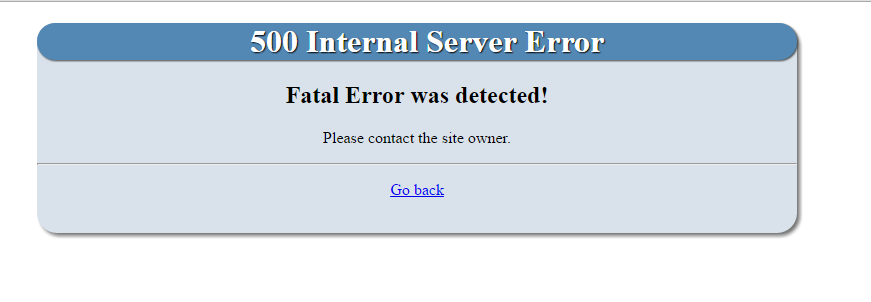
Last edit: 10 years 6 months ago by stanimir.
Please Log in or Create an account to join the conversation.

10 years 6 months ago #173944
by xillibit
I don't provide support by PM, because this can be useful for someone else.
Replied by xillibit on topic Infinite loop in libraries/kunena/error.php
Hello,
Do-you have an error message if enable debug mode in Joomla! and Kunena configuration panel ?
Do-you have an error message if enable debug mode in Joomla! and Kunena configuration panel ?
I don't provide support by PM, because this can be useful for someone else.
Please Log in or Create an account to join the conversation.
10 years 6 months ago #173945
by stanimir
Replied by stanimir on topic Infinite loop in libraries/kunena/error.php
No, I am getting this error only - Fatal error: Allowed memory size of 142606336 bytes exhausted (tried to allocate 75 bytes) in /home/metalde/public_html/test/libraries/joomla/database/driver/mysqli.php on line 567
After further investigation it turns out that if the Itemid is not in the menu, joomla get into that loop. Do you know how to resolve that?
After further investigation it turns out that if the Itemid is not in the menu, joomla get into that loop. Do you know how to resolve that?
Please Log in or Create an account to join the conversation.
10 years 6 months ago - 10 years 6 months ago #173946
by stanimir
Replied by stanimir on topic Infinite loop in libraries/kunena/error.php
I found the problem in Ice Mega Menu -
forum.joomla.org/viewtopic.php?f=624&t=672876&view=next
Adding a break in order to avoid looping:
function getCurrentMenuItem()
{
global $mainframe;
$itemId = JRequest::getInt("Itemid",0);
if(!empty($itemId))
{
$db = JFactory::getDBO();
$parent = $itemId;
while($parent >0)
{
$query = "SELECT id,parent_id FROM #__menu WHERE id = ".$parent;
$db->setQuery($query);
$row = $db->loadObject();
if(!empty($row))
{
$parent = $row->parent_id;
if($parent == 1)
{
$itemId = $row->id;
}
}else {
break;
}
}
$this->_currentItemId = $itemId;
}
}
Adding a break in order to avoid looping:
function getCurrentMenuItem()
{
global $mainframe;
$itemId = JRequest::getInt("Itemid",0);
if(!empty($itemId))
{
$db = JFactory::getDBO();
$parent = $itemId;
while($parent >0)
{
$query = "SELECT id,parent_id FROM #__menu WHERE id = ".$parent;
$db->setQuery($query);
$row = $db->loadObject();
if(!empty($row))
{
$parent = $row->parent_id;
if($parent == 1)
{
$itemId = $row->id;
}
}else {
break;
}
}
$this->_currentItemId = $itemId;
}
}
Last edit: 10 years 6 months ago by stanimir.
Please Log in or Create an account to join the conversation.
Time to create page: 0.173 seconds