
- Posts: 12
- Thank you received: 1
Kunena 7.0.11 & Kunena 6.4.16 – Security Updates Released and K7.1 in RC1 2
The Kunena team has announce the arrival of three simultaneous security release : K6.4.16, K7.0.11 and K7.1 RC2. Just a reminder K6.4.16 receives only securities fixes untill end of 2026, so it's advised for users to upgrade to K7.0.11. K7.0.11 is the last release of the K7.0 because it's replaced by K7.1 branch with the stable release in the corner. The translations for K7.1 on crowdin.com/project/kunena-forum-7-1 needs to be checked or improved becasue it has been generated by TM (Translation Machine).
Solved Topic Icons not Equal With Radio Buttons
- 313designs
-
 Topic Author
- Offline
- New Member
-

Less
More
10 years 7 months ago #173546
by 313designs
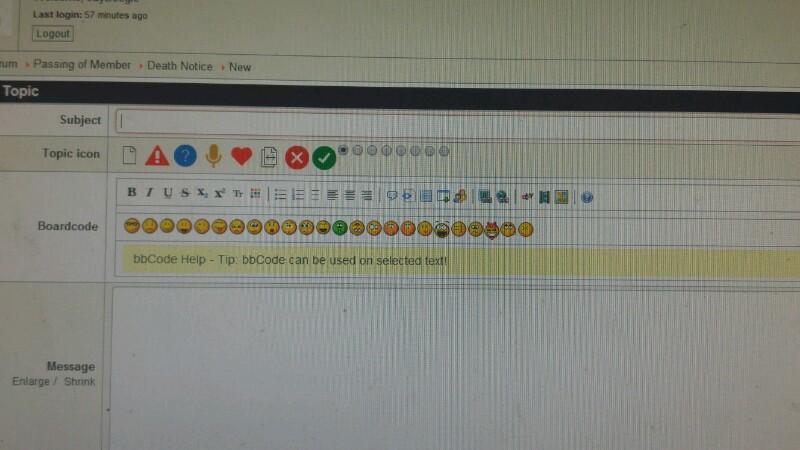
Topic Icons not Equal With Radio Buttons was created by 313designs
Greetings,
The attached image shows how the Topic icons are not coinciding with their associating radio buttons.
James
The attached image shows how the Topic icons are not coinciding with their associating radio buttons.
James
Please Log in or Create an account to join the conversation.
- 9themestore
-

- Offline
- Premium Member
-

10 years 7 months ago #173548
by 9themestore
- Please provide your site url if it has been lived.
- Please share tip if it worked fine with you.
- Don't be shy about using the "Thanks" button below if you found my comment helpful
Replied by 9themestore on topic Topic Icons not Equal With Radio Buttons
Hi 313designs,
It's very easy. Please provide your site url and a test account here. I'll help you solve it.
It's very easy. Please provide your site url and a test account here. I'll help you solve it.
- Please provide your site url if it has been lived.
- Please share tip if it worked fine with you.
- Don't be shy about using the "Thanks" button below if you found my comment helpful
Please Log in or Create an account to join the conversation.
- 313designs
-
Topic Author
- Offline
- New Member
-
Less
More
- Posts: 12
- Thank you received: 1
10 years 7 months ago #173549
by 313designs
Replied by 313designs on topic Topic Icons not Equal With Radio Buttons
Please Log in or Create an account to join the conversation.
- 9themestore
-
- Offline
- Premium Member
-
10 years 7 months ago #173551
by 9themestore
- Please provide your site url if it has been lived.
- Please share tip if it worked fine with you.
- Don't be shy about using the "Thanks" button below if you found my comment helpful
Replied by 9themestore on topic Topic Icons not Equal With Radio Buttons
Hi,
- First step: Open the custom.css file in the "components/com_kunena/template/blue_eagle/css/" path. Copy and pates below CSS rule to that file.
- Disable the System - JCH Optimize plugin and refresh your site to view all change.
- Clear cache of your site and enable the System - JCH Optimize plugin.
I tried to check on firebug and It worked fine.
- First step: Open the custom.css file in the "components/com_kunena/template/blue_eagle/css/" path. Copy and pates below CSS rule to that file.
Code:
#Kunena .kiconsel {
display: inline-block;
}
#Kunena .kiconsel img {
display: inline-block !important;
float: none !important;
vertical-align: middle;
}
#Kunena .kiconsel input[type="radio"] {
vertical-align: middle;
}
- Disable the System - JCH Optimize plugin and refresh your site to view all change.
- Clear cache of your site and enable the System - JCH Optimize plugin.
I tried to check on firebug and It worked fine.
- Please provide your site url if it has been lived.
- Please share tip if it worked fine with you.
- Don't be shy about using the "Thanks" button below if you found my comment helpful
The following user(s) said Thank You: 313designs
Please Log in or Create an account to join the conversation.
- 313designs
-
Topic Author
- Offline
- New Member
-
Less
More
- Posts: 12
- Thank you received: 1
10 years 7 months ago #173552
by 313designs
Replied by 313designs on topic Topic Icons not Equal With Radio Buttons
Thank you so much! Worked perfectly.
Please Log in or Create an account to join the conversation.
- 9themestore
-
- Offline
- Premium Member
-
10 years 7 months ago #173554
by 9themestore
- Please provide your site url if it has been lived.
- Please share tip if it worked fine with you.
- Don't be shy about using the "Thanks" button below if you found my comment helpful
Replied by 9themestore on topic Topic Icons not Equal With Radio Buttons
@313designs,
Please remove the test account.
Please remove the test account.
- Please provide your site url if it has been lived.
- Please share tip if it worked fine with you.
- Don't be shy about using the "Thanks" button below if you found my comment helpful
Please Log in or Create an account to join the conversation.
Time to create page: 0.119 seconds