


- Posts: 839
- Thank you received: 36
Kunena 7.0.11 & Kunena 6.4.16 – Security Updates Released and K7.1 in RC1 2
The Kunena team has announce the arrival of three simultaneous security release : K6.4.16, K7.0.11 and K7.1 RC2. Just a reminder K6.4.16 receives only securities fixes untill end of 2026, so it's advised for users to upgrade to K7.0.11. K7.0.11 is the last release of the K7.0 because it's replaced by K7.1 branch with the stable release in the corner. The translations for K7.1 on crowdin.com/project/kunena-forum-7-1 needs to be checked or improved becasue it has been generated by TM (Translation Machine).
Solved [K.4.0.7] mode-unapproved not working as expected
10 years 10 months ago #171221
by ssh
[K.4.0.7] mode-unapproved not working as expected was created by ssh
Please take a look, mode-unapproved is not working as expected.
I have a lot of unapproved messages, but I am not able to see them if I go to:
example.com/topics/posts/mode-unapproved
I am only able to see them if I specify the cat-id in the URL, like this:
example.com/topics/posts/mode-unapproved/ catid-9048/
This was tested with crypsis, K 4.0.7
I have a lot of unapproved messages, but I am not able to see them if I go to:
example.com/topics/posts/mode-unapproved
I am only able to see them if I specify the cat-id in the URL, like this:
example.com/topics/posts/mode-unapproved/ catid-9048/
This was tested with crypsis, K 4.0.7
Please Log in or Create an account to join the conversation.


Less
More
- Posts: 12297
- Thank you received: 2543
10 years 10 months ago - 10 years 10 months ago #171222
by rich
Important! Always create a backup before you make any changes to your website!
Replied by rich on topic [K.4.0.7] mode-unapproved not working as expected
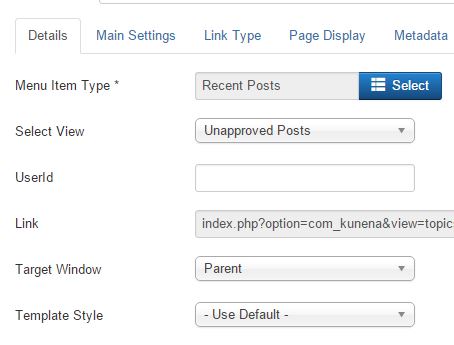
Create the Kunena menu item type Recent Posts and Select View = Unapproved Posts. This menu item shows all unapproved posts.
Or use the search option. Click on the search button, mark the option "Show Unapproved Posts" and in the keyword field put only a star. * Then click on search. All unapproved posts should be found (if there are any).
Or use the search option. Click on the search button, mark the option "Show Unapproved Posts" and in the keyword field put only a star. * Then click on search. All unapproved posts should be found (if there are any).
Important! Always create a backup before you make any changes to your website!
Last edit: 10 years 10 months ago by rich.
Please Log in or Create an account to join the conversation.
10 years 10 months ago #171259
by ssh
I found that I have more than 124 unapproved messages.
It means I have this problem since a long time ago

Replied by ssh on topic [K.4.0.7] mode-unapproved not working as expected
This is exactly how I have it, and it does not workrich wrote: Create the Kunena menu item type Recent Posts and Select View = Unapproved Posts. This menu item shows all unapproved posts.
After performing this suggestion, I realize that my problem is bigger than I thought.rich wrote: use the search option. Click on the search button, mark the option "Show Unapproved Posts" and in the keyword field put only a star. * Then click on search. All unapproved posts should be found (if there are any).
I found that I have more than 124 unapproved messages.
It means I have this problem since a long time ago
Please Log in or Create an account to join the conversation.
Less
More
- Posts: 12297
- Thank you received: 2543
10 years 10 months ago #171266
by rich
Important! Always create a backup before you make any changes to your website!
Replied by rich on topic [K.4.0.7] mode-unapproved not working as expected
hm.. you use Blue Eagle? I've tested it now and you're right. This menu item not working as expected. But this problem exists only with Blue Eagle and not with Crypsis. I will create a bug report.
Important! Always create a backup before you make any changes to your website!
Please Log in or Create an account to join the conversation.
10 years 10 months ago #171267
by ssh
Replied by ssh on topic [K.4.0.7] mode-unapproved not working as expected
I have found a couple of problems with crypsis, and I had to switch back to blue eagle.
Please Log in or Create an account to join the conversation.


10 years 10 months ago #171268
by 810
Replied by 810 on topic [K.4.0.7] mode-unapproved not working as expected
yes, you need to enter * under userid, then you see all messages that are under review.
Please Log in or Create an account to join the conversation.
Time to create page: 0.130 seconds