Kunena 7.0.8 Released

The Kunena team has announce the arrival of Kunena 7.0.8 [K 7.0.8] in stable which is now available for download as a native Joomla extension for J! 5.4.x/6.0.x./6.1.x. This version addresses most of the issues that were discovered in K 6.2 / K 6.3 / K 6.4 and issues discovered during the last development stages of K 7.0

Solved Needing to change font color

More
11 years 1 month ago - 11 years 1 month ago #166366 by BTK
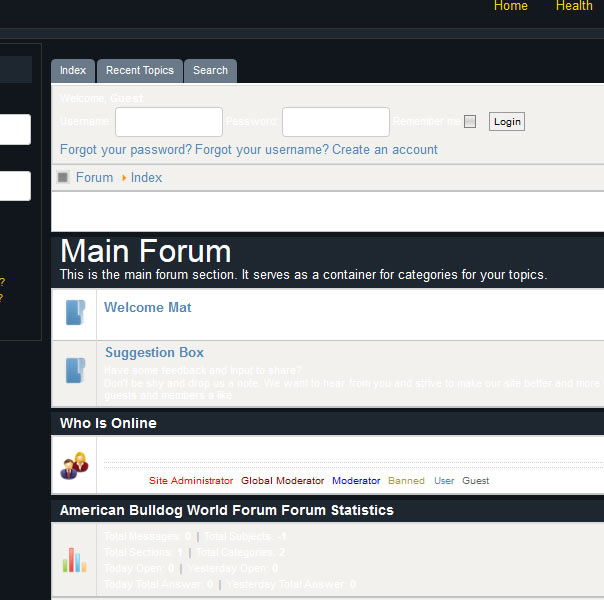
Hi all, i'm needing to change font color from white to black as I can't read text. Would anyone know where I can change this thanks. Or maybe it would be better to change the background. I'm using the Blue Eagle template
Last edit: 11 years 1 month ago by BTK.

Please Log in or Create an account to join the conversation.

More
11 years 1 month ago #166367 by sozzled
It is not too difficult to do if you use a browser-based developer tool (e.g. Firebug for Firefox) and create some new custom rules to over-ride those that are in your Joomla site template. The FAQs page may help you, together with this tutorial: What CSS file should I change …?

Please Log in or Create an account to join the conversation.

More
11 years 1 month ago #166369 by 810
Replied by 810 on topic Needing to change font color
backend - kunena - template manager - select blue eagle - edit css - select custom.css


Enter this in the file:
Code:
body { color: #000 !important; }
The following user(s) said Thank You: BTK

Please Log in or Create an account to join the conversation.

Time to create page: 0.240 seconds