


- Posts: 362
- Thank you received: 45
Kunena 7.0.11 & Kunena 6.4.16 – Security Updates Released and K7.1 in RC1 2
The Kunena team has announce the arrival of three simultaneous security release : K6.4.16, K7.0.11 and K7.1 RC2. Just a reminder K6.4.16 receives only securities fixes untill end of 2026, so it's advised for users to upgrade to K7.0.11. K7.0.11 is the last release of the K7.0 because it's replaced by K7.1 branch with the stable release in the corner. The translations for K7.1 on crowdin.com/project/kunena-forum-7-1 needs to be checked or improved becasue it has been generated by TM (Translation Machine).
Solved Show/Hide Search & Forum Category UX Improvement
11 years 5 months ago - 11 years 5 months ago #165235
by Josh
Show/Hide Search & Forum Category UX Improvement was created by Josh
Currently the hide toggle button displays as an "X" as expected, however when you collapse the item it remains as an X. As a result this can be a bit confusing to the user (if they want to uncollapse the item) and does not look as friendly. I did a investigation into this, carefully figuring out what I believe the best practices are to solve this as well as sizing to keep consistency.
Here's a visual of my proposed method:
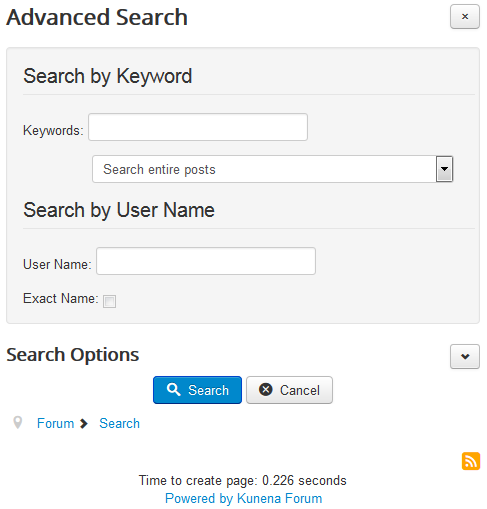
Here's a YouTube video showing it in action:
I had to remove the hard coded X from the DOM model in order to make it not appear when the collapse toggle swaps to the arrow. Anyways, I used the following CSS:
So be sure in Firebug to remove the x from the HTML. Using the content property to display the x allows it to dynamically change when the collapsed class is applied. Also note that the x I am using in the code above is slightly different from how it is right now, but is better in my opinion with the context of the arrow. I've done a bit of playing around and if the arrow is any smaller, it's harder to see what it is. If the x is the same as it currently is, the user notices the sizing difference when clicking the arrow. In other words the CSS I have above is pretty close at keeping both of them consistent and visually proper in terms of readability and sizing.
Here's a visual of my proposed method:
Here's a YouTube video showing it in action:
I had to remove the hard coded X from the DOM model in order to make it not appear when the collapse toggle swaps to the arrow. Anyways, I used the following CSS:
Code:
#kunena .btn-toolbar .btn.btn-small:before, #kunena #search .btn.btn-small:before {
content: "×";
font-size: 14px;
}
#kunena .btn-toolbar .btn.btn-small.collapsed:before, #kunena #search .btn.btn-small.collapsed:before {
content: "";
font-family: "icomoon";
font-size: 8px;
}
So be sure in Firebug to remove the x from the HTML. Using the content property to display the x allows it to dynamically change when the collapsed class is applied. Also note that the x I am using in the code above is slightly different from how it is right now, but is better in my opinion with the context of the arrow. I've done a bit of playing around and if the arrow is any smaller, it's harder to see what it is. If the x is the same as it currently is, the user notices the sizing difference when clicking the arrow. In other words the CSS I have above is pretty close at keeping both of them consistent and visually proper in terms of readability and sizing.
Last edit: 11 years 5 months ago by Josh.
Please Log in or Create an account to join the conversation.

11 years 5 months ago #165236
by ruud
sharing = caring
Replied by ruud on topic Show/Hide Search & Forum Category UX Improvement
Hi, looks good!
For me the toggling doesn't work: I can press the X once to hide the content. Pressing a second time doesn't show the content again (need to do a ctrl f5).
This is template / bootstrap.js related
However: the show / hide attachment in reply does work correct.
So I would like to suggest to replace the code for hiding/showing the x with the code for showing / hiding the attachment info...
For me the toggling doesn't work: I can press the X once to hide the content. Pressing a second time doesn't show the content again (need to do a ctrl f5).
This is template / bootstrap.js related
However: the show / hide attachment in reply does work correct.
So I would like to suggest to replace the code for hiding/showing the x with the code for showing / hiding the attachment info...
sharing = caring
Please Log in or Create an account to join the conversation.
11 years 5 months ago #165239
by Josh
Thanks.
I assume you're saying this as a general statement of the function itself without my mod? Are you using the Protostar template for testing?
Replied by Josh on topic Show/Hide Search & Forum Category UX Improvement
ruud wrote: Hi, looks good!
Thanks.
ruud wrote: For me the toggling doesn't work: I can press the X once to hide the content. Pressing a second time doesn't show the content again (need to do a ctrl f5).
This is template / bootstrap.js related
I assume you're saying this as a general statement of the function itself without my mod? Are you using the Protostar template for testing?
Please Log in or Create an account to join the conversation.
11 years 5 months ago #165241
by ruud
sharing = caring
Replied by ruud on topic Show/Hide Search & Forum Category UX Improvement
yes, a general statement not to be confused by a thread hijack :0
I am testing with meet_gavern template, issues with templates customized bootstrap.css I could fix with a custom.less, but I have no way to replace the templates bootstrap.js
In Protostar it works okay.
But strange thing is that in meet_gavern other hide/show functionality is working correct (like the more / less user profile info, and the attachment button in the reply). So functionality is not consistent in implementation
I am testing with meet_gavern template, issues with templates customized bootstrap.css I could fix with a custom.less, but I have no way to replace the templates bootstrap.js
In Protostar it works okay.
But strange thing is that in meet_gavern other hide/show functionality is working correct (like the more / less user profile info, and the attachment button in the reply). So functionality is not consistent in implementation
sharing = caring
Please Log in or Create an account to join the conversation.
11 years 5 months ago #165243
by ruud
As it turned out, the joomla team made an adjustment to the collapse function that is being called to show/hide content. I have ported this change over to meet_gavern's bootstrap file and now it works
just made a pull request, hope they adopt the change
github.com/GavickPro/Meet-Gavern/pull/238
sharing = caring
Replied by ruud on topic Show/Hide Search & Forum Category UX Improvement
ruud wrote: I am testing with meet_gavern template, issues with templates customized bootstrap.css I could fix with a custom.less, but I have no way to replace the templates bootstrap.js
As it turned out, the joomla team made an adjustment to the collapse function that is being called to show/hide content. I have ported this change over to meet_gavern's bootstrap file and now it works
just made a pull request, hope they adopt the change
github.com/GavickPro/Meet-Gavern/pull/238
sharing = caring
The following user(s) said Thank You: Josh
Please Log in or Create an account to join the conversation.


11 years 4 months ago #165278
by 810
Replied by 810 on topic Show/Hide Search & Forum Category UX Improvement
Merged this thnx josh
Please Log in or Create an account to join the conversation.
Time to create page: 0.141 seconds