
Kunena 7.0.11 & Kunena 6.4.16 – Security Updates Released and K7.1 in RC1 2
The Kunena team has announce the arrival of three simultaneous security release : K6.4.16, K7.0.11 and K7.1 RC2. Just a reminder K6.4.16 receives only securities fixes untill end of 2026, so it's advised for users to upgrade to K7.0.11. K7.0.11 is the last release of the K7.0 because it's replaced by K7.1 branch with the stable release in the corner. The translations for K7.1 on crowdin.com/project/kunena-forum-7-1 needs to be checked or improved becasue it has been generated by TM (Translation Machine).
Solved UX feedback


1. I noticed that I am 'overwhelmed' with all the action / quick-reply buttons when going through a topic.
2. when replying to a topic I couldn't find the submit button
So I asked my wife, who is as 'handy' as our average forum user, her reactions:
1. > I do not know what to do when I want to reply... which button do I press there are so many?
2. > I have typed my reply so how does it work, what do I need to do now?
I thing the quick-reply works best (most intuitive): just type your reply and press submit.
where it becomes confusing is with the normal reply window.
Because the submit button is 'below-the-fold' I saw my wife stopped scrolling down and scroll back up.
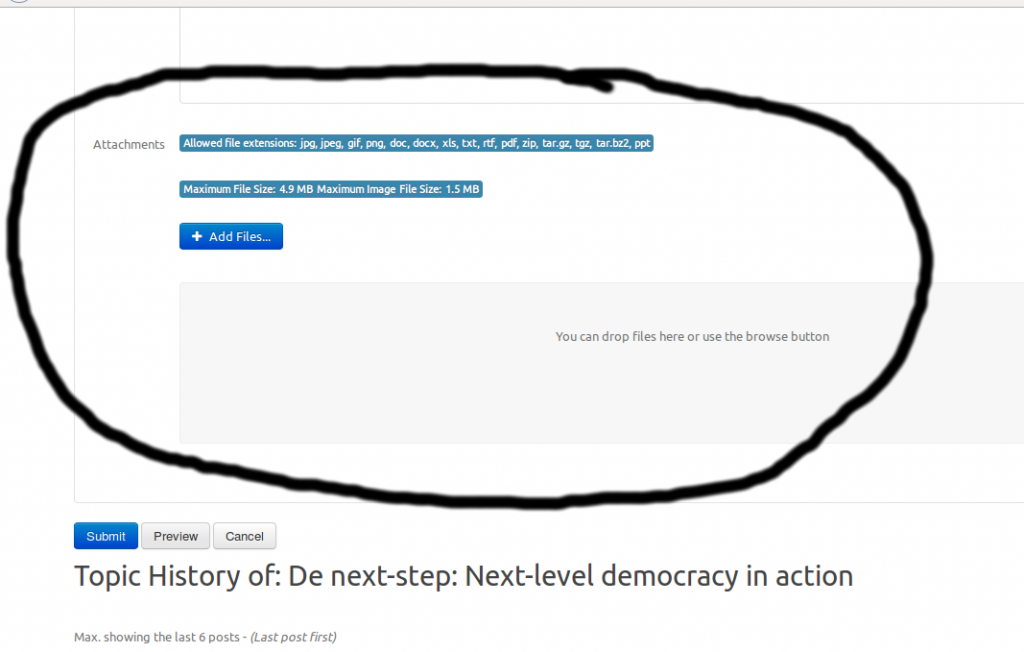
This is I think due to the 'big' attachment part.
Suggestion: by default hide the attachment part under a button > clicking the attachment button displays the screen
sharing = caring
Please Log in or Create an account to join the conversation.


2) Submit button have a primary color, and is the same position as K3.0.7. in the center. But it looks your joomla template floats to the left. Missing center class??
Please Log in or Create an account to join the conversation.
not sure how to interpret this :blink:810 wrote: Missing center class??
sharing = caring
Please Log in or Create an account to join the conversation.
Please Log in or Create an account to join the conversation.
Otherwise you will also have to make e.g. the Protostar template a requirement

Just my thought, will save you a lot of troubleshooting for people with other joomla templates
and I think this is common practise for components etc. sharing = caring
Please Log in or Create an account to join the conversation.
ruud wrote: Hi, not a bug but also a 'show stopper'
1. I noticed that I am 'overwhelmed' with all the action / quick-reply buttons when going through a topic.
2. when replying to a topic I couldn't find the submit button
So I asked my wife, who is as 'handy' as our average forum user, her reactions:
1. > I do not know what to do when I want to reply... which button do I press there are so many?
2. > I have typed my reply so how does it work, what do I need to do now?
I thing the quick-reply works best (most intuitive): just type your reply and press submit.
where it becomes confusing is with the normal reply window.
Because the submit button is 'below-the-fold' I saw my wife stopped scrolling down and scroll back up.
This is I think due to the 'big' attachment part.
Suggestion: by default hide the attachment part under a button > clicking the attachment button displays the screen
Working with the [attachment] button is a great improvement
much cleaner this way, thanks for implementing this sharing = caring
Please Log in or Create an account to join the conversation.