


- Posts: 8
- Thank you received: 0
Kunena 7.0.6 & Kunena 6.4.12 – Security Updates Released
The Kunena team has announce the arrival of Kunena 7.0.6 [K 7.0.6] in stable which is now available for download as a native Joomla extension for J! 5.4.x/6.0.x. This version addresses most of the issues that were discovered in K 6.2 / K 6.3 / K 6.4 and issues discovered during the last development stages of K 7.0.
The Kunena team is also pleased to announce the twelfth version of Kunena 6.4, a native Joomla extension for Joomla! 5.0, 5.1, 5.2, 5.3, 5.4 and 6.0.
Bug Unknown column "allreadtime" in "field list" after update to 4.03
10 years 11 months ago - 10 years 11 months ago #166758
by rpfacts64
Good afternoon, this morning I updated from version 3.08 to 4.03. after the update I get the following error:
Unknown column "allreadtime" In "field list" SQL=UPDATE
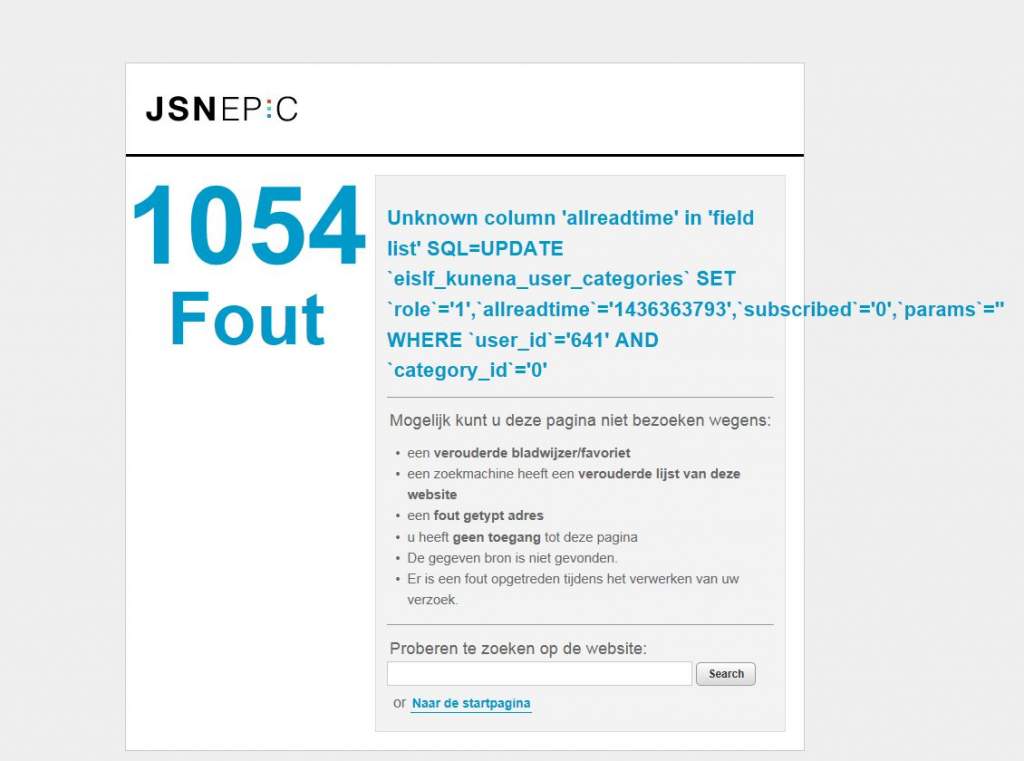
For further information see the "report configuration"
Please help
Kind regards
Ronald
Unknown column "allreadtime" In "field list" SQL=UPDATE
For further information see the "report configuration"
Please help
Kind regards
Ronald
Last edit: 10 years 11 months ago by rpfacts64.
Please Log in or Create an account to join the conversation.


10 years 11 months ago - 10 years 11 months ago #166761
by xillibit
I don't provide support by PM, because this can be useful for someone else.
Replied by xillibit on topic Unknown column "allreadtime" in "field list" after update to 4.03
Hello,
the field allreadtime is missing in the table #__kunena_user_categories, you can add it:
the field allreadtime is missing in the table #__kunena_user_categories, you can add it:
Code:
CREATE TABLE IF NOT EXISTS `#__kunena_user_categories` (
`user_id` int(11) NOT NULL,
`category_id` int(11) NOT NULL,
`role` tinyint(4) NOT NULL default '0',
`allreadtime` int(11) NOT NULL default '0',
`subscribed` tinyint(4) NOT NULL default '0',
`params` text NOT NULL,
PRIMARY KEY (user_id,category_id),
KEY `category_subscribed` (category_id,subscribed),
KEY `role` (role) ) DEFAULT CHARACTER SET utf8;
I don't provide support by PM, because this can be useful for someone else.
Last edit: 10 years 11 months ago by xillibit.
Please Log in or Create an account to join the conversation.
10 years 11 months ago - 10 years 11 months ago #166780
by rpfacts64
Replied by rpfacts64 on topic Unknown column "allreadtime" in "field list" after update to 4.03
Hello, Thanks for this quick reaction! But I am not so familiare with Adding SQL to a table. Can you tell me how to do that please?
Thanks in advance!
Ronald
Thanks in advance!
Ronald
Last edit: 10 years 11 months ago by rpfacts64.
Please Log in or Create an account to join the conversation.


10 years 11 months ago - 10 years 11 months ago #166781
by sozzled
If you manually modify your Joomla database, in any way, you run the risk of destroying not only your Kunena data but also your entire Joomla website.
The query that xillibit wrote is only half complete.
Yes, using a tool like myPhpAdmin (you will probably find this in your webhost cPanel) can help. Unless you are skilled in running SQL queries against a database you may discover that it's not as easy as you had hoped.
I do not know why you had the error message to begin with when you attempted to upgrade from K 3.0.8 to K 4.0.3. This should not have occurred.
However, given my own experiences upgrading from K 3.0.8 to K 4.0.x, nothing really surprises me these days.
My recommendation is that you revert your site to the backup you made before you attempted to upgrade to K 4.0.3. If I was in your situation, I would then check and double-check that you have (a) met all the technical requirements to be able to use K 4.0.3, (b) checked the integrity of your Kunena database tables (possibly using the tools in phpMyAdmin before you attempt to upgrade to K 4.0.3. I would also refresh my knowledge about how to upgrade to K 4.0 (except that this information is a little out-of-date and discussed to how to update to K 3.0; it also does not explain how to downgrade from K 4.0 to K 3.0).
Blue Eagle vs. Crypsis reference guide
Read my blog and

Replied by sozzled on topic Unknown column "allreadtime" in "field list" after update to 4.03
This is really difficult to explain and I am constrained in what I tell you by the rules of this forum .rpfacts64 wrote: I am not so familiar with adding SQL to a table. Can you tell me how to do that please?
If you manually modify your Joomla database, in any way, you run the risk of destroying not only your Kunena data but also your entire Joomla website.
The query that xillibit wrote is only half complete.
Yes, using a tool like myPhpAdmin (you will probably find this in your webhost cPanel) can help. Unless you are skilled in running SQL queries against a database you may discover that it's not as easy as you had hoped.
I do not know why you had the error message to begin with when you attempted to upgrade from K 3.0.8 to K 4.0.3. This should not have occurred.
However, given my own experiences upgrading from K 3.0.8 to K 4.0.x, nothing really surprises me these days.
My recommendation is that you revert your site to the backup you made before you attempted to upgrade to K 4.0.3. If I was in your situation, I would then check and double-check that you have (a) met all the technical requirements to be able to use K 4.0.3, (b) checked the integrity of your Kunena database tables (possibly using the tools in phpMyAdmin before you attempt to upgrade to K 4.0.3. I would also refresh my knowledge about how to upgrade to K 4.0 (except that this information is a little out-of-date and discussed to how to update to K 3.0; it also does not explain how to downgrade from K 4.0 to K 3.0).
Blue Eagle vs. Crypsis reference guide
Read my blog and
Last edit: 10 years 11 months ago by sozzled.
Please Log in or Create an account to join the conversation.

10 years 11 months ago #166784
by 810
Replied by 810 on topic Unknown column "allreadtime" in "field list" after update to 4.03
see this tutorial:
support.hostgator.com/articles/specializ...ueries-in-phpmyadmin
support.hostgator.com/articles/specializ...ueries-in-phpmyadmin
Please Log in or Create an account to join the conversation.
10 years 11 months ago #166797
by rpfacts64
Replied by rpfacts64 on topic Unknown column "allreadtime" in "field list" after update to 4.03
Hello, Because I had a backup of my site I first tried to run the query but the columns were not added. So I manually only added the "allreadtime" collumn and it is working again.
Thanks for the help
regards Ronald
Thanks for the help
regards Ronald
Please Log in or Create an account to join the conversation.
Time to create page: 0.244 seconds