Kunena 6.4.13 Released

The Kunena team has announce the arrival of Kunena 6.4.13 [6.4.13] in stable which is now available for download as a native Joomla extension for J! 5.4.x/6.0.x./6.1.x. This version addresses most of the issues that were discovered in K 6.2 / K 6.3 / K 6.4 and issues discovered during the last development stages of K 6.0
Hint: This version is primarily intended to facilitate an upgrade if Joomla was first updated to version 6.1 before Kunena was up to dated.

Solved Change the browser tab title

More
10 years 3 months ago - 10 years 3 months ago #174141 by DaddyPenguin
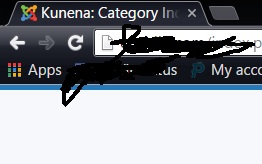
How do I change the browser title. Right now it says Kunena:Category Index. I have attached a picture to show what i mean. I know how to change the Kunena but how i remove category index or rename it
Last edit: 10 years 3 months ago by DaddyPenguin.

Please Log in or Create an account to join the conversation.

More
10 years 3 months ago #174142 by 810
Replied by 810 on topic Change the browser tab title
use the browser title option on edit the menu item.

So go to kunenamenu -> index menu item
The following user(s) said Thank You: DaddyPenguin

Please Log in or Create an account to join the conversation.

More
10 years 3 months ago #174167 by DaddyPenguin
Thanks. Totally forgot about the Kunena Menu.

Please Log in or Create an account to join the conversation.

Time to create page: 0.230 seconds