


- Posts: 412
- Thank you received: 5
Kunena 6.4.13 Released
The Kunena team has announce the arrival of Kunena 6.4.13 [6.4.13] in stable which is now available for download as a native Joomla extension for J! 5.4.x/6.0.x./6.1.x. This version addresses most of the issues that were discovered in K 6.2 / K 6.3 / K 6.4 and issues discovered during the last development stages of K 6.0
Hint: This version is primarily intended to facilitate an upgrade if Joomla was first updated to version 6.1 before Kunena was up to dated.
Solved CAPTCHA only in the first post
10 years 7 months ago #170905
by Nikiniko
CAPTCHA only in the first post was created by Nikiniko
Is it possible to set CAPTCHA only in the first or 2 first posts ?
If yes is it possible to choose the kind of CAPTCHA ?
I mean letters, numeric captcha,pictures,click to confirm that you are human,etc
If yes is it possible to choose the kind of CAPTCHA ?
I mean letters, numeric captcha,pictures,click to confirm that you are human,etc
Please Log in or Create an account to join the conversation.


10 years 7 months ago #170908
by 810
Replied by 810 on topic CAPTCHA only in the first post
yes, you can set it up on the kunena configuration, also you need to enable the joomla- recaptcha plugin.
Please Log in or Create an account to join the conversation.


10 years 7 months ago #170920
by sozzled
Yes, Kunena uses Google reCAPTCHA. Yes, Crypsis uses the Joomla Captcha - ReCaptcha plugin settings to choose between version 1.0 or 2.0 of Google reCAPTCHA. If you use a "non-HMVC" template—Crypsis is the only HMVC template in existence—the answer is no. If you use a "non-HMVC" template you use the Kunena configuration settings irrespective of the Joomla Captcha - ReCaptcha plugin settings. No, after you have chosen the Kunena template you will use (remember, Google reCAPTCHA is the only CAPTCHA software that operates with Kunena) you cannot "choose" how the reCAPTCHA will be displayed except to refine the colour scheme a little.
The article Using CAPTCHA spam protection in Kunena contains more information.
Blue Eagle vs. Crypsis reference guide
Read my blog and

Replied by sozzled on topic CAPTCHA only in the first post
Yes and no. It depends whether you use the Crypsis template or some other template.Nikiniko wrote: If yes is it possible to choose the kind of CAPTCHA ?
I mean letters, numeric captcha,pictures,click to confirm that you are human,etc
Yes, Kunena uses Google reCAPTCHA. Yes, Crypsis uses the Joomla Captcha - ReCaptcha plugin settings to choose between version 1.0 or 2.0 of Google reCAPTCHA. If you use a "non-HMVC" template—Crypsis is the only HMVC template in existence—the answer is no. If you use a "non-HMVC" template you use the Kunena configuration settings irrespective of the Joomla Captcha - ReCaptcha plugin settings. No, after you have chosen the Kunena template you will use (remember, Google reCAPTCHA is the only CAPTCHA software that operates with Kunena) you cannot "choose" how the reCAPTCHA will be displayed except to refine the colour scheme a little.
The article Using CAPTCHA spam protection in Kunena contains more information.
Blue Eagle vs. Crypsis reference guide
Read my blog and
Please Log in or Create an account to join the conversation.
10 years 7 months ago #171016
by Nikiniko
Replied by Nikiniko on topic CAPTCHA only in the first post
thank you,
i already fixed it.
I dont know how to change it ,
but when i will have time i will try it.
i already fixed it.
I dont know how to change it ,
but when i will have time i will try it.
Please Log in or Create an account to join the conversation.


Less
More
- Posts: 12287
- Thank you received: 2536
10 years 7 months ago #171021
by rich
Important! Always create a backup before you make any changes to your website!
Replied by rich on topic CAPTCHA only in the first post
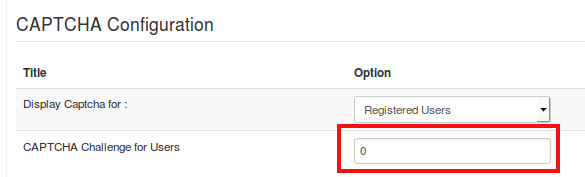
Yes it's possible. Enter the number 2 here (Configuration -> Security).Is it possible to set CAPTCHA only in the first or 2 first posts ?
Important! Always create a backup before you make any changes to your website!
Please Log in or Create an account to join the conversation.
10 years 7 months ago #171091
by Nikiniko
Replied by Nikiniko on topic CAPTCHA only in the first post
I ment change the kind CAPTCHA not the number of the posts.
Thank you anyway.
Thank you anyway.
Please Log in or Create an account to join the conversation.
Time to create page: 0.290 seconds