


- Posts: 6
- Thank you received: 0
Kunena 7.0.9 & Kunena 6.4.14 – Security Updates Released
The Kunena team has announce the arrival of Kunena 7.0.9 [K 7.0.9] in stable which is now available for download as a native Joomla extension for J! 5.4.x/6.0.x./6.1.x. This version addresses most of the issues that were discovered in K 6.2 / K 6.3 / K 6.4 and issues discovered during the last development stages of K 7.0
Topics that are moved into this category are generally considered to be closed. Users may want to add additional information but these topics should not be resurrected in order to discuss new problems or unrelated matters.
Solved A "simplified" Kunena
12 years 1 month ago - 12 years 1 week ago #158225
by bumpeboy
A "simplified" Kunena was created by bumpeboy
My members (mostly matured) who are tired of all these social networks have requested to have a simplified kunena. I have pointed out the most requested changes below. Numbers on issues correspond with the numbers on the attached image.
1. I have restricted my forum to registered members only. When unregistered members visit my front page or forum they see image 1. I don’t want them to see that either on the front page or forum link. So how can get rid of the part in mage ONE.
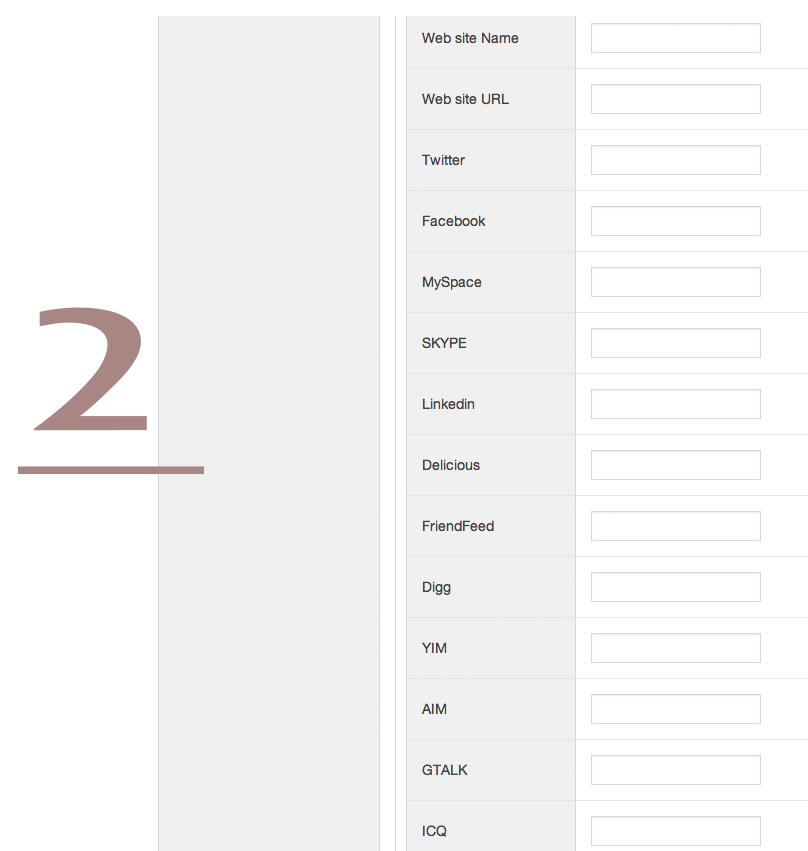
2. This applies to fields marked 2 and 3 in the image.
My users have all agreed that these fields are not needed and i don’t need them as well they are putting unnecessary pressure on my users to fill all those fields and honestly anyone who has all those profiles will not have time for my site. I just want to remain with the basic info under user account. Name, Username, password and email. But i would not mind to keep a field for location/city
How can i remove fields on images TWO and THREE
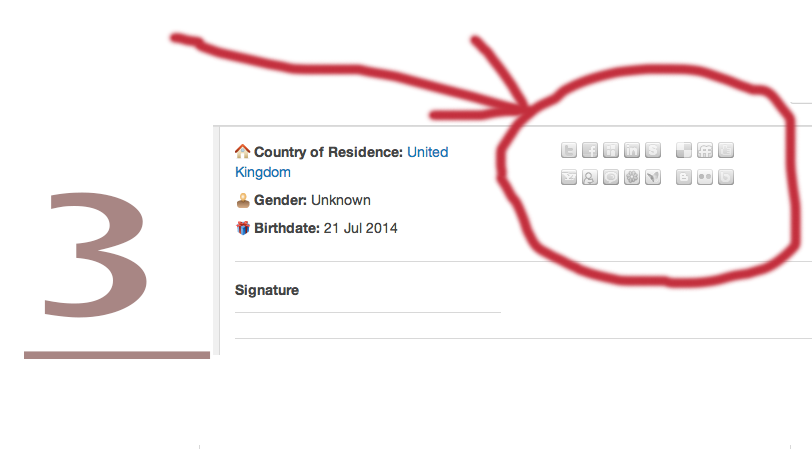
3. following the same issue on number 2 i don’t want the social icons, how can i remove them as well.
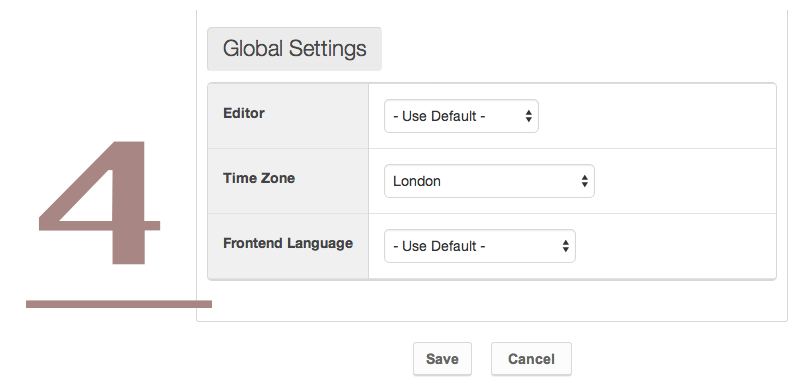
4. Is there a way i can have global settings on this from the admin there is no use of users being able to make this selections. How can i get rid of the entire area numbered FOUR
5. That menu is appearing on the forum two times. At the top and at the bottom. I would like to know how to edit it or remove the bottom one and leave the top one or get rid of both of them.
Please assist me as much as possible. Kind regards
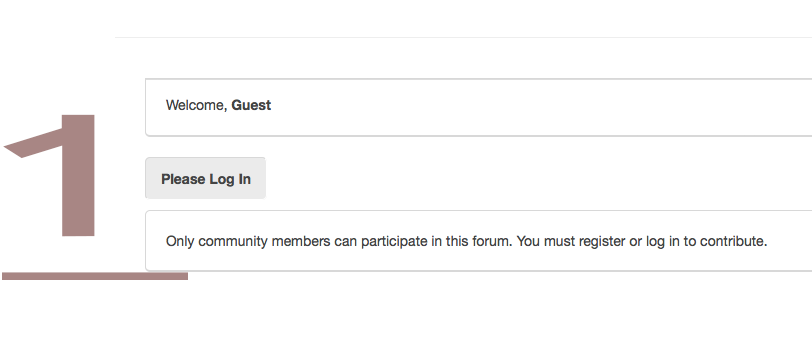

1. I have restricted my forum to registered members only. When unregistered members visit my front page or forum they see image 1. I don’t want them to see that either on the front page or forum link. So how can get rid of the part in mage ONE.
2. This applies to fields marked 2 and 3 in the image.
My users have all agreed that these fields are not needed and i don’t need them as well they are putting unnecessary pressure on my users to fill all those fields and honestly anyone who has all those profiles will not have time for my site. I just want to remain with the basic info under user account. Name, Username, password and email. But i would not mind to keep a field for location/city
How can i remove fields on images TWO and THREE
3. following the same issue on number 2 i don’t want the social icons, how can i remove them as well.
4. Is there a way i can have global settings on this from the admin there is no use of users being able to make this selections. How can i get rid of the entire area numbered FOUR
5. That menu is appearing on the forum two times. At the top and at the bottom. I would like to know how to edit it or remove the bottom one and leave the top one or get rid of both of them.
Please assist me as much as possible. Kind regards
This message contains confidential information
Database collation check: The collation of your table fields are correct
Joomla! SEF: Enabled | Joomla! SEF rewrite: Enabled | FTP layer: Disabled |
This message contains confidential informationhtaccess: Exists | PHP environment: Max execution time: 30 seconds | Max execution memory: 256M | Max file upload: 64M
Kunena menu details:
Warning: Spoiler!
ID Name Menutype Link Path 101 Home mainmenu view=home&defaultmenu=213 homepage 227 My Profile responsive view=user profile 226 Edit Profile responsive view=user&layout=edit edit-profile 228 My Topics responsive view=topics&layout=user&mode=default my-topics 164 Forum mainmenu Itemid=169 kunena-2014-07-18 169 Forum kunenamenu view=home&defaultmenu=171 forum 170 Index kunenamenu view=category&layout=list forum/index 171 Recent Topics kunenamenu view=topics&mode=replies forum/recent 172 New Topic kunenamenu view=topic&layout=create forum/newtopic 173 No Replies kunenamenu view=topics&mode=noreplies forum/noreplies 174 My Topics kunenamenu view=topics&layout=user&mode=default forum/mylatest 175 Profile kunenamenu view=user forum/profile 176 Help kunenamenu view=misc forum/help 177 Search kunenamenu view=search forum/search 178 KuRegister mainmenu view=user register 223 WaKenya UK mainmenu view=category&catid=2 wakenya-uk 230 Create a Topic responsive view=topic&layout=create create-a-topic 245 Start a NEW topic mainmenu view=topic&layout=create start-a-new-topic
Joomla default template details : purity_III | author: JoomlArt.com | version: 1.1.0 | creationdate: Unknown
Kunena default template details : NTS KArgo | author: Nice Theme Store | version: 3.5.1 | creationdate: 2014-02-28
Kunena version detailed: Kunena 3.0.6 | 2014-07-28 [ Tala ]
| Kunena detailed configuration:| Kunena integration settings:Warning: Spoiler!
Kunena config settings: board_offline 0 enablerss 1 threads_per_page 20 messages_per_page 6 messages_per_page_search 15 showhistory 1 historylimit 6 shownew 1 disemoticons 0 template nts_kargo showannouncement 0 avataroncat 1 catimagepath category_images showchildcaticon 0 rtewidth 450 rteheight 300 enableforumjump 0 reportmsg 1 username 0 askemail 0 showemail 0 showuserstats 0 showkarma 1 useredit 1 useredittime 0 useredittimegrace 600 editmarkup 1 allowsubscriptions 1 subscriptionschecked 1 allowfavorites 1 maxsubject 50 maxsig 300 regonly 1 pubwrite 0 floodprotection 0 mailmod 0 mailadmin 0 captcha 0 mailfull 0 allowavatarupload 1 allowavatargallery 0 avatarquality 100 avatarsize 2048 imageheight 800 imagewidth 800 imagesize 150 filetypes txt,rtf,pdf,zip,tar.gz,tgz,tar.bz2 filesize 120 showranking 1 rankimages 1 userlist_rows 30 userlist_online 0 userlist_avatar 0 userlist_name 0 userlist_posts 0 userlist_karma 0 userlist_email 0 userlist_joindate 0 userlist_lastvisitdate 0 userlist_userhits 0 latestcategory 0 showstats 0 showwhoisonline 0 showgenstats 0 showpopuserstats 0 popusercount 5 showpopsubjectstats 0 popsubjectcount 5 usernamechange 0 showspoilertag 0 showvideotag 1 showebaytag 0 trimlongurls 1 trimlongurlsfront 40 trimlongurlsback 20 autoembedyoutube 1 autoembedebay 0 ebaylanguagecode en-us sessiontimeout 1800 highlightcode 0 rss_type topic rss_timelimit month rss_limit 100 rss_included_categories rss_excluded_categories rss_specification rss2.0 rss_allow_html 1 rss_author_format name rss_author_in_title 1 rss_word_count 0 rss_old_titles 1 rss_cache 900 defaultpage recent default_sort asc sef 1 showimgforguest 0 showfileforguest 1 pollnboptions 4 pollallowvoteone 1 pollenabled 0 poppollscount 5 showpoppollstats 0 polltimebtvotes 00:15:00 pollnbvotesbyuser 100 pollresultsuserslist 1 maxpersotext 50 ordering_system replyid post_dateformat datetime_today post_dateformat_hover datetime hide_ip 1 imagetypes jpg,jpeg,gif,png, checkmimetypes 1 imagemimetypes image/jpeg,image/jpg,image/gif,image/png imagequality 50 thumbheight 32 thumbwidth 32 hideuserprofileinfo put_empty boxghostmessage 0 userdeletetmessage 0 latestcategory_in 1 topicicons 0 debug 0 catsautosubscribed 0 showbannedreason 0 version_check 1 showthankyou 1 showpopthankyoustats 1 popthankscount 5 mod_see_deleted 0 bbcode_img_secure text listcat_show_moderators 0 lightbox 1 show_list_time 8760 show_session_type 0 show_session_starttime 0 userlist_allowed 1 userlist_count_users 0 enable_threaded_layouts 0 category_subscriptions post topic_subscriptions first pubprofile 0 thankyou_max 10 email_recipient_count 0 email_recipient_privacy bcc captcha_post_limit 0 keywords 0 userkeywords 0 image_upload registered file_upload everybody topic_layout flat time_to_create_page 0 show_imgfiles_manage_profile 1 hold_newusers_posts 0 hold_guest_posts 0 attachment_limit 8 pickup_category 0 article_display full send_emails 1 fallback_english 1 cache 1 cache_time 60 iptracking 1 rss_feedburner_url autolink 0 access_component 0 statslink_allowed 0 superadmin_userlist 0 | Joomla! detailed language files installed:Warning: Spoiler!Kunena - AlphaUserPoints Disabled
Kunena - Community Builder Disabled
Kunena - Gravatar Disabled
Kunena - JomSocial Disabled
Kunena - Joomla Enabled: access=1 login=0
Kunena - Kunena Enabled: avatar=1 profile=1
Kunena - UddeIM Disabled
Warning: Spoiler!
Joomla! languages installed: en-GB English (United Kingdom)
Third-party components: AlphaUserPoints 1.9.8
Third-party SEF components: None
Plugins: Content - Kunena Discuss 3.0.1
Modules: Kunena Latest 3.0.1 | Kunena Login 3.0.1
Last edit: 12 years 1 week ago by bumpeboy.
Please Log in or Create an account to join the conversation.


12 years 4 weeks ago #158562
by Matias
Replied by Matias on topic A "simplified" Kunena
Giving the full answer is involved, but in short: everything else than 4) can be done by simply removing those parts from the template files. There may also be a way to hide some content by CSS rules.
4) It's a Joomla setting (User Manager > Options > Frontend User Parameters).
4) It's a Joomla setting (User Manager > Options > Frontend User Parameters).
The following user(s) said Thank You: bumpeboy
Please Log in or Create an account to join the conversation.
12 years 4 weeks ago #158579
by bumpeboy
Thanks Matias.
Thats issue
4 sorted
Am still waiting for the other three issues.
Issue 1
Issue 2&3
Issue 5
Fingers crossed for help to come.
Replied by bumpeboy on topic A "simplified" Kunena
Matias wrote: Giving the full answer is involved, but in short: everything else than 4) can be done by simply removing those parts from the template files. There may also be a way to hide some content by CSS rules.
4) It's a Joomla setting (User Manager > Options > Frontend User Parameters).
Thanks Matias.
Thats issue
4 sorted
Am still waiting for the other three issues.
Issue 1
Issue 2&3
Issue 5
Fingers crossed for help to come.
Please Log in or Create an account to join the conversation.

12 years 2 weeks ago - 12 years 2 weeks ago #158804
by joomleb
Replied by joomleb on topic A "simplified" Kunena
...I'm also interested on solve Issue 5
Last edit: 12 years 2 weeks ago by joomleb.
Please Log in or Create an account to join the conversation.


12 years 2 weeks ago #158806
by sozzled
Blue Eagle vs. Crypsis reference guide
Read my blog and

Replied by sozzled on topic A "simplified" Kunena
"Issue 5" is a question about how to remove the breadcrumbs that appears at the bottom of the page. To understand this issue better, read Pathway .joomleb wrote: ...I'm also interested on solve Issue 5
Blue Eagle vs. Crypsis reference guide
Read my blog and
Please Log in or Create an account to join the conversation.


12 years 1 week ago #158934
by Josh
Replied by Josh on topic A "simplified" Kunena
The resolution in those screen shots is quite low making it hard to know exactly what fields you want removed. I can provide a CSS mod to hide them, but I need to know exact which fields to hide. 
The following user(s) said Thank You: bumpeboy
Please Log in or Create an account to join the conversation.
Time to create page: 0.970 seconds