


- Posts: 25
- Thank you received: 0
Kunena 7.1.0 Released
The Kunena team has announce the arrival of Kunena 7.1.0 [K 7.1.0] in stable which is now available for download as a native Joomla extension for J! 5.4.x/6.0.x./6.1.x./6.2.x This version addresses most of the issues that were discovered in K 6.2 / K 6.3 / K 6.4 / K7.0 and issues discovered during the last development stages of K 7.1
Just a reminder: K6.4.16 receives only securities fixes until end of 2026, so it's advised for users to upgrade to K7.1.
Topics that are moved into this category are generally considered to be closed. Users may want to add additional information but these topics should not be resurrected in order to discuss new problems or unrelated matters.
Question Category icons; category colours
12 years 11 months ago #150603
by diogene
Category icons; category colours was created by diogene
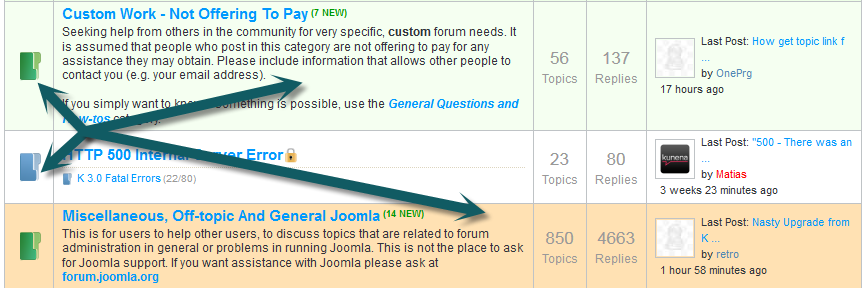
Hello, could you tell me please how to get qil result of the img. The color sand and green and how do I change the color of folders? Forde depends on the number of posts? thanks
The topic has been locked.
- 9themestore
-

- Offline
- Premium Member
-

12 years 11 months ago #150604
by 9themestore
- Please provide your site url if it has been lived.
- Please share tip if it worked fine with you.
- Don't be shy about using the "Thanks" button below if you found my comment helpful
Replied by 9themestore on topic Category icons; category colours
Hi,
1. The folder: you can use the Adobe Photoshop or an other editor to change color of folder.
2. The high light row: You need custom CSS to show high light row.
Regards,
1. The folder: you can use the Adobe Photoshop or an other editor to change color of folder.
2. The high light row: You need custom CSS to show high light row.
Regards,
- Please provide your site url if it has been lived.
- Please share tip if it worked fine with you.
- Don't be shy about using the "Thanks" button below if you found my comment helpful
The topic has been locked.
12 years 11 months ago #150605
by diogene
Replied by diogene on topic Category icons; category colours
Regards Thanks for the answer, but if I change the color to change all the folder with photoshop, in the example I posted instead changes color depending on the type of post. Then I would chiderti if it is possible retrieval on the Internet an example of css to make those changes in color or if you have to be able to integrate to encode the basic template of kenena 3 ....
Thanks Marianio,
Thanks Marianio,
The topic has been locked.
- 9themestore
-
- Offline
- Premium Member
-
12 years 11 months ago #150606
by 9themestore
- Please provide your site url if it has been lived.
- Please share tip if it worked fine with you.
- Don't be shy about using the "Thanks" button below if you found my comment helpful
Replied by 9themestore on topic Category icons; category colours
Hi,
Please visit this link to change folder for the category ( www.kunena.org/docs/Category_icons ). If you want to change the color of a row you can do some bellow steps:
1. Login to your back-end and go to "Components -> Kunena Forum -> Category Manageter".
2. Click to the folder you want to change color and scroll to the bottom of the page and find the "Category CSS Class Suffix" option.
3. Input your class suffix name to the input box(EX: highlight). You need add a white space before the class suffix name.
4. Add bellow CSS code section to the template.css file of the Joomla! template.
5. Back to front-end and refresh your forum.
Regards,
Please visit this link to change folder for the category ( www.kunena.org/docs/Category_icons ). If you want to change the color of a row you can do some bellow steps:
1. Login to your back-end and go to "Components -> Kunena Forum -> Category Manageter".
2. Click to the folder you want to change color and scroll to the bottom of the page and find the "Category CSS Class Suffix" option.
3. Input your class suffix name to the input box(EX: highlight). You need add a white space before the class suffix name.
4. Add bellow CSS code section to the template.css file of the Joomla! template.
Code:
#Kunena tr.highlight td {
background: #ffffcc !important; /* Change by your color code */
}
5. Back to front-end and refresh your forum.
Regards,
- Please provide your site url if it has been lived.
- Please share tip if it worked fine with you.
- Don't be shy about using the "Thanks" button below if you found my comment helpful
The topic has been locked.


12 years 11 months ago - 12 years 11 months ago #150619
by sozzled
Blue Eagle vs. Crypsis reference guide
Read my blog and

Replied by sozzled on topic Category icons; category colours
There are two completely different issue in this topic:
1) Category icons: See Category icons in the Wiki
2) Category colours: See Coloured categories in the Wiki
diogene wrote:
Then you will be able use the two new suffixes -custom1 and -custom2
1) Category icons: See Category icons in the Wiki
2) Category colours: See Coloured categories in the Wiki
diogene wrote:
Those were extra custom colours that I added to the forum here at www.kunena.org ; these extra colours are not distributed with the Kunena installation kit but you can always add your own. The way to add these two extra colours is to add the following lines to the end of your Joomla site template CSS file:Could you tell me please how to get ... [the colours] sand and green
Code:
#Kunena .kforum-headerdesc-custom1 {
background-color: #FFE1B3;
color: #000000;
}
#Kunena tr.krow1-custom1 td {
background-color: #FFE1B3;
}
#Kunena tr.krow2-custom1 td {
background-color: #FFF2DD;
}
#Kunena .kforum-headerdesc-custom2 {
background-color: #F5FFF1;
color: #000000;
}
#Kunena tr.krow1-custom2 td {
background-color: #F5FFF1;
}
#Kunena tr.krow2-custom2 td {
background-color: #EEFFE7;
}
Then you will be able use the two new suffixes -custom1 and -custom2
Blue Eagle vs. Crypsis reference guide
Read my blog and
Last edit: 12 years 11 months ago by sozzled.
The topic has been locked.
12 years 11 months ago #150620
by diogene
Replied by diogene on topic Category icons; category colours
Thanks for the reply, I tried to point 2) but does not work, I tried all the solutions-Red-Red with the initial space, Red and Red with the leading space but does not change anything, while the code shown in the above post
"Works fine, but I would like to replicate the same code with different colors but do not know how to do. For point 1) I have not seen it yet, look now then let you know. Thanks
Code:
# Kunena tr.highlight td {
background: # FFFFCC! important; / *
Change by your color code * /
}
The topic has been locked.
Time to create page: 0.133 seconds