

- Posts: 7
- Thank you received: 0
Kunena 6.3.0 released
The Kunena team has announce the arrival of Kunena 6.3.0 [K 6.3.0] in stable which is now available for download as a native Joomla extension for J! 4.4.x/5.0.x/5.1.x. This version addresses most of the issues that were discovered in K 6.2 and issues discovered during the last development stages of K 6.3
Question Joomla 3.2 1146 Error on install
8 years 9 months ago #11
by zelena
Replied by zelena on topic Joomla 3.2 1146 Error on install
Yes, like I said I checked all the technical requirements - and yes, we meet them.
Please Log in or Create an account to join the conversation.

8 years 9 months ago #12
by 810
Replied by 810 on topic Joomla 3.2 1146 Error on install
try this:
1) clean cache
2) Install Kunena
Do you get any error or is it installed
1) clean cache
2) Install Kunena
Do you get any error or is it installed
Please Log in or Create an account to join the conversation.
8 years 9 months ago #13
by zelena
Replied by zelena on topic Joomla 3.2 1146 Error on install
I've tried to install many times - each time I install, I get the error 1146, and no kunena tables are created.
I also (based on a different thread about a different 1146 error) tried installing and activating the kunena plugin first, followed by either (i) the other files (component, library, etc), or (ii) the entire kunena package. Same trouble.
Each time I need to manually remove the kunena component and admin files in order to even use my administrator section again.
I also (based on a different thread about a different 1146 error) tried installing and activating the kunena plugin first, followed by either (i) the other files (component, library, etc), or (ii) the entire kunena package. Same trouble.
Each time I need to manually remove the kunena component and admin files in order to even use my administrator section again.
Please Log in or Create an account to join the conversation.
8 years 9 months ago #14
by 810
Replied by 810 on topic Joomla 3.2 1146 Error on install
many times this a weird database error:
You can try this:
on phpmyadmin:
rename all prefixes on your tables to 'tm9pa' (without quotes)
and change the configuration.php file on the root of your dir.
change the public $dbprefix to public $dbprefix = 'tm9pa_';
You can try this:
on phpmyadmin:
rename all prefixes on your tables to 'tm9pa' (without quotes)
and change the configuration.php file on the root of your dir.
change the public $dbprefix to public $dbprefix = 'tm9pa_';
Please Log in or Create an account to join the conversation.
8 years 9 months ago #15
by zelena
Replied by zelena on topic Joomla 3.2 1146 Error on install
Wow - I am scared to mess up my entire site by doing that...
Please Log in or Create an account to join the conversation.
8 years 9 months ago #16
by 810
Replied by 810 on topic Joomla 3.2 1146 Error on install
I can do it for you, can skype me jelle810
Please Log in or Create an account to join the conversation.

8 years 8 months ago #17
by pdeleeuw
Replied by pdeleeuw on topic Joomla 3.2 1146 Error on install
Do I understand this right:
The table prefix is the problem?
I saw some old entries where it was explained that the prefix must be "jos_".
You now tell us that the prefix must be "tm9pa_".
Why is that, that one cannot use any prefix?
The table prefix is the problem?
I saw some old entries where it was explained that the prefix must be "jos_".
You now tell us that the prefix must be "tm9pa_".
Why is that, that one cannot use any prefix?
Please Log in or Create an account to join the conversation.

8 years 8 months ago #18
by xillibit
I don't provide support by PM, because this can be useful for someone else.
Replied by xillibit on topic Joomla 3.2 1146 Error on install
The prefix jos_ was used in Joomla! 1.5 but since Joomla! 2.5 the prefix is set randomly during Joomla! install. You need to look with phpmyadmin how your actual table prefix look like
I don't provide support by PM, because this can be useful for someone else.
Please Log in or Create an account to join the conversation.
8 years 8 months ago - 8 years 8 months ago #19
by pdeleeuw
Replied by pdeleeuw on topic Joomla 3.2 1146 Error on install
Hi thanks for the reply,
but that is not the point.
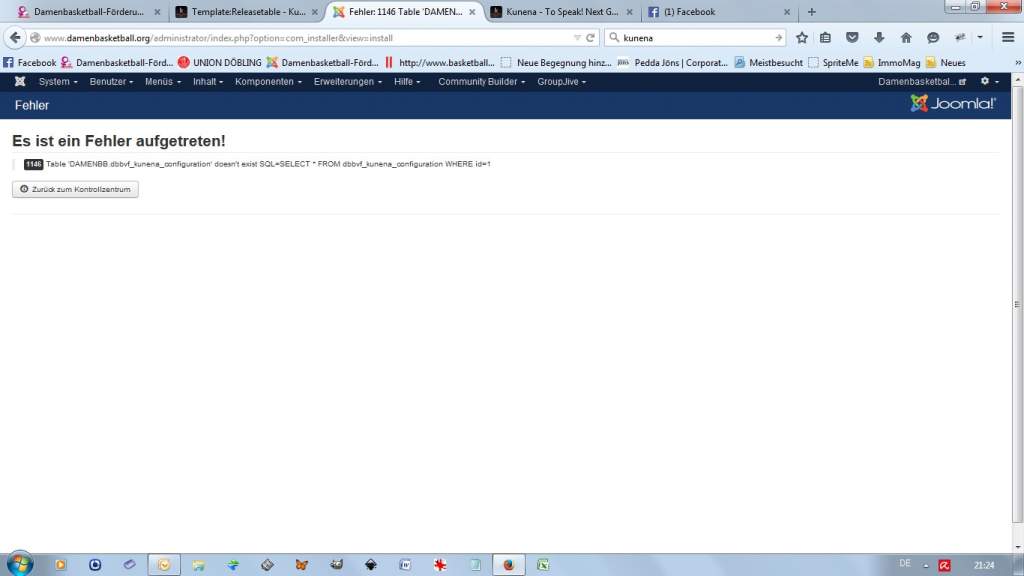
I want to install kunena but as my prefix is dbbvf_ it seems to be impossible to install kunena unless I do not rename the tables into jos_* or - following the post above - tm9pa_* ?
I hope that there will be a possibility to install kunena with any prefix used.
Until today I was not able to install due to that 1146 error.
Best regards
Peter
but that is not the point.
I want to install kunena but as my prefix is dbbvf_ it seems to be impossible to install kunena unless I do not rename the tables into jos_* or - following the post above - tm9pa_* ?
I hope that there will be a possibility to install kunena with any prefix used.
Until today I was not able to install due to that 1146 error.
Best regards
Peter
Last edit: 8 years 8 months ago by pdeleeuw.
Please Log in or Create an account to join the conversation.
8 years 8 months ago #20
by xillibit
I don't provide support by PM, because this can be useful for someone else.
Replied by xillibit on topic Joomla 3.2 1146 Error on install
If you check with phpmyadmin, do-you have a table nammed dbbvf_kunena_configuration ? Your database prefix is right dbbvf by looking others tables ?
I don't provide support by PM, because this can be useful for someone else.
Please Log in or Create an account to join the conversation.
Time to create page: 0.708 seconds