


- Posts: 117
- Thank you received: 2
Kunena 7.0.4 Released
The Kunena team has announce the arrival of Kunena 7.0.4 [K 7.0.4] in stable which is now available for download as a native Joomla extension for J! 5.4.x/6.0.x. This version addresses most of the issues that were discovered in K 6.2 / K 6.3 / K 6.4 and issues discovered during the last development stages of K 7.0
Question Problems Kunena 2.0.4 to Kunena 3.0.1 - minimum system requirements not met


12 years 9 months ago #146881
by rich
Important! Always create a backup before you make any changes to your website!
Replied by rich on topic Problems Kunena 2.0.4 to Kunena 3.0.1 - minimum system requirements not met
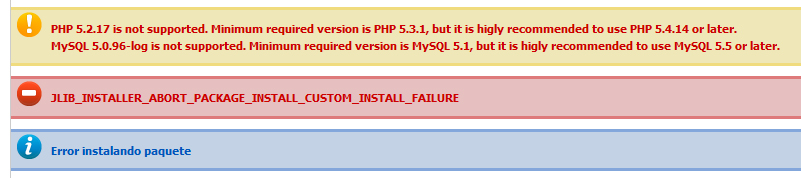
Your system requirements are not sufficient. In this case, the installation will be aborted.
Minimum system requirements
Minimum system requirements
Important! Always create a backup before you make any changes to your website!
The topic has been locked.


12 years 7 months ago #148933
by Joeriv
Replied by Joeriv on topic Problems Kunena 2.0.4 to Kunena 3.0.1 - minimum system requirements not met
I have THE samen problem what can i do About iT
The topic has been locked.


12 years 7 months ago #148934
by sozzled
Blue Eagle vs. Crypsis reference guide
Read my blog and

Replied by sozzled on topic Problems Kunena 2.0.4 to Kunena 3.0.1 - minimum system requirements not met
Did you read
Technical Requirements
?
Blue Eagle vs. Crypsis reference guide
Read my blog and
The topic has been locked.
12 years 7 months ago #148999
by Joeriv
Replied by Joeriv on topic Problems Kunena 2.0.4 to Kunena 3.0.1 - minimum system requirements not met
Yes but i sprak dutch but i do not really now what it 's all
The topic has been locked.
12 years 7 months ago - 12 years 7 months ago #149000
by sozzled
Blue Eagle vs. Crypsis reference guide
Read my blog and
Replied by sozzled on topic Problems Kunena 2.0.4 to Kunena 3.0.1 - minimum system requirements not met
It means that if your site does not meet the minimum technical requirements and you cannot install K 3.0 on your website. What you probably need to do is to find a webhosting provider who can advise you if they meet the minimum technical requirements to allow you to install Kunena.
Blue Eagle vs. Crypsis reference guide
Read my blog and
Last edit: 12 years 7 months ago by sozzled.
The topic has been locked.
Time to create page: 0.233 seconds