
Kunena 7.0.9 & Kunena 6.4.14 – Security Updates Released
The Kunena team has announce the arrival of Kunena 7.0.9 [K 7.0.9] in stable which is now available for download as a native Joomla extension for J! 5.4.x/6.0.x./6.1.x. This version addresses most of the issues that were discovered in K 6.2 / K 6.3 / K 6.4 and issues discovered during the last development stages of K 7.0
This is a community-driven self-help category to ask questions about designing or developing your own Kunena template. Please be aware that there are rules that apply to topics posted in this category:
Do not use this category for:
- asking questions about how to make simple changes to a template designed by the Kunena project team (use K 3.0 Templates instead);
- advertising your own template designs.
Topics that do not meet the above guidelines may be removed without notice.
If you are having problems then, for your own benefit, it would save us all a lot of time if you would kindly post your configuration report when you ask for help from this forum. If you do not post your configuration report we will not ask you for it but you will probably not get your problem solved, either.
Question Problems with custom (non-standard) topic icons in Google Chrome


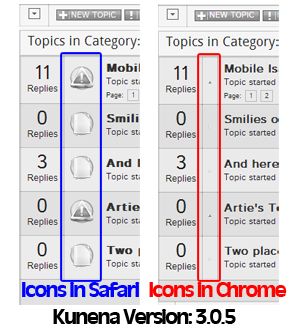
Any idea if there is or can be a chrome fix? Most everyone I know uses chrome or safari so I am trying to make it as friendly to both of these browsers as possible.
Thanks again guys as always! Hoping to be done with it soon so I can hurry up and rate it at Joomla and open my site.
Please Log in or Create an account to join the conversation.


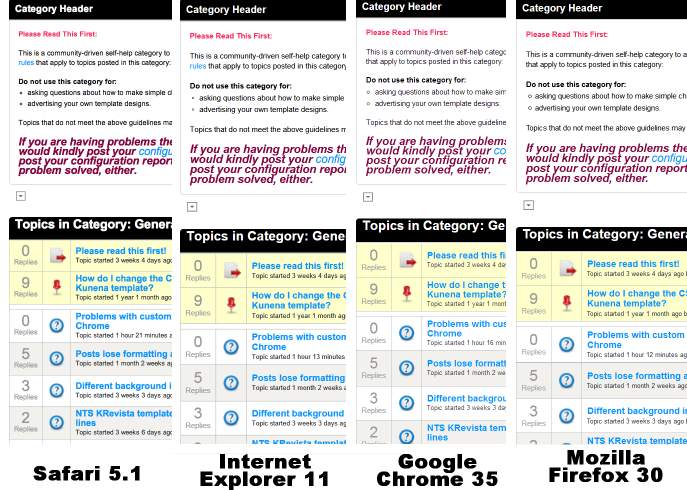
I do not know what needs to be changed in Kunena to make things work right for you because, when I look at a Kunena website that uses standard topic icons, the picture below shows you what I see using different browsers:Artie wrote: Any idea if there is or can be a chrome fix?
Blue Eagle vs. Crypsis reference guide
Read my blog and

Please Log in or Create an account to join the conversation.


We said that chrome will now break with the icons.
So you need to add fixed width on that header image.
Please Log in or Create an account to join the conversation.
Chrome is a naughty thing lately.
Oh and PS - the icons I added were after the break already occurred - I was hoping they would fix the break. The standard didn't work either.
When I updated kunena it wiped out everything I already did to customize it. I thought it was because my icons reverted to normal.
Please Log in or Create an account to join the conversation.
I'm not tryin to be funny when I ask, "where did you "do" it?" A lot of people have a lot of problems understanding What CSS file should I change ... ?Artie wrote: I did that one already does it belong in a different spot in that file or a different file?
:laugh: No comment ... naughty Chrome, ba-a-a-a-d ChromeArtie wrote: Chrome is a naughty thing lately.
Blue Eagle vs. Crypsis reference guide
Read my blog and
Please Log in or Create an account to join the conversation.
iphone and chrome are my undoing this weekend. They both need to be put in a corner.
I searched through the css files and didn't see a place that is making chrome singled out... I know not that there would be arrows and a sign saying "right here" that would be too easy - so I thought I would come ask for help. :}
Please Log in or Create an account to join the conversation.