Kunena 7.0.4 Released

The Kunena team has announce the arrival of Kunena 7.0.4 [K 7.0.4] in stable which is now available for download as a native Joomla extension for J! 5.4.x/6.0.x. This version addresses most of the issues that were discovered in K 6.2 / K 6.3 / K 6.4 and issues discovered during the last development stages of K 7.0

If you are having problems then, for your own benefit, it would save us all a lot of time if you would kindly post your configuration report when you ask for help from this forum. If you do not post your configuration report we will not ask you for it but you will probably not get your problem solved, either.

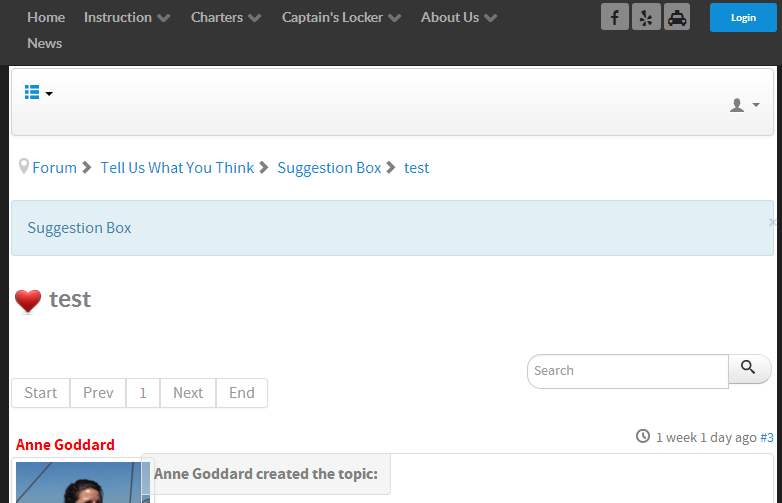
Question Search button outside website area

More
10 years 9 months ago - 10 years 9 months ago #166986 by maccas28
Ok thanks. How can I make the search button the same height as the search box?
Last edit: 10 years 9 months ago by maccas28.

Please Log in or Create an account to join the conversation.

More
10 years 5 months ago #169997 by bluewatersailingweb
I'm bumping this post. Adding the code to the custom.less file of the crypsis template worked. It brought the button back within the page area of my site. However, the button isn't the same height as the search text entry area.

Any magic code to correct this?

Please Log in or Create an account to join the conversation.

More
10 years 5 months ago #169998 by bluewatersailingweb
Figured it out. At least, I think.

Place the following code in the same custom.less file as above:
Code:
button.btn.btn-default {line-height: 25px;}

That fixed it on mine.

However, since I made both of the fixes, I see an error on the page using the Chrome Developer Tools. In the Console window, I see the following:

suggestion-box:18 GET 185.56.85.149/~bluewa66/media/kunena/cac...ypsis/css/custom.css


I can see that the css file is loading the code I added. Don't know what's going on there.

Please Log in or Create an account to join the conversation.

Time to create page: 0.238 seconds