
Kunena 7.0.5 & Kunena 6.4.11 – Security Updates Released
The Kunena team has announce the arrival of Kunena 7.0.5 [K 7.0.5] in stable which is now available for download as a native Joomla extension for J! 5.4.x/6.0.x. This version addresses most of the issues that were discovered in K 6.2 / K 6.3 / K 6.4 and issues discovered during the last development stages of K 7.0.
The Kunena team is also pleased to announce the eleventh version of Kunena 6.4, a native Joomla extension for Joomla! 5.0, 5.1, 5.2, 5.3, 5.4 and 6.0.
Question Increase fonts size in Blue Eagle Template


Can you tell me which .css file shall I open (and the exact line of it) in order to change the fonts size?
(My forum: www.Gameworld.gr/Forum )
Thank you.
Please Log in or Create an account to join the conversation.


font-size: 26px }
Just add it on your joomla template.
Please Log in or Create an account to join the conversation.
As I said in my initial post, please give me the exact path of the file that I must edit, and also the line that I will have to add it (at the end before the { I guess?)
Thank you.
Please Log in or Create an account to join the conversation.
just copy the css and paste it there on the bottom
Please Log in or Create an account to join the conversation.
I'd also like to change fonts inside topics and the topic titles. So three stuff in total.
Generally all fonts should change so please provide an example paragraph
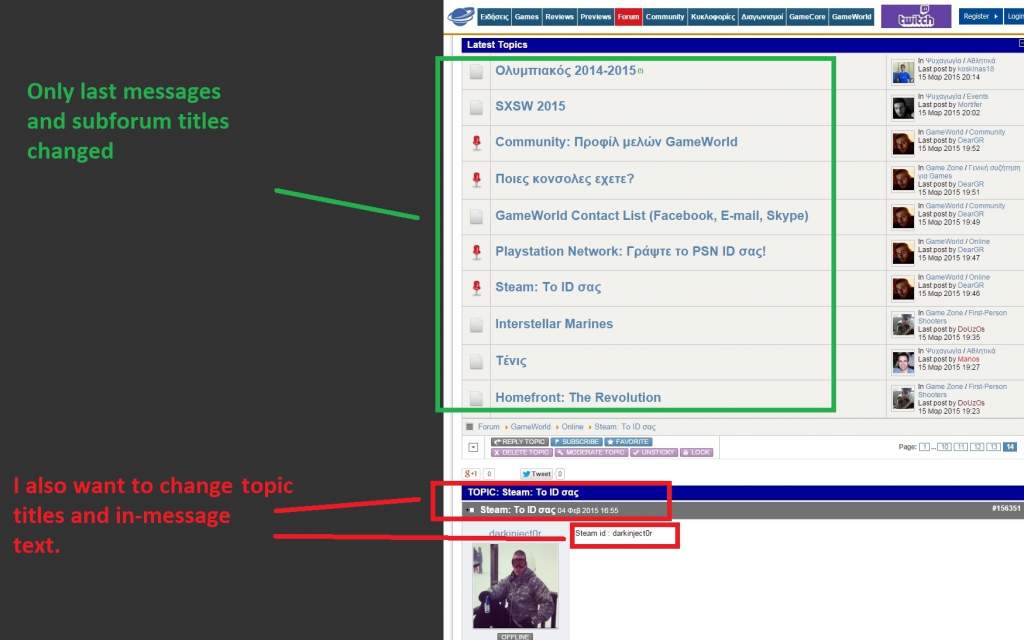
Thank you.
Please Log in or Create an account to join the conversation.


Blue Eagle vs. Crypsis reference guide
Read my blog and

Please Log in or Create an account to join the conversation.