Kunena 7.0.5 & Kunena 6.4.11 – Security Updates Released

The Kunena team has announce the arrival of Kunena 7.0.5 [K 7.0.5] in stable which is now available for download as a native Joomla extension for J! 5.4.x/6.0.x. This version addresses most of the issues that were discovered in K 6.2 / K 6.3 / K 6.4 and issues discovered during the last development stages of K 7.0.

The Kunena team is also pleased to announce the eleventh version of Kunena 6.4, a native Joomla extension for Joomla! 5.0, 5.1, 5.2, 5.3, 5.4 and 6.0.

If you are having problems then, for your own benefit, it would save us all a lot of time if you would kindly post your configuration report when you ask for help from this forum. If you do not post your configuration report we will not ask you for it but you will probably not get your problem solved, either.

Idea Problem with poll bars
More
11 years 3 months ago - 11 years 3 months ago #162100 by Tribun Maximus
Hey guys,

I'm a beginner so pls forgive me for my (maybe) stupid question.

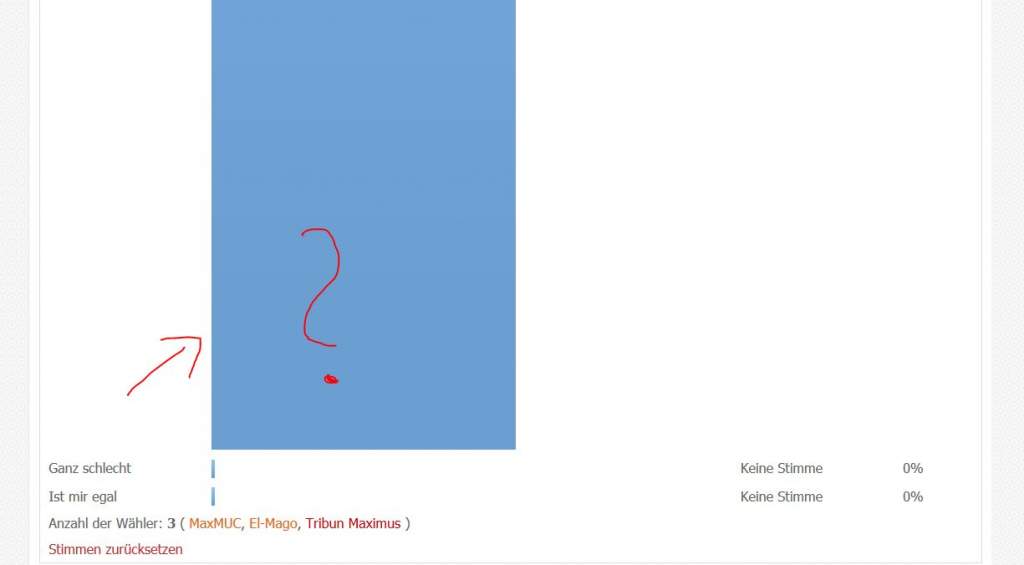
I have a problem in my forum that I can't find how to change the look of the poll. Now it looks like this:


Here is the link but I'm not sure, if you will see it as guest.
www.hd-filmreviews.de/index.php/kunena/h...chandising-shop#3484

My problem is, that the chosen bar is tooo big and fat. I want them all in the same size.

Did i something wrong? Where to change this?

I'm using the newest Joomla version.

Thx in advance!
Last edit: 11 years 3 months ago by Tribun Maximus.

Please Log in or Create an account to join the conversation.

More
11 years 3 months ago #162105 by 810

Please Log in or Create an account to join the conversation.

More
11 years 3 months ago #162125 by sozzled
Replied by sozzled on topic Problem with poll bars

Tribun Maximus wrote: Where to change this?

Add the following lines to the end of your Joomla site template CSS file:
Code:
#Kunena img.jr-forum-stat-bar { max-height: 20px; }

Please Log in or Create an account to join the conversation.

Time to create page: 0.406 seconds