
Kunena 7.0.8 Released
The Kunena team has announce the arrival of Kunena 7.0.8 [K 7.0.8] in stable which is now available for download as a native Joomla extension for J! 5.4.x/6.0.x./6.1.x. This version addresses most of the issues that were discovered in K 6.2 / K 6.3 / K 6.4 and issues discovered during the last development stages of K 7.0
Topics that are moved into this category are generally considered to be closed. Users may want to add additional information but these topics should not be resurrected in order to discuss new problems or unrelated matters.
Solved Embed Google map in a post


11 years 5 months ago #162875
by Nemo10
Oh for a neat solution...
Replied by Nemo10 on topic Embed Google map in a post
Interesting topic.
I can get the standard map view to show my location Ok but when I try to add the satellite and/or zoom code it takes me to somewhere in the middle Est. If I remove what I added it resumes to the correct default view.
I must be missing the obvious.. I'm running 3.0.5 at present.
This is the Co-ords for my location, -36.8174635,144.2239816
Can you show the exact code I need for zoom/satellite?
I can get the standard map view to show my location Ok but when I try to add the satellite and/or zoom code it takes me to somewhere in the middle Est. If I remove what I added it resumes to the correct default view.
I must be missing the obvious.. I'm running 3.0.5 at present.
This is the Co-ords for my location, -36.8174635,144.2239816
Can you show the exact code I need for zoom/satellite?
Oh for a neat solution...
Please Log in or Create an account to join the conversation.


11 years 5 months ago #162880
by xillibit
I don't provide support by PM, because this can be useful for someone else.
Replied by xillibit on topic Embed Google map in a post
You need to put that into a kunena message [*map zoom=20 type=satellite]-36.8174635,144.2239816[/map] but without the *
What you have added exactly ?
What you have added exactly ?
I don't provide support by PM, because this can be useful for someone else.
Please Log in or Create an account to join the conversation.
11 years 5 months ago #162898
by Nemo10
Oh for a neat solution...
Replied by Nemo10 on topic Embed Google map in a post
Thanks, I was putting additional zoom sat code towards the end of the string.
Works fine now (sans the *).
Is the vertical "Map Data" bar removable?
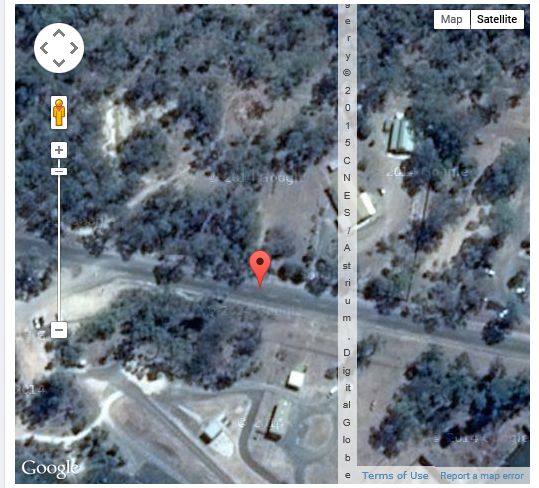
And is there any code that will set the altitude by default?
Thanks again
Works fine now (sans the *).
Is the vertical "Map Data" bar removable?
And is there any code that will set the altitude by default?
Thanks again
Oh for a neat solution...
Please Log in or Create an account to join the conversation.
11 years 5 months ago - 11 years 5 months ago #162901
by xillibit
I don't provide support by PM, because this can be useful for someone else.
Replied by xillibit on topic Embed Google map in a post
You can change the zoom level to modify the altitude
I don't have this vertical bar, maybe your Joomla! template broke the display of maps :
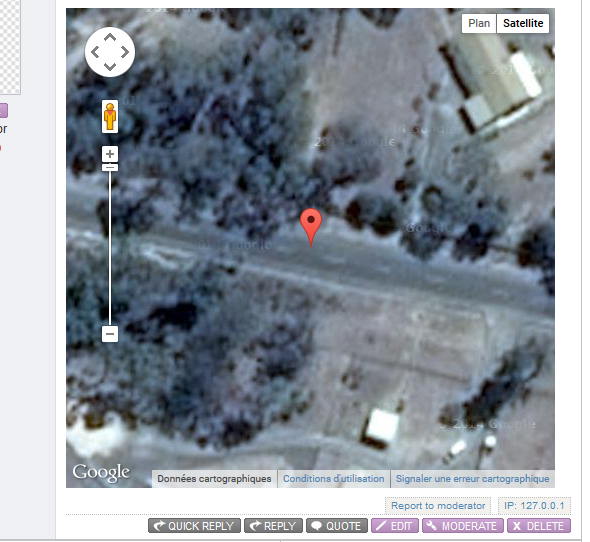
I don't have this vertical bar, maybe your Joomla! template broke the display of maps :
I don't provide support by PM, because this can be useful for someone else.
Last edit: 11 years 5 months ago by xillibit.
Please Log in or Create an account to join the conversation.
11 years 5 months ago #162905
by Nemo10
Oh for a neat solution...
Replied by Nemo10 on topic Embed Google map in a post
Thanks!
Yes, no doubt the template.. doesn't cause any other visible aberrations so I'll leave well enough alone.
Yes, no doubt the template.. doesn't cause any other visible aberrations so I'll leave well enough alone.
Oh for a neat solution...
Please Log in or Create an account to join the conversation.
Time to create page: 0.381 seconds