
- Posts: 78
- Thank you received: 5
Kunena 7.0.5 & Kunena 6.4.11 – Security Updates Released
The Kunena team has announce the arrival of Kunena 7.0.5 [K 7.0.5] in stable which is now available for download as a native Joomla extension for J! 5.4.x/6.0.x. This version addresses most of the issues that were discovered in K 6.2 / K 6.3 / K 6.4 and issues discovered during the last development stages of K 7.0.
The Kunena team is also pleased to announce the eleventh version of Kunena 6.4, a native Joomla extension for Joomla! 5.0, 5.1, 5.2, 5.3, 5.4 and 6.0.
Topics that are moved into this category are generally considered to be closed. Users may want to add additional information but these topics should not be resurrected in order to discuss new problems or unrelated matters.
Solved Kunena forum moderator ranks not displaying as expected
- jimrowland
-
 Topic Author
- Offline
- Senior Member
-

Less
More
12 years 3 months ago #154004
by jimrowland
I'm posting this in the CB area, because I can't figure out if this is a problem with CB/GJ or Kunena.
I have set up my forum ranks as follows:
My question is with the moderator rank. You can see that it's set to "special", which I assume means that I must manually assign it. However, I'm using CB+GroupJive, allowing members to create their own discussion groups, which sets up a Kunena category. These members who set up a group become a moderator of that group, and they are picking up the rankmod.gif.
I don't want them to be listed as a "Pilot Service Rep", because the actual pilot service reps are site-wide moderators and have a customer service role both within and outside of the forums.
Is there any way to prevent these "category moderators" from being listed with the rankmod.gif, and only assign that to user accounts manually?
I have set up my forum ranks as follows:
| Rank Image | Title | Special | Minimum Post Count |
| rank1.gif | Student Pilot | No | 0 |
| rank2.gif | Private Pilot | No | 40 |
| rank3.gif | Commercial Pilot | No | 250 |
| rankadmin.gif | Administrator | Yes | 0 |
| rankmod.gif | Pilot Service Representative | Yes | 0 |
My question is with the moderator rank. You can see that it's set to "special", which I assume means that I must manually assign it. However, I'm using CB+GroupJive, allowing members to create their own discussion groups, which sets up a Kunena category. These members who set up a group become a moderator of that group, and they are picking up the rankmod.gif.
I don't want them to be listed as a "Pilot Service Rep", because the actual pilot service reps are site-wide moderators and have a customer service role both within and outside of the forums.
Is there any way to prevent these "category moderators" from being listed with the rankmod.gif, and only assign that to user accounts manually?
Please Log in or Create an account to join the conversation.


12 years 3 months ago - 12 years 3 months ago #154010
by sozzled
Blue Eagle vs. Crypsis reference guide
Read my blog and

Replied by sozzled on topic Kunena forum moderator ranks not displaying as expected
I don't know if this helps but there have been topics that discuss the issues with the moderator rank image (see
How to change rank image for moderator
. Basically you need to replace the existing image file in ../media/kunena/ranks (the one called rankmod.gif) with a different file that you upload.
I have a feeling that the moderator rank image needs to be named "rankmod.gif" but I could be wrong.
I have a feeling that the moderator rank image needs to be named "rankmod.gif" but I could be wrong.
Blue Eagle vs. Crypsis reference guide
Read my blog and
Last edit: 12 years 3 months ago by sozzled.
Please Log in or Create an account to join the conversation.
- jimrowland
-
Topic Author
- Offline
- Senior Member
-
Less
More
- Posts: 78
- Thank you received: 5
12 years 3 months ago #154015
by jimrowland
Replied by jimrowland on topic Kunena forum moderator ranks not displaying as expected
Thanks, Sozzled. I reviewed that post, but I'm not sure it addresses my issue. I don't have any problem getting the special moderator rank, or the image, to show up for my site moderators.
My problem is that this rank and this image is being assigned to people that it should not be. Namely, those people who are "category moderators".
I think the following should be true statements, but maybe I'm wrong:
1. If I want someone to have a "special" rank/title of Pilot Service Rep, then I need to go to the back end (under rank manager) and create that rank (I've done that). Then, I need to go to:
Kunena > User Manager > [username] > Forum Settings > Rank Title
... and specifically assign the desired member to this rank/title.
2. Category moderators, and any other user who has not been specifically assigned a title in the User Manager as described above should get the forum rank badge and title for which they match the "criteria" (number of posts) of any title with "Special" set as "No".
#2 above is not happening. Category moderators are being assigned to a "special" rank automatically, and I don't think this is an intended feature.
My problem is that this rank and this image is being assigned to people that it should not be. Namely, those people who are "category moderators".
I think the following should be true statements, but maybe I'm wrong:
1. If I want someone to have a "special" rank/title of Pilot Service Rep, then I need to go to the back end (under rank manager) and create that rank (I've done that). Then, I need to go to:
Kunena > User Manager > [username] > Forum Settings > Rank Title
... and specifically assign the desired member to this rank/title.
2. Category moderators, and any other user who has not been specifically assigned a title in the User Manager as described above should get the forum rank badge and title for which they match the "criteria" (number of posts) of any title with "Special" set as "No".
#2 above is not happening. Category moderators are being assigned to a "special" rank automatically, and I don't think this is an intended feature.
Please Log in or Create an account to join the conversation.
12 years 3 months ago - 12 years 3 months ago #154018
by sozzled
Did you watch the video in How to assign forum moderators in K 3.0
This is not something related to CB (as far as I'm aware) and, for that reason, I am relocating this topic to our "general questions" category (and renaming the subject).
*** Topic moved; subject changed ***
Blue Eagle vs. Crypsis reference guide
Read my blog and
Replied by sozzled on topic Kunena forum moderator ranks not displaying as expected
Hmm ... strange.jimrowland wrote: My problem is that this rank and this image is being assigned to people that it should not be. Namely, those people who are "category moderators".
Did you watch the video in How to assign forum moderators in K 3.0
This is not something related to CB (as far as I'm aware) and, for that reason, I am relocating this topic to our "general questions" category (and renaming the subject).
*** Topic moved; subject changed ***
Blue Eagle vs. Crypsis reference guide
Read my blog and
Last edit: 12 years 3 months ago by sozzled.
Please Log in or Create an account to join the conversation.
- jimrowland
-
Topic Author
- Offline
- Senior Member
-
Less
More
- Posts: 78
- Thank you received: 5
12 years 3 months ago - 12 years 3 months ago #154021
by jimrowland
Replied by jimrowland on topic Kunena forum moderator ranks not displaying as expected
I did watch the video a while ago. I re-watched it just now. Now that I'm more familiar with Kunena things, I thought I might pick up some more information that I missed earlier. Unfortuantely, though... that's not the case - I understood it well enough already, so no new info.
I have no problems assigning moderators, nor assigning them to different levels (category vs. global).
My issue is with the title and rank badge. I just don't want my category moderators having the "special" rank that I created, called "pilot service rep". But, despite me not assigning this special rank to their account, they pick it up anyway.
Here is a picture (3 different screenshots mashed together) to highlight what I'm describing. You can see that this user is showing with the rank of "Pilot Service Representative" on the front end, despite being set to "no rank" on the back end.
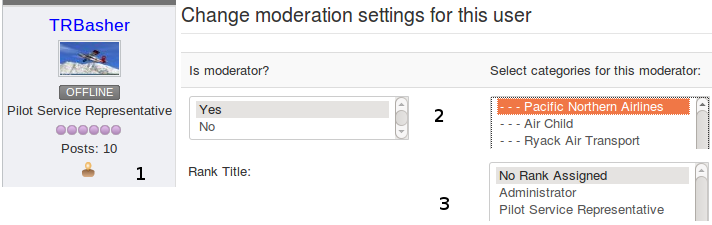
He is a category moderator, and that's why he is picking up this rank. If I remove his category moderator privledges, his title changes back to "Student Pilot" (as shown in the table of my original post).
(note: he is being assigned as a category moderator through the CB Integration, not by me, manually, in the back end. That's why I thought it might have something to do with CB)
I only want people that I specifically designate to have the title of "Pilot Service Rep". I do not want all of my category moderators to have this title. I cannot figure out why my category moderators are being assigned to this rank.
I have no problems assigning moderators, nor assigning them to different levels (category vs. global).
My issue is with the title and rank badge. I just don't want my category moderators having the "special" rank that I created, called "pilot service rep". But, despite me not assigning this special rank to their account, they pick it up anyway.
Here is a picture (3 different screenshots mashed together) to highlight what I'm describing. You can see that this user is showing with the rank of "Pilot Service Representative" on the front end, despite being set to "no rank" on the back end.
He is a category moderator, and that's why he is picking up this rank. If I remove his category moderator privledges, his title changes back to "Student Pilot" (as shown in the table of my original post).
(note: he is being assigned as a category moderator through the CB Integration, not by me, manually, in the back end. That's why I thought it might have something to do with CB)
I only want people that I specifically designate to have the title of "Pilot Service Rep". I do not want all of my category moderators to have this title. I cannot figure out why my category moderators are being assigned to this rank.
Last edit: 12 years 3 months ago by jimrowland.
Please Log in or Create an account to join the conversation.


Less
More
- Posts: 12285
- Thank you received: 2535
12 years 3 months ago - 12 years 3 months ago #154022
by rich
Important! Always create a backup before you make any changes to your website!
Replied by rich on topic Kunena forum moderator ranks not displaying as expected
If you rename the word "Moderator" to "Pilot Service Rep", then all moderators are "Pilot Service Rep". This is assigned automatically. You can only manually other names for diffrent moderators assign. The same goes for admins.
Important! Always create a backup before you make any changes to your website!
Last edit: 12 years 3 months ago by rich.
Please Log in or Create an account to join the conversation.
Time to create page: 0.276 seconds