


- Posts: 3
- Thank you received: 1
Kunena 7.0.5 & Kunena 6.4.11 – Security Updates Released
The Kunena team has announce the arrival of Kunena 7.0.5 [K 7.0.5] in stable which is now available for download as a native Joomla extension for J! 5.4.x/6.0.x. This version addresses most of the issues that were discovered in K 6.2 / K 6.3 / K 6.4 and issues discovered during the last development stages of K 7.0.
The Kunena team is also pleased to announce the eleventh version of Kunena 6.4, a native Joomla extension for Joomla! 5.0, 5.1, 5.2, 5.3, 5.4 and 6.0.
Topics that are moved into this category are generally considered to be closed. Users may want to add additional information but these topics should not be resurrected in order to discuss new problems or unrelated matters.
Solved Users get CAPTCHA even when turned off
12 years 4 months ago #152732
by thistle
Users get CAPTCHA even when turned off was created by thistle
I'm on Joomla 3.2.1 and Kunena 3.0.4 also with JomSocial 3.1. Some, but not all, of our users are getting the Captcha message even though the appropriate settings are turned off (as far as I know). One modification to our site is that new users are added to Publisher instead of Registered. But my account as only a Publisher works fine.
Relevant settings:
Captcha for Guests: No
Captcha for Users: 0
Here's a screenshot showing that it is showing the Captcha form for this user:
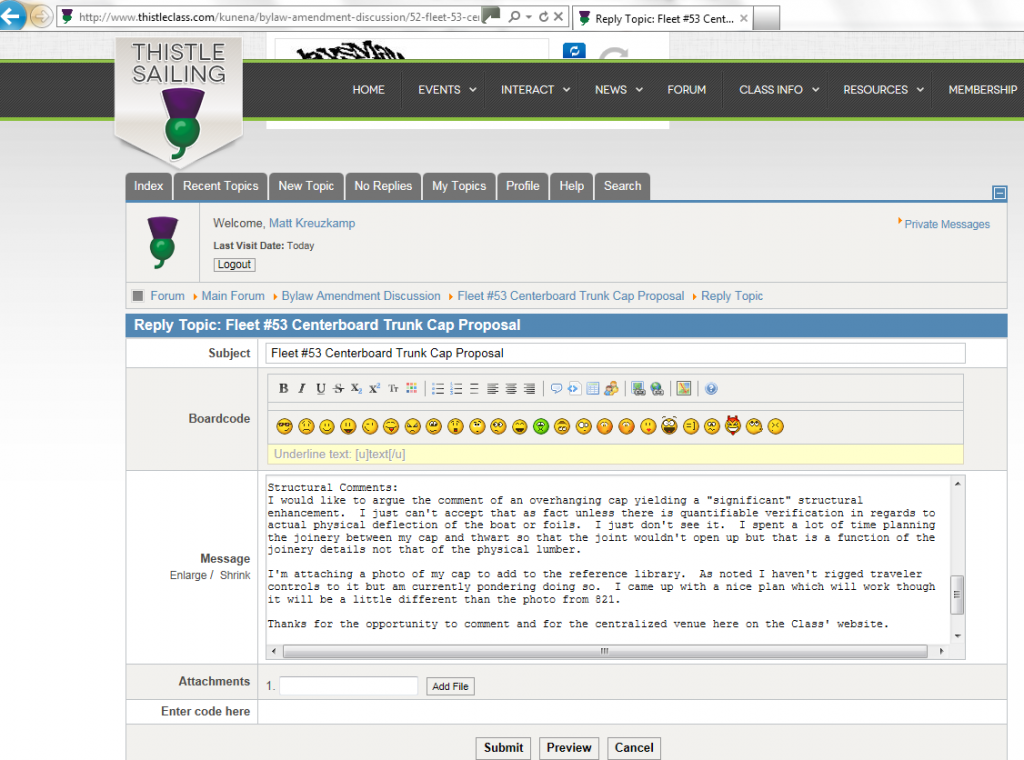
Anyone have an idea?
Relevant settings:
Captcha for Guests: No
Captcha for Users: 0
Here's a screenshot showing that it is showing the Captcha form for this user:
Anyone have an idea?
This message contains confidential information
Database collation check: The collation of your table fields are correct
Joomla! SEF: Enabled | Joomla! SEF rewrite: Enabled | FTP layer: Disabled |
This message contains confidential informationhtaccess: Exists | PHP environment: Max execution time: 30 seconds | Max execution memory: 200M | Max file upload: 10M
Kunena menu details:
Warning: Spoiler!
ID Name Menutype Link Path 204 Forum mainmenu view=home&defaultmenu=228 forum 264 Forum mainmenu view=category&catid=1 kunena-2012-09-11 255 Forum kunenamenu view=home&defaultmenu=257 kunena 256 Index kunenamenu view=category&layout=list kunena/index 257 Recent Topics kunenamenu view=topics&mode=replies kunena/recent 258 New Topic kunenamenu view=topic&layout=create kunena/newtopic 259 No Replies kunenamenu view=topics&mode=noreplies kunena/noreplies 260 My Topics kunenamenu view=topics&layout=user&mode=default kunena/mylatest 261 Profile kunenamenu view=user kunena/profile 262 Help kunenamenu view=misc kunena/help 263 Search kunenamenu view=search kunena/search
Joomla default template details : rt_diametric_responsive | author: RocketTheme, LLC | version: 1.5 | creationdate: Unknown
Kunena default template details : Blue Eagle | author: Kunena Team | version: 3.0.4 | creationdate: 2013-12-22
Kunena version detailed: Kunena 3.0.4 | 2013-12-22 [ Ukko ]
| Kunena detailed configuration:| Kunena integration settings:Warning: Spoiler!
Kunena config settings: board_offline 0 enablerss 1 threads_per_page 20 messages_per_page 20 messages_per_page_search 15 showhistory 1 historylimit 20 shownew 1 disemoticons 0 template blue_eagle showannouncement 1 avataroncat 0 catimagepath category_images showchildcaticon 1 rtewidth 450 rteheight 300 enableforumjump 1 reportmsg 1 username 0 askemail 0 showemail 0 showuserstats 1 showkarma 1 useredit 1 useredittime 0 useredittimegrace 600 editmarkup 1 allowsubscriptions 1 subscriptionschecked 1 allowfavorites 1 maxsubject 125 maxsig 300 regonly 0 pubwrite 0 floodprotection 0 mailmod 0 mailadmin 0 captcha 0 mailfull 1 allowavatarupload 1 allowavatargallery 1 avatarquality 75 avatarsize 2048 imageheight 800 imagewidth 800 imagesize 2000 filetypes txt,rtf,pdf,zip,tar.gz,tgz,tar.bz2,doc,docx,xls,xlsx,* filesize 8000 showranking 1 rankimages 1 userlist_rows 30 userlist_online 1 userlist_avatar 1 userlist_name 1 userlist_posts 1 userlist_karma 1 userlist_email 0 userlist_joindate 1 userlist_lastvisitdate 1 userlist_userhits 1 latestcategory showstats 1 showwhoisonline 1 showgenstats 1 showpopuserstats 1 popusercount 5 showpopsubjectstats 1 popsubjectcount 5 usernamechange 0 showspoilertag 0 showvideotag 0 showebaytag 0 trimlongurls 1 trimlongurlsfront 40 trimlongurlsback 20 autoembedyoutube 1 autoembedebay 0 ebaylanguagecode en-us sessiontimeout 1800 highlightcode 0 rss_type topic rss_timelimit month rss_limit 100 rss_included_categories rss_excluded_categories rss_specification rss2.0 rss_allow_html 1 rss_author_format name rss_author_in_title 1 rss_word_count 0 rss_old_titles 1 rss_cache 900 defaultpage recent default_sort asc sef 1 showimgforguest 1 showfileforguest 1 pollnboptions 8 pollallowvoteone 1 pollenabled 1 poppollscount 5 showpoppollstats 1 polltimebtvotes 00:15:00 pollnbvotesbyuser 100 pollresultsuserslist 1 maxpersotext 50 ordering_system mesid post_dateformat datetime_today post_dateformat_hover datetime hide_ip 1 imagetypes jpg,jpeg,gif,png checkmimetypes 1 imagemimetypes image/jpeg,image/jpg,image/gif,image/png imagequality 50 thumbheight 32 thumbwidth 32 hideuserprofileinfo put_empty boxghostmessage 0 userdeletetmessage 1 latestcategory_in 1 topicicons 1 debug 0 catsautosubscribed 0 showbannedreason 0 version_check 1 showthankyou 1 showpopthankyoustats 1 popthankscount 5 mod_see_deleted 0 bbcode_img_secure text listcat_show_moderators 0 lightbox 1 show_list_time 720 show_session_type 0 show_session_starttime 0 userlist_allowed 1 userlist_count_users 1 enable_threaded_layouts 0 category_subscriptions post topic_subscriptions every pubprofile 0 thankyou_max 10 email_recipient_count 0 email_recipient_privacy bcc captcha_post_limit 0 keywords 0 userkeywords 0 image_upload registered file_upload registered topic_layout flat time_to_create_page 1 show_imgfiles_manage_profile 1 hold_newusers_posts 0 hold_guest_posts 0 attachment_limit 8 pickup_category 0 article_display intro send_emails 1 fallback_english 1 cache 1 cache_time 1800 iptracking 1 rss_feedburner_url autolink 1 access_component 1 statslink_allowed 1 userlist_usertype 0 sefutf8 0 | Joomla! detailed language files installed:Warning: Spoiler!Kunena - AlphaUserPoints Disabled
Kunena - Community Builder Disabled
Kunena - Gravatar Disabled
Kunena - JomSocial Enabled: access=0 login=1 activity=1 avatar=1 profile=1 private=1 activity_points_limit=0 activity_stream_limit=0
Kunena - Joomla Enabled: access=1 login=1
Kunena - Kunena Enabled: avatar=1 profile=1
Kunena - UddeIM Disabled
Warning: Spoiler!
Joomla! languages installed: en-GB English (United Kingdom)
Third-party components: Jomsocial 3.1.0
Third-party SEF components: None
Plugins: JomSocial - My Kunena Forum Menu 2.0.3 | JomSocial - Kunena Groups 2.0.3
Modules: None
Please Log in or Create an account to join the conversation.


12 years 4 months ago - 12 years 4 months ago #152839
by sozzled
Blue Eagle vs. Crypsis reference guide
Read my blog and

Replied by sozzled on topic Users get CAPTCHA even when turned off
G'day, thistle, and welcome to Kunena.
Forum Configuration » Security » Security Settings » Moderate New Users
According to your configuration report, the value for this setting is zero. Therefore, new users should not be subjected to the CAPTCHA challenge.
One other point revealed by your configuration report could be a problem. You have a Joomla menu item (id=204) that points to a non-existent or out-of-date reference. This may or may not be relaed to your current problem.
I would also recommend that you uninstall the two Kunena add-ons : JomSocial - My Kunena Forum Menu 2.0.3 and JomSocial - Kunena Groups 2.0.3 because those versions do not work with K 3.0. Ask JomSocial for the updates for those things if you require them.
The relevant settings are described in the article Using CAPTCHA spam protection in Kunena and one other one:thistle wrote: Captcha for Guests: No
Captcha for Users: 0
Forum Configuration » Security » Security Settings » Moderate New Users
According to your configuration report, the value for this setting is zero. Therefore, new users should not be subjected to the CAPTCHA challenge.
One other point revealed by your configuration report could be a problem. You have a Joomla menu item (id=204) that points to a non-existent or out-of-date reference. This may or may not be relaed to your current problem.
I would also recommend that you uninstall the two Kunena add-ons : JomSocial - My Kunena Forum Menu 2.0.3 and JomSocial - Kunena Groups 2.0.3 because those versions do not work with K 3.0. Ask JomSocial for the updates for those things if you require them.
Blue Eagle vs. Crypsis reference guide
Read my blog and
Last edit: 12 years 4 months ago by sozzled.
Please Log in or Create an account to join the conversation.
12 years 4 months ago #152840
by thistle
Replied by thistle on topic Users get CAPTCHA even when turned off
Thanks for the reply.
The issue is that even with the number for Challenge for Users set to zero, they still get Captcha. I have all the settings described, but at least one user is still getting the Captcha.
Thanks for pointing out the menu item...I actually changed the alias for that item and Kunena between my original post and your reply.
I was able to get the captcha at least in the right place so users can put it in, so I don't think it's worth any more effort, but there's still something going on.
Thanks again.
The issue is that even with the number for Challenge for Users set to zero, they still get Captcha. I have all the settings described, but at least one user is still getting the Captcha.
Thanks for pointing out the menu item...I actually changed the alias for that item and Kunena between my original post and your reply.
I was able to get the captcha at least in the right place so users can put it in, so I don't think it's worth any more effort, but there's still something going on.
Thanks again.
Please Log in or Create an account to join the conversation.
12 years 4 months ago - 12 years 4 months ago #152842
by sozzled
So, in fact there were three problems!
(1) Some of your users are getting CAPTCHA.
(2) All your new users are being registered as Joomla Publishers - there's a Joomla configuration opion in the User Manager panel to change that.
(3) When the CAPTCHA displays, it is displayed in the wrong place.
You have fixed the last of those issues. As far as the first issue is concerned, I'm not sure what is behind it.
Kunena configuration settings can be problematic - they still confuse me sometimes! :laugh: Some settings interoperate with other settings and some settings may, in fact, conflict with others. I wish I had a few months to document what I know about configuration settings. My advice is always to use the KISS principle: change one thing at a time and test the results of that change. The more changes you make, the more likely that problems can occur.
As a simple way around this, try resetting the Kunena configuration settings back to their original default values to see if this eliminates the issue in which some users - we don't know which ones they are or what are the circumstances when they are hit with the CAPTCHA challenge - get the CAPTCHA challenge. By default, the original settings of Kunena do not impose any CAPTCHA challenge.
Let us know if the problem persists and, if it does, post your updated Kunena configuration report.
Very strange indeed. :S
Blue Eagle vs. Crypsis reference guide
Read my blog and
Replied by sozzled on topic Users get CAPTCHA even when turned off
Oh! :blush: I'm sorry. I didn't see the CAPTCHA hidden behind your main menu!thistle wrote: I was able to get the captcha at least in the right place so users can put it in, so I don't think it's worth any more effort, but there's still something going on.
So, in fact there were three problems!
(1) Some of your users are getting CAPTCHA.
(2) All your new users are being registered as Joomla Publishers - there's a Joomla configuration opion in the User Manager panel to change that.
(3) When the CAPTCHA displays, it is displayed in the wrong place.
You have fixed the last of those issues. As far as the first issue is concerned, I'm not sure what is behind it.
Kunena configuration settings can be problematic - they still confuse me sometimes! :laugh: Some settings interoperate with other settings and some settings may, in fact, conflict with others. I wish I had a few months to document what I know about configuration settings. My advice is always to use the KISS principle: change one thing at a time and test the results of that change. The more changes you make, the more likely that problems can occur.
As a simple way around this, try resetting the Kunena configuration settings back to their original default values to see if this eliminates the issue in which some users - we don't know which ones they are or what are the circumstances when they are hit with the CAPTCHA challenge - get the CAPTCHA challenge. By default, the original settings of Kunena do not impose any CAPTCHA challenge.
Let us know if the problem persists and, if it does, post your updated Kunena configuration report.
Very strange indeed. :S
Blue Eagle vs. Crypsis reference guide
Read my blog and
Last edit: 12 years 4 months ago by sozzled.
Please Log in or Create an account to join the conversation.
12 years 4 months ago #152843
by thistle
Thanks for the followup! The second issue is also intended (Publisher by default). We're a pretty tight knit community and almost everyone knows everyone in real life. We need pretty much everyone to be able to publish regatta reports, notices of events, etc. And we just heavily moderate who signs up.
I think now that the Captcha is at least in a place where the users can enter it, we won't get any more complaints. I'll see if the users who had the issue continue to after a few posts. I changed the number for users to 3 just assuming it's good practice.
Thanks again for you help here and all your work.
For anyone with the Captcha display issue in a Rockettheme template there's a div called recaptcha_widget_div and you need to override the position: absolute element.
Replied by thistle on topic Users Getting Captcha Even When Turned Off
sozzled wrote:
Oh! :blush: I'm sorry. I didn't see the CAPTCHA hidden behind your main menu!thistle wrote: I was able to get the captcha at least in the right place so users can put it in, so I don't think it's worth any more effort, but there's still something going on.
So, in fact there were three problems!
(1) Some of your users are getting CAPTCHA.
(2) All your new users are being registered as Joomla Publishers - there's a Joomla configuration opion in the User Manager panel to change that.
(3) When the CAPTCHA displays, it is displayed in the wrong place.
You have fixed the last of those issues. As far as the first issue is concerned, I'm not sure what is behind it.
Kunena configuration settings can be problematic - they still confuse me sometimes! :laugh: Some settings interoperate with other settings and some settings may, in fact, conflict with others. I wish I had a few months to document what I know about configuration settings. My advice is always to use the KISS principle: change one thing at a time and test the results of that change. The more changes you make, the more likely that problems can occur.
As a simple way around this, try resetting the Kunena configuration settings back to their original default values to see if this eliminates the issue in which some users - we don't know which ones they are or what are the circumstances when they are hit with the CAPTCHA challenge - get the CAPTCHA challenge. By default, the original settings of Kunena do not impose any CAPTCHA challenge.
Let us know if the problem persists and, if it does, post your updated Kunena configuration report.
Very strange indeed. :S
Thanks for the followup! The second issue is also intended (Publisher by default). We're a pretty tight knit community and almost everyone knows everyone in real life. We need pretty much everyone to be able to publish regatta reports, notices of events, etc. And we just heavily moderate who signs up.
I think now that the Captcha is at least in a place where the users can enter it, we won't get any more complaints. I'll see if the users who had the issue continue to after a few posts. I changed the number for users to 3 just assuming it's good practice.
Thanks again for you help here and all your work.
For anyone with the Captcha display issue in a Rockettheme template there's a div called recaptcha_widget_div and you need to override the position: absolute element.
The following user(s) said Thank You: sozzled
Please Log in or Create an account to join the conversation.
Time to create page: 0.266 seconds