


- Posts: 26
- Thank you received: 0
Kunena 7.0.8 Released
The Kunena team has announce the arrival of Kunena 7.0.8 [K 7.0.8] in stable which is now available for download as a native Joomla extension for J! 5.4.x/6.0.x./6.1.x. This version addresses most of the issues that were discovered in K 6.2 / K 6.3 / K 6.4 and issues discovered during the last development stages of K 7.0
Topics that are moved into this category are generally considered to be closed. Users may want to add additional information but these topics should not be resurrected in order to discuss new problems or unrelated matters.
Solved SOLVED: Edit existing posting: "You don't have permission to access /forum on this server."
12 years 8 months ago - 10 years 7 months ago #151380
by Bastian
SOLVED: Edit existing posting: "You don't have permission to access /forum on this server." was created by Bastian
Hi,
I am receiving following error, when I try to edit an existing posting and press the save button.
I am Admin and I have authorization to this forum etc.
New postings isn't an issue.
What can I do?
Thanks in advance, Bastian
I am receiving following error, when I try to edit an existing posting and press the save button.
Code:
Forbidden
You don't have permission to access /forum on this server.
New postings isn't an issue.
What can I do?
Thanks in advance, Bastian
This message contains confidential information
Database collation check: The collation of your table fields are correct
Joomla! SEF: Enabled | Joomla! SEF rewrite: Enabled | FTP layer: Disabled |
This message contains confidential informationhtaccess: Exists | PHP environment: Max execution time: 30 seconds | Max execution memory: 80M | Max file upload: 16M
Kunena menu details:
Warning: Spoiler!
ID Name Menutype Link Path 100022 Forumbeitrag schreiben usermenue view=topic&catid=0&layout=create mitglieder/aktiv-mitwirken/forumbeitrag-schreiben 100633 Forum kunenamenu view=home&defaultmenu=100634 forum 100634 Index kunenamenu view=category&layout=list forum/index 100635 Aktuell kunenamenu view=topics&mode=replies forum/aktuell 100636 Neues Thema kunenamenu view=topic&layout=create forum/neuesthema 100637 Ohne Antwort kunenamenu view=topics&mode=noreplies forum/ohneantwort 100638 Meine Themen kunenamenu view=topics&layout=user&mode=default forum/meinethemen 100639 Profil kunenamenu view=user forum/profil 100640 Hilfe kunenamenu view=misc forum/hilfe 100641 Suche kunenamenu view=search forum/suche 100632 Forum mainmenu Itemid=100633 schnpsforum
Joomla default template details : yoo_radiance | author: YOOtheme | version: 1.0.4 | creationdate: Unbekannt
Kunena default template details : Blue Eagle | author: Kunena Team | version: 3.0.3 | creationdate: 2013-10-20
Kunena version detailed: Kunena 3.0.3 | 2013-10-20 [ Bifrost ]
| Kunena detailed configuration:| Kunena integration settings:Warning: Spoiler!
Kunena config settings: board_offline 0 enablerss 1 threads_per_page 20 messages_per_page 6 messages_per_page_search 15 showhistory 1 historylimit 6 shownew 1 disemoticons 0 template blue_eagle showannouncement 0 avataroncat 0 catimagepath category_images showchildcaticon 1 rtewidth 450 rteheight 300 enableforumjump 0 reportmsg 0 username 1 askemail 1 showemail 1 showuserstats 1 showkarma 0 useredit 1 useredittime 0 useredittimegrace 600 editmarkup 1 allowsubscriptions 1 subscriptionschecked 1 allowfavorites 0 maxsubject 50 maxsig 300 regonly 0 pubwrite 1 floodprotection 6 mailmod 0 mailadmin 0 captcha 0 mailfull 0 allowavatarupload 1 allowavatargallery 1 avatarquality 90 avatarsize 2048 imageheight 800 imagewidth 800 imagesize 500 filetypes zip,rar,txt,doc,docx,gz,tgz,pdf,xml,xls,xlsx,mp3,jpg,ppt filesize 5000 showranking 1 rankimages 1 userlist_rows 0 userlist_online 1 userlist_avatar 1 userlist_name 0 userlist_posts 1 userlist_karma 0 userlist_email 0 userlist_joindate 0 userlist_lastvisitdate 1 userlist_userhits 1 latestcategory 0 showstats 0 showwhoisonline 0 showgenstats 1 showpopuserstats 0 popusercount 5 showpopsubjectstats 1 popsubjectcount 5 usernamechange 0 showspoilertag 1 showvideotag 1 showebaytag 0 trimlongurls 1 trimlongurlsfront 40 trimlongurlsback 20 autoembedyoutube 1 autoembedebay 0 ebaylanguagecode de-de sessiontimeout 1800 highlightcode 0 rss_type post rss_timelimit month rss_limit 100 rss_included_categories rss_excluded_categories rss_specification rss2.0 rss_allow_html 1 rss_author_format name rss_author_in_title 1 rss_word_count 0 rss_old_titles 1 rss_cache 900 defaultpage categories default_sort asc sef 1 showimgforguest 1 showfileforguest 1 pollnboptions 5 pollallowvoteone 1 pollenabled 1 poppollscount 5 showpoppollstats 1 polltimebtvotes 00:15:00 pollnbvotesbyuser 100 pollresultsuserslist 1 maxpersotext 50 ordering_system mesid post_dateformat ago post_dateformat_hover datetime hide_ip 1 imagetypes jpg,jpeg,gif,png checkmimetypes 1 imagemimetypes image/jpeg,image/jpg,image/gif,image/png imagequality 50 thumbheight 32 thumbwidth 32 hideuserprofileinfo put_empty boxghostmessage 1 userdeletetmessage 0 latestcategory_in 1 topicicons 1 debug 0 catsautosubscribed 0 showbannedreason 0 version_check 1 showthankyou 0 showpopthankyoustats 1 popthankscount 5 mod_see_deleted 0 bbcode_img_secure text listcat_show_moderators 0 lightbox 1 show_list_time 720 show_session_type 0 show_session_starttime 0 userlist_allowed 1 userlist_count_users 1 enable_threaded_layouts 0 category_subscriptions post topic_subscriptions every pubprofile 0 thankyou_max 10 email_recipient_count 0 email_recipient_privacy bcc captcha_post_limit 0 keywords 0 userkeywords 0 image_upload registered file_upload registered topic_layout flat time_to_create_page 0 show_imgfiles_manage_profile 1 hold_newusers_posts 0 hold_guest_posts 0 attachment_limit 8 pickup_category 0 article_display intro send_emails 1 fallback_english 1 cache 1 cache_time 60 iptracking 1 rss_feedburner_url autolink 1 access_component 1 userlist_usertype 0 sefutf8 1 changename 0 enablepdf 0 jmambot 1 annmodid 62 userlist_username 1 rules_infb 0 help_infb 0 onlineusers 1 | Joomla! detailed language files installed:Warning: Spoiler!Kunena - AlphaUserPoints Disabled
Kunena - Community Builder Enabled: access=1 login=0 activity=1 avatar=1 profile=1 private=0
Kunena - Gravatar Disabled
Kunena - JomSocial Disabled
Kunena - Joomla Enabled: access=1 login=0
Kunena - Kunena Enabled: avatar=1 profile=1
Kunena - UddeIM Disabled
Warning: Spoiler!
Joomla! languages installed: de-DE German (DE-CH-AT) en-GB English (United Kingdom)
Third-party components: CommunityBuilder 1.9.1
Third-party SEF components: None
Plugins: Search - Kunena Search 3.0.1 | Content - Kunena Discuss 3.0.1
Modules: Kunena Latest 3.0.1 | Kunena Login 3.0.1 | Kunena Search 3.0.1
Last edit: 10 years 7 months ago by Bastian. Reason: topic solved with 4.0.8.
Please Log in or Create an account to join the conversation.


Less
More
- Posts: 12290
- Thank you received: 2537
12 years 8 months ago - 12 years 8 months ago #151389
by rich
Important! Always create a backup before you make any changes to your website!
Replied by rich on topic Edit existing posting: "You don't have permission to access /forum on this server."
Hello Bastian,
You had this error about 1 year ago. Is it still the same? I see now that you were not repaired this menu item. It can be caused by this wrong menu item.
Please change this menu item to "Menu Item Alias" and try again.
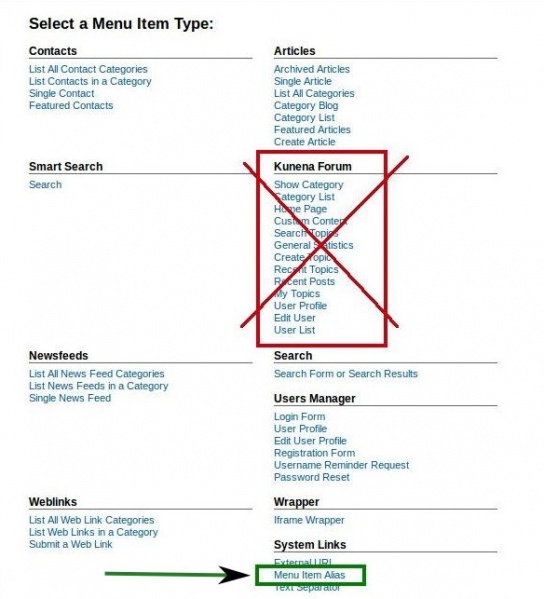
You had this error about 1 year ago. Is it still the same? I see now that you were not repaired this menu item. It can be caused by this wrong menu item.
Code:
100022 Forumbeitrag schreiben usermenue view=topic&catid=0&layout=create mitglieder/aktiv-mitwirken/forumbeitrag-schreiben
Important! Always create a backup before you make any changes to your website!
Last edit: 12 years 8 months ago by rich.
Please Log in or Create an account to join the conversation.
12 years 8 months ago #151390
by Bastian
Replied by Bastian on topic Edit existing posting: "You don't have permission to access /forum on this server."
Hello Rich,
you are right, still the same issue.
My workaround is editing the posting direct with phpmyadmin at the database. Not nice.
Coming back to your hint:
My Forum menu item is based Menu item Alias but I receive the error.
I changed now also the Menu 100022 to Menu item Alias.
Unfortuntely the same error message appears.
Cheers, Bastian
you are right, still the same issue.
My workaround is editing the posting direct with phpmyadmin at the database. Not nice.
Coming back to your hint:
My Forum menu item is based Menu item Alias but I receive the error.
I changed now also the Menu 100022 to Menu item Alias.
Unfortuntely the same error message appears.
Cheers, Bastian
Please Log in or Create an account to join the conversation.
Less
More
- Posts: 12290
- Thank you received: 2537
12 years 8 months ago #151395
by rich
Important! Always create a backup before you make any changes to your website!
Replied by rich on topic Edit existing posting: "You don't have permission to access /forum on this server."
Sorry about your wait, but I had to ask itself. Have you a directory named /forum on your installation? Then it gives this error. And if it so then rename the folder please.
Important! Always create a backup before you make any changes to your website!
Please Log in or Create an account to join the conversation.
12 years 8 months ago #151405
by Bastian
Replied by Bastian on topic Edit existing posting: "You don't have permission to access /forum on this server."
I can't find any folder "forum" with FTP program.
What's interessting, I am able to edit the second post of corresponding thread without any error message. Just at the first posting I am receiving the error message. Strange or isn't it?
What's interessting, I am able to edit the second post of corresponding thread without any error message. Just at the first posting I am receiving the error message. Strange or isn't it?
Please Log in or Create an account to join the conversation.
Less
More
- Posts: 12290
- Thank you received: 2537
12 years 8 months ago - 12 years 8 months ago #151432
by rich
Important! Always create a backup before you make any changes to your website!
Replied by rich on topic Edit existing posting: "You don't have permission to access /forum on this server."
Yes, it's very strange. The error "You don't have permission to access /forum on this server." comes from the server, not from Joomla or Kunena. Please try a test without Joomla SEO.
Important! Always create a backup before you make any changes to your website!
Last edit: 12 years 8 months ago by rich.
Please Log in or Create an account to join the conversation.
Time to create page: 0.300 seconds