


- Posts: 4
- Thank you received: 0
Kunena 7.0.5 & Kunena 6.4.11 – Security Updates Released
The Kunena team has announce the arrival of Kunena 7.0.5 [K 7.0.5] in stable which is now available for download as a native Joomla extension for J! 5.4.x/6.0.x. This version addresses most of the issues that were discovered in K 6.2 / K 6.3 / K 6.4 and issues discovered during the last development stages of K 7.0.
The Kunena team is also pleased to announce the eleventh version of Kunena 6.4, a native Joomla extension for Joomla! 5.0, 5.1, 5.2, 5.3, 5.4 and 6.0.
Topics that are moved into this category are generally considered to be closed. Users may want to add additional information but these topics should not be resurrected in order to discuss new problems or unrelated matters.
Solved All Button-text displaying link alias, not link title.
12 years 6 months ago - 12 years 6 months ago #150684
by rtraub
All Button-text displaying link alias, not link title. was created by rtraub
Hi!
Searching the forums, I've only succeeded in finding one topic referring to my problem:
Tracesea wrote:
I have the identical problem with my newly installed K-3.0.3 - except that it applies to all Frontend option buttons above and below each reply (causing the buttons to extend outside the border of my template),

plus various functions in the K. backend admin, and even the naming of K. menu-items in my Joomla 2.5.16 installation's Menu Manager. So, for example, in the K. Category Manager "Category Settings" section, within Yes/No dropdown boxes, I'm seeing (rather than "No" or "Yes") COM_KUNENA_NO or COM_KUNENA_YES; in the "Category Name and Description", the title of the 3rd row (instead of "Alias") reads COM_KUNENA_A_CATEGORY_ALIAS; in the K. User Manager, to the right of the Search field are two buttons, the first displaying COM_KUNENA_SYS_BUTTON_SUBMIT, the second, COM_KUNENA_SYS_BUTTON_RESET; on the main side-menu, (instead of "Plugin Manager") I'm seeing COM_KUNENA_PLUGIN_MANAGER.
The behaviour even shows up in my Joomla 2.5.16 installation's Menu Manager with the naming of Kunena Menu items, as in this snapshot
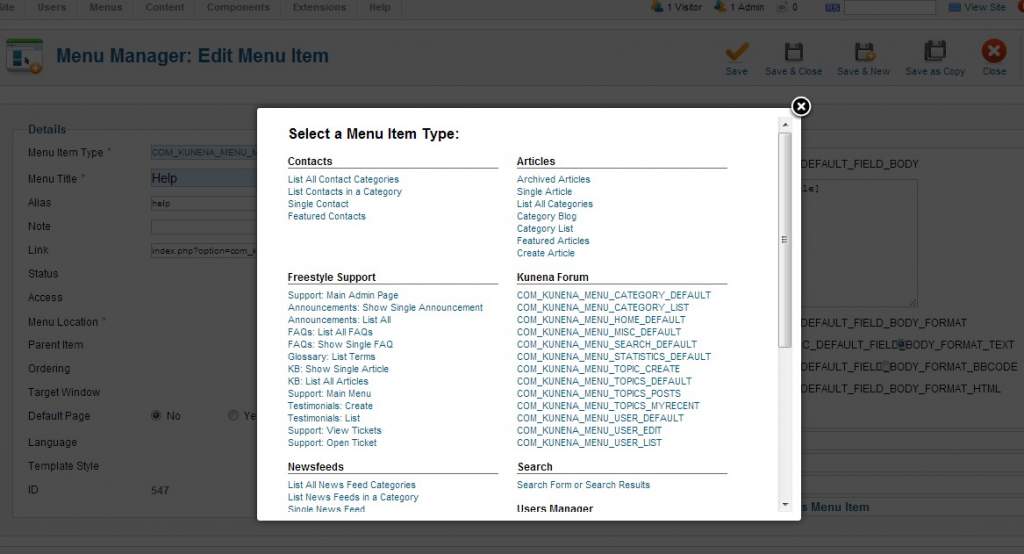
and, worst of all, the Options on the right of this snapshot:
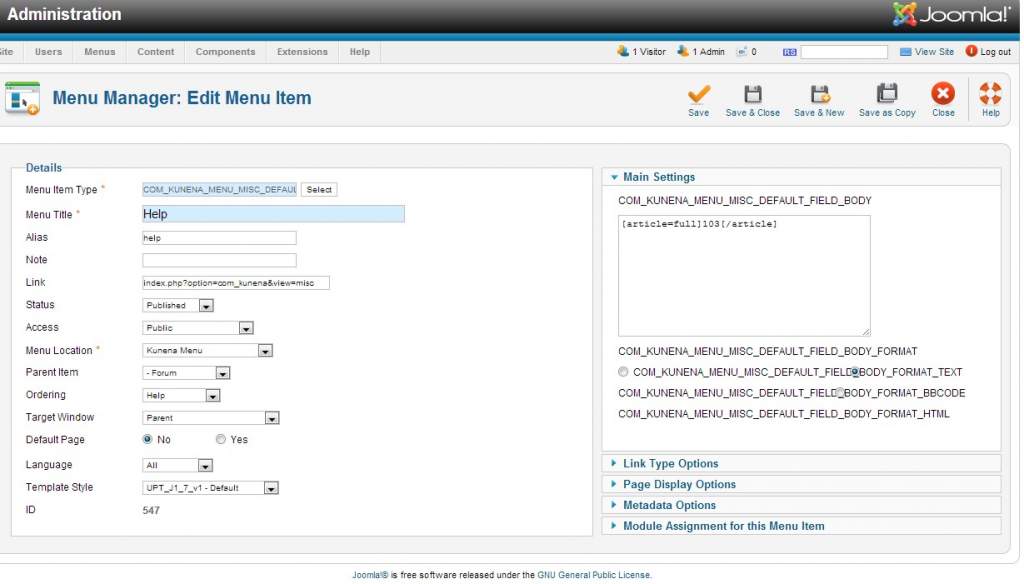
which completely desynchronizes with and obliterates the radio buttons (I need to use these!).
(Incidentally, and somewhat surprisingly, the Forum Kunena top-menu tabs are displaying correctly!)
Tracesea resolved the issue unaided, before any reply could be made to her/his question, by re-installing Kunena. Myself, I'd prefer to seek an alternative fix before resorting to that, lest the considerable work I've already put into optimizing my present installation (which works fine, functionally speaking) gets undone.
Can anyone tell me how to fix this, please? Thanks for reading!
My K Config Report:
Searching the forums, I've only succeeded in finding one topic referring to my problem:
Tracesea wrote:
The button to create a new topic reads:
COM_KUNENA_BUTTON_TOPIC_CREATE
and the subscribe button reads:
COM_KUNENA_BUTTON_CATEGORY_SUBSCRIBE
I want to change the text on these buttons so that their purpose is clearer, can anyone help?
I have the identical problem with my newly installed K-3.0.3 - except that it applies to all Frontend option buttons above and below each reply (causing the buttons to extend outside the border of my template),
plus various functions in the K. backend admin, and even the naming of K. menu-items in my Joomla 2.5.16 installation's Menu Manager. So, for example, in the K. Category Manager "Category Settings" section, within Yes/No dropdown boxes, I'm seeing (rather than "No" or "Yes") COM_KUNENA_NO or COM_KUNENA_YES; in the "Category Name and Description", the title of the 3rd row (instead of "Alias") reads COM_KUNENA_A_CATEGORY_ALIAS; in the K. User Manager, to the right of the Search field are two buttons, the first displaying COM_KUNENA_SYS_BUTTON_SUBMIT, the second, COM_KUNENA_SYS_BUTTON_RESET; on the main side-menu, (instead of "Plugin Manager") I'm seeing COM_KUNENA_PLUGIN_MANAGER.
The behaviour even shows up in my Joomla 2.5.16 installation's Menu Manager with the naming of Kunena Menu items, as in this snapshot
and, worst of all, the Options on the right of this snapshot:
which completely desynchronizes with and obliterates the radio buttons (I need to use these!).
(Incidentally, and somewhat surprisingly, the Forum Kunena top-menu tabs are displaying correctly!)
Tracesea resolved the issue unaided, before any reply could be made to her/his question, by re-installing Kunena. Myself, I'd prefer to seek an alternative fix before resorting to that, lest the considerable work I've already put into optimizing my present installation (which works fine, functionally speaking) gets undone.
Can anyone tell me how to fix this, please? Thanks for reading!
My K Config Report:
This message contains confidential information
Database collation check: The collation of your table fields are correct
Joomla! SEF: Enabled | Joomla! SEF rewrite: Disabled | FTP layer: Disabled |
This message contains confidential informationhtaccess: Exists | PHP environment: Max execution time: 30 seconds | Max execution memory: 128M | Max file upload: 64M
Kunena menu details:
Warning: Spoiler!
ID Name Menutype Link Path 539 Forum kunenamenu view=home&defaultmenu=540 kunenaforum 548 Search kunenamenu view=search kunenaforum/search 547 Help kunenamenu view=misc kunenaforum/help 546 Rules kunenamenu view=misc kunenaforum/rules 544 My Topics kunenamenu view=topics&layout=user&mode=default kunenaforum/mylatest 545 Profile kunenamenu view=user kunenaforum/profile 540 Index kunenamenu view=category&catid=1&layout=list kunenaforum/index 541 Recent Topics kunenamenu view=topics&layout=default&mode=replies kunenaforum/recent 543 No Replies kunenamenu view=topics&layout=default&mode=noreplies kunenaforum/noreplies 542 New Topic kunenamenu view=topic&catid=0&layout=create kunenaforum/newtopic 493 Sample Forum uptcomhomepagemenu view=home&defaultmenu=539 sample-forum 563 Forum Index uptcomhomepagemenu view=category&catid=1&layout=list forum-index 688 UPT.com Open Forum visitors-area-side-menu view=category&catid=1&layout=list visitors-forum-index 689 Kunena Entry Page visitors-area-side-menu view=home&defaultmenu=539 kunena-entry-page 714 Members' Forum community-side-menu view=home&defaultmenu=540 members-forum
Joomla default template details : | author: | version: | creationdate:
Kunena default template details : Blue Eagle (default) | author: Kunena Team | version: 1.7.0 | creationdate: 2011-08-29
Kunena version detailed: Kunena 3.0.3 | 2013-10-20 [ Bifrost ]
| Kunena detailed configuration:| Kunena integration settings:Warning: Spoiler!
Kunena config settings: board_offline 0 enablerss 1 threads_per_page 20 messages_per_page 6 messages_per_page_search 15 showhistory 1 historylimit 6 shownew 1 disemoticons 0 template default showannouncement 1 avataroncat 0 catimagepath category_images/ showchildcaticon 1 rtewidth 400 rteheight 300 enableforumjump 1 reportmsg 1 username 1 askemail 0 showemail 0 showuserstats 1 showkarma 0 useredit 1 useredittime 0 useredittimegrace 600 editmarkup 1 allowsubscriptions 1 subscriptionschecked 1 allowfavorites 1 maxsubject 50 maxsig 300 regonly 0 pubwrite 0 floodprotection 0 mailmod 0 mailadmin 0 captcha 0 mailfull 1 allowavatarupload 1 allowavatargallery 1 avatarquality 65 avatarsize 2048 imageheight 800 imagewidth 800 imagesize 150 filetypes txt,rtf,pdf,zip,tar.gz,tgz,tar.bz2 filesize 120 showranking 0 rankimages 1 userlist_rows 30 userlist_online 1 userlist_avatar 0 userlist_name 0 userlist_posts 1 userlist_karma 0 userlist_email 0 userlist_joindate 1 userlist_lastvisitdate 1 userlist_userhits 0 latestcategory 0 showstats 1 showwhoisonline 1 showgenstats 1 showpopuserstats 1 popusercount 5 showpopsubjectstats 1 popsubjectcount 5 usernamechange 0 showspoilertag 1 showvideotag 1 showebaytag 0 trimlongurls 1 trimlongurlsfront 40 trimlongurlsback 20 autoembedyoutube 1 autoembedebay 0 ebaylanguagecode en-us sessiontimeout 1800 highlightcode 0 rss_type topic rss_timelimit month rss_limit 100 rss_included_categories rss_excluded_categories rss_specification rss2.0 rss_allow_html 1 rss_author_format name rss_author_in_title 1 rss_word_count 0 rss_old_titles 1 rss_cache 900 defaultpage recent default_sort asc sef 1 showimgforguest 1 showfileforguest 0 pollnboptions 4 pollallowvoteone 1 pollenabled 0 poppollscount 5 showpoppollstats 0 polltimebtvotes 00:15:00 pollnbvotesbyuser 100 pollresultsuserslist 1 maxpersotext 50 ordering_system mesid post_dateformat datetime post_dateformat_hover datetime hide_ip 1 imagetypes jpg,jpeg,gif,png checkmimetypes 1 imagemimetypes image/jpeg,image/jpg,image/gif,image/png imagequality 50 thumbheight 32 thumbwidth 32 hideuserprofileinfo put_empty boxghostmessage 0 userdeletetmessage 2 latestcategory_in 1 topicicons 0 debug 0 catsautosubscribed 0 showbannedreason 0 version_check 1 showthankyou 1 showpopthankyoustats 1 popthankscount 5 mod_see_deleted 0 bbcode_img_secure text listcat_show_moderators 1 lightbox 1 show_list_time 720 show_session_type 0 show_session_starttime 0 userlist_allowed 0 userlist_count_users 1 enable_threaded_layouts 0 category_subscriptions topic topic_subscriptions every pubprofile 0 thankyou_max 10 email_recipient_count 0 email_recipient_privacy bcc captcha_post_limit 5 keywords 0 userkeywords 0 image_upload registered file_upload registered topic_layout flat time_to_create_page 1 show_imgfiles_manage_profile 1 hold_newusers_posts 0 hold_guest_posts 0 attachment_limit 8 pickup_category 0 article_display intro send_emails 1 fallback_english 1 cache 1 cache_time 60 iptracking 1 rss_feedburner_url autolink 1 access_component 1 enablepdf 1 jmambot 0 annmodid 62 changename 0 userlist_username 1 userlist_usertype 1 rules_infb 1 help_infb 1 sefutf8 0 onlineusers 1 | Joomla! detailed language files installed:Warning: Spoiler!Kunena - AlphaUserPoints Enabled: activity=1 avatar=1 profile=1 activity_points_limit=0
Kunena - Community Builder Enabled: access=0 login=0 activity=1 avatar=1 profile=1 private=1
Kunena - Gravatar Disabled
Kunena - JomSocial Enabled: access=0 login=0 activity=1 avatar=1 profile=1 private=1 activity_points_limit=0 activity_stream_limit=0
Kunena - Joomla Enabled: access=1 login=1
Kunena - Kunena Enabled: avatar=1 profile=1
Kunena - UddeIM Enabled: private=1
Warning: Spoiler!
Joomla! languages installed: en-GB English (United Kingdom)
Third-party components: None
Third-party SEF components: None
Plugins: Content - Kunena Discuss 1.6.4
Modules: Kunena Latest 1.6.4
Last edit: 12 years 6 months ago by rtraub. Reason: text became duplicated somehow!
Please Log in or Create an account to join the conversation.


12 years 6 months ago - 12 years 6 months ago #150687
by sozzled
See K 3.0 buttons display constant names and see Where is the language file?
Your configuration report shows that you have installed two out-of-date Kunena add-ons : Content - Kunena Discuss 1.6.4 and Kunena Latest 1.6.4. Please update or uninstall these two items.
Your configuration report shows that you have enabled a number of Kunena integration plugins . Please change those things as indicated in red below:
Kunena - AlphaUserPoints Disabled
Kunena - Community Builder Disabled
Kunena - Gravatar Disabled
Kunena - JomSocial Disabled
Kunena - Joomla Enabled: access=1 login=1
Kunena - Kunena Enabled: avatar=1 profile=1
Kunena - UddeIM Enabled: Disabled
If you are having problems with the Kunena menu, see Kunena Menu issues in the Wiki.
Blue Eagle vs. Crypsis reference guide
Read my blog and

Replied by sozzled on topic All Button-text displaying link alias, not link title.
The symbolic names are defined in the language file. It's possible, however, that your installation of Kunena was not completely successful because of some unknown issue (e.g. some peculiar or "special" folder permission setting).rtraub wrote: I want to change the text on these buttons so that their purpose is clearer, can anyone help?
See K 3.0 buttons display constant names and see Where is the language file?
Your configuration report shows that you have installed two out-of-date Kunena add-ons : Content - Kunena Discuss 1.6.4 and Kunena Latest 1.6.4. Please update or uninstall these two items.
Your configuration report shows that you have enabled a number of Kunena integration plugins . Please change those things as indicated in red below:
Kunena - AlphaUserPoints Disabled
Kunena - Community Builder Disabled
Kunena - Gravatar Disabled
Kunena - JomSocial Disabled
Kunena - Joomla Enabled: access=1 login=1
Kunena - Kunena Enabled: avatar=1 profile=1
Kunena - UddeIM Enabled: Disabled
If you are having problems with the Kunena menu, see Kunena Menu issues in the Wiki.
"Considerable work"? I don't know what you might have done but I will ask, what is really stopping you from re-installing K 3.0.3? :dry: And, more imporantly, when K 3.0.4 is released, will this work you've done be lost and stop you from upgrading to the next version that is under construction now to fix the problems that have been reported to the project team?rtraub wrote: I'd prefer to seek an alternative fix before resorting to that, lest the considerable work I've already put into optimizing my present installation (which works fine, functionally speaking) gets undone.
Blue Eagle vs. Crypsis reference guide
Read my blog and
Last edit: 12 years 6 months ago by sozzled.
The following user(s) said Thank You: rtraub
Please Log in or Create an account to join the conversation.
12 years 6 months ago #150724
by rtraub
Replied by rtraub on topic All Button-text displaying link alias, not link title.
Many thanks, Sozzled, for your time and work, very much appreciated.
After first inspecting all the .php files including the alias strings with WindowsGrep (great utility, that, thanks for putting me onto it!), I still couldn't track down the Jtext translations file, but what I did find, together with your last paragraph's reasoning, was sufficient to prompt me to re-install K_3.0.3 - and the problem (and some snags with integration of User emails and CSS text-displaying I'd already worked around) has disappeared. (The work I mentioned I'd done referred to those work-arounds, by the way, so in the end it amounted to a waste of time!)
Performing the re-installation operation itself indicated that my first attempt hadn't gone entirely as it ought - on that occasion I never got to see the installer dialog, even after ten minutes - I guess some connection glitch with my host server prevented it from entirely rounding off the installation.
My thanks again - and also for your observations regarding un-needed extensions on my system. All seen to now.
Kind regards!
After first inspecting all the .php files including the alias strings with WindowsGrep (great utility, that, thanks for putting me onto it!), I still couldn't track down the Jtext translations file, but what I did find, together with your last paragraph's reasoning, was sufficient to prompt me to re-install K_3.0.3 - and the problem (and some snags with integration of User emails and CSS text-displaying I'd already worked around) has disappeared. (The work I mentioned I'd done referred to those work-arounds, by the way, so in the end it amounted to a waste of time!)
Performing the re-installation operation itself indicated that my first attempt hadn't gone entirely as it ought - on that occasion I never got to see the installer dialog, even after ten minutes - I guess some connection glitch with my host server prevented it from entirely rounding off the installation.
My thanks again - and also for your observations regarding un-needed extensions on my system. All seen to now.
Kind regards!
Please Log in or Create an account to join the conversation.
12 years 6 months ago #150739
by sozzled
Blue Eagle vs. Crypsis reference guide
Read my blog and
Replied by sozzled on topic All Button-text displaying link alias, not link title.
I am pleased I was able to help. I'm assuming this matter has now been resolved and, accordingly, I am moving it to our archive.
Blue Eagle vs. Crypsis reference guide
Read my blog and
The following user(s) said Thank You: rtraub
Please Log in or Create an account to join the conversation.
Time to create page: 0.323 seconds