


- Posts: 10
- Thank you received: 0
Kunena 7.0.9 & Kunena 6.4.14 – Security Updates Released
The Kunena team has announce the arrival of Kunena 7.0.9 [K 7.0.9] in stable which is now available for download as a native Joomla extension for J! 5.4.x/6.0.x./6.1.x. This version addresses most of the issues that were discovered in K 6.2 / K 6.3 / K 6.4 and issues discovered during the last development stages of K 7.0
Topics that are moved into this category are generally considered to be closed. Users may want to add additional information but these topics should not be resurrected in order to discuss new problems or unrelated matters.
Solved K 3.0.3 Sorting Categories in BE does not work
12 years 10 months ago - 12 years 10 months ago #150452
by Leviathan
K 3.0.3 Sorting Categories in BE does not work was created by Leviathan
Hello!
In the backend at Components-->Kunena Forum-->Categories the order of the categories is supposed to be configured by sorting them by order by selecting "choose order" (I think this is the english translation) in the combo box in the top right corner.
Like in the Joomla menus I expect the gray lines in front of each category to become black, but if I select "choose order" this does not happen, instead the combo box jumps back to "ascending" or "descending". I tried to select several items in the combo box to the right of it, but without success.
If you ask for further information about this issue, please also let me know where to find it!
cheers
In the backend at Components-->Kunena Forum-->Categories the order of the categories is supposed to be configured by sorting them by order by selecting "choose order" (I think this is the english translation) in the combo box in the top right corner.
Like in the Joomla menus I expect the gray lines in front of each category to become black, but if I select "choose order" this does not happen, instead the combo box jumps back to "ascending" or "descending". I tried to select several items in the combo box to the right of it, but without success.
If you ask for further information about this issue, please also let me know where to find it!
cheers
This message contains confidential information
Database collation check: The collation of your table fields are correct
Joomla! SEF: Enabled | Joomla! SEF rewrite: Enabled | FTP layer: Disabled |
This message contains confidential informationhtaccess: Exists | PHP environment: Max execution time: 30 seconds | Max execution memory: 128M | Max file upload: 20M
Kunena menu details:
Warning: Spoiler!
ID Name Menutype Link Path 213 Forum kunenamenu view=home&defaultmenu=215 forum 214 Index kunenamenu view=category&layout=list forum/index 215 Aktuell kunenamenu view=topics&mode=replies forum/aktuell 216 Neues Thema kunenamenu view=topic&layout=create forum/neuesthema 217 Ohne Antwort kunenamenu view=topics&mode=noreplies forum/ohneantwort 218 Meine Themen kunenamenu view=topics&layout=user&mode=default forum/meinethemen 219 Profil kunenamenu view=user forum/profil 220 Hilfe kunenamenu view=misc forum/hilfe 221 Suche kunenamenu view=search forum/suche 222 Forum mainmenu Itemid=213 kunena-2013-11-12
Joomla default template details : WolfsklanTemplate | author: Christoph Schnack | version: 1.0.0 | creationdate: Unknown
Kunena default template details : Blue Eagle | author: Kunena Team | version: 3.0.3 | creationdate: 2013-10-20
Kunena version detailed: Kunena 3.0.3 | 2013-10-20 [ Bifrost ]
| Kunena detailed configuration:| Kunena integration settings:Warning: Spoiler!
Kunena config settings: board_offline 0 enablerss 1 threads_per_page 20 messages_per_page 6 messages_per_page_search 15 showhistory 1 historylimit 6 shownew 1 disemoticons 0 template blue_eagle showannouncement 1 avataroncat 0 catimagepath category_images showchildcaticon 1 rtewidth 450 rteheight 300 enableforumjump 1 reportmsg 1 username 1 askemail 0 showemail 0 showuserstats 1 showkarma 1 useredit 1 useredittime 0 useredittimegrace 600 editmarkup 1 allowsubscriptions 1 subscriptionschecked 1 allowfavorites 1 maxsubject 50 maxsig 300 regonly 0 pubwrite 0 floodprotection 0 mailmod 0 mailadmin 0 captcha 0 mailfull 1 allowavatarupload 1 allowavatargallery 1 avatarquality 75 avatarsize 2048 imageheight 800 imagewidth 800 imagesize 150 filetypes txt,rtf,pdf,zip,tar.gz,tgz,tar.bz2 filesize 120 showranking 1 rankimages 1 userlist_rows 30 userlist_online 1 userlist_avatar 1 userlist_name 1 userlist_posts 1 userlist_karma 1 userlist_email 0 userlist_joindate 1 userlist_lastvisitdate 1 userlist_userhits 1 latestcategory showstats 1 showwhoisonline 1 showgenstats 1 showpopuserstats 1 popusercount 5 showpopsubjectstats 1 popsubjectcount 5 usernamechange 0 showspoilertag 1 showvideotag 1 showebaytag 1 trimlongurls 1 trimlongurlsfront 40 trimlongurlsback 20 autoembedyoutube 1 autoembedebay 1 ebaylanguagecode en-us sessiontimeout 1800 highlightcode 0 rss_type post rss_timelimit month rss_limit 100 rss_included_categories rss_excluded_categories rss_specification rss2.0 rss_allow_html 1 rss_author_format name rss_author_in_title 1 rss_word_count 0 rss_old_titles 1 rss_cache 900 defaultpage recent default_sort asc sef 1 showimgforguest 1 showfileforguest 1 pollnboptions 4 pollallowvoteone 1 pollenabled 1 poppollscount 5 showpoppollstats 1 polltimebtvotes 00:15:00 pollnbvotesbyuser 100 pollresultsuserslist 1 maxpersotext 50 ordering_system mesid post_dateformat ago post_dateformat_hover datetime hide_ip 1 imagetypes jpg,jpeg,gif,png checkmimetypes 1 imagemimetypes image/jpeg,image/jpg,image/gif,image/png imagequality 50 thumbheight 32 thumbwidth 32 hideuserprofileinfo put_empty boxghostmessage 0 userdeletetmessage 0 latestcategory_in 1 topicicons 1 debug 0 catsautosubscribed 0 showbannedreason 0 version_check 1 showthankyou 1 showpopthankyoustats 1 popthankscount 5 mod_see_deleted 0 bbcode_img_secure text listcat_show_moderators 1 lightbox 1 show_list_time 720 show_session_type 0 show_session_starttime 0 userlist_allowed 0 userlist_count_users 1 enable_threaded_layouts 0 category_subscriptions post topic_subscriptions every pubprofile 1 thankyou_max 10 email_recipient_count 0 email_recipient_privacy bcc captcha_post_limit 0 keywords 0 userkeywords 0 image_upload registered file_upload registered topic_layout flat time_to_create_page 1 show_imgfiles_manage_profile 1 hold_newusers_posts 0 hold_guest_posts 0 attachment_limit 8 pickup_category 0 article_display intro send_emails 1 fallback_english 1 cache 1 cache_time 60 iptracking 1 rss_feedburner_url autolink 1 access_component 1 | Joomla! detailed language files installed:Warning: Spoiler!Kunena - AlphaUserPoints Disabled
Kunena - Community Builder Disabled
Kunena - Gravatar Disabled
Kunena - JomSocial Disabled
Kunena - Joomla Enabled: access=1 login=1
Kunena - Kunena Enabled: avatar=1 profile=1
Kunena - UddeIM Disabled
Warning: Spoiler!
Joomla! languages installed: de-DE German (DE-CH-AT) en-GB English (United Kingdom)
Third-party components: None
Third-party SEF components: None
Plugins: None
Modules: None
Last edit: 12 years 10 months ago by Leviathan.
Please Log in or Create an account to join the conversation.


12 years 10 months ago #150557
by Matias
Replied by Matias on topic K 3.0.3 Sorting Categories in BE does not work
You can only reorder if you have picked the reordering field. That was how Joomla 3.1 worked -- not sure if they have changed this in J!3.2.
Please Log in or Create an account to join the conversation.
12 years 10 months ago - 12 years 10 months ago #150608
by Leviathan
Replied by Leviathan on topic K 3.0.3 Sorting Categories in BE does not work
Hello Matias!
Do you mean another reordering field than depicted in the following screenshot?

Do you mean another reordering field than depicted in the following screenshot?

Last edit: 12 years 10 months ago by Leviathan.
Please Log in or Create an account to join the conversation.


Less
More
- Posts: 12291
- Thank you received: 2538
12 years 10 months ago - 12 years 10 months ago #150611
by rich
Important! Always create a backup before you make any changes to your website!
Replied by rich on topic K 3.0.3 Sorting Categories in BE does not work
That is not a Kunena problem. This is a Joomla function. Try modules or plugins to sorting. It's the same. This order is only temporary. You must choose first "Sort Table By" and afterwards select the ordering.
Important! Always create a backup before you make any changes to your website!
Last edit: 12 years 10 months ago by rich.
Please Log in or Create an account to join the conversation.
12 years 10 months ago #150647
by Leviathan
Replied by Leviathan on topic K 3.0.3 Sorting Categories in BE does not work
Hi rich,
how this system works is familiar with me from the Joomla menus. But also choosing "Sort table by" first doesn't work here, so I guess it has something to do with Kunena.
What do you mean with "just temporarily"? Is this not the place, where I can set the order in which the categories are displayed in the fronted?
regards, Leviathan
how this system works is familiar with me from the Joomla menus. But also choosing "Sort table by" first doesn't work here, so I guess it has something to do with Kunena.
What do you mean with "just temporarily"? Is this not the place, where I can set the order in which the categories are displayed in the fronted?
regards, Leviathan
Please Log in or Create an account to join the conversation.
Less
More
- Posts: 12291
- Thank you received: 2538
12 years 10 months ago - 12 years 10 months ago #150654
by rich
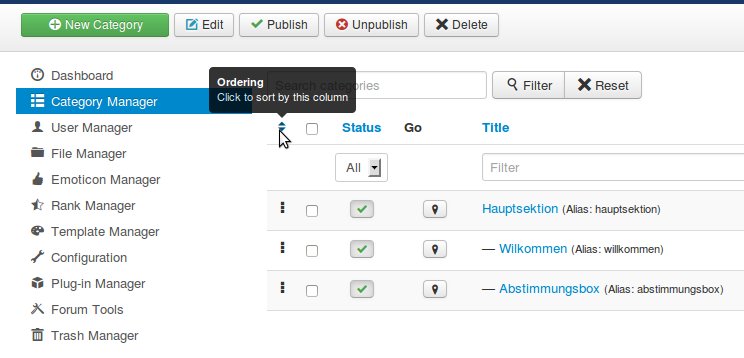
Step 1: click on the symbol (image 1)
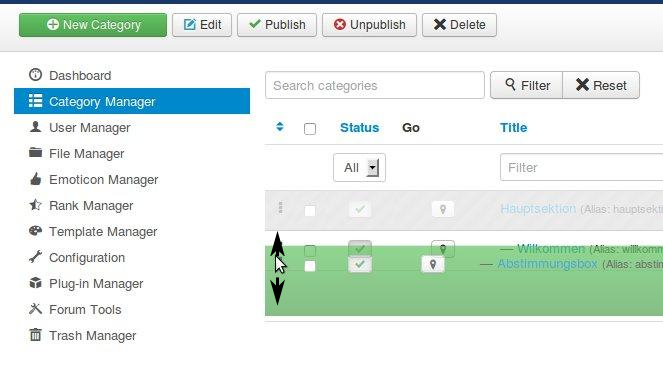
Step 2: move the categories (image 2)
Important! Always create a backup before you make any changes to your website!
Replied by rich on topic K 3.0.3 Sorting Categories in BE does not work
No, that's only temporary for working in the backend. If you want move for the frontend you need two steps on the left hand side.Is this not the place, where I can set the order in which the categories are displayed in the fronted?
Step 1: click on the symbol (image 1)
Step 2: move the categories (image 2)
Important! Always create a backup before you make any changes to your website!
Last edit: 12 years 10 months ago by rich.
Please Log in or Create an account to join the conversation.
Time to create page: 0.259 seconds