The Kunena team has announce the arrival of Kunena 7.0.5 [K 7.0.5] in stable which is now available for download as a native Joomla extension for J! 5.4.x/6.0.x. This version addresses most of the issues that were discovered in K 6.2 / K 6.3 / K 6.4 and issues discovered during the last development stages of K 7.0.
The Kunena team is also pleased to announce the eleventh version of Kunena 6.4, a native Joomla extension for Joomla! 5.0, 5.1, 5.2, 5.3, 5.4 and 6.0.
Topics that are moved into this category are generally considered to be closed. Users may want to add additional information but these topics should not be resurrected in order to discuss new problems or unrelated matters.
Hi
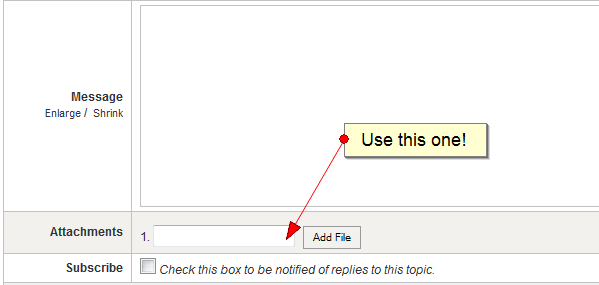
On this editor there is a link in toolbar to upload image by URL, How can I ad an image upload icon to browse my computer to upload an image?[img]"C:\Users\amahr\Pictures\2013-09-25\113.jpeg"[/img] hopeless. The address I added for image "C:\Users\amahr\Pictures\2013-09-25\113.jpeg"
This is not a valid URL and that approach will not not work. You need to first upload an image stored on your computer to your server. See msg #7 of How to upload, insert and display an image attachment
. Pinkeltje is correct.
Thanks for the help it still would be better on toolbar as well but I will make a point of making a post in head of forum how to insert photo as most people will not realize.