
Kunena 7.1.1 & Kunena 6.4.17 – Security Updates Released
The Kunena team has announce the arrival of Kunena 7.1.1 [K 7.1.1] in stable which is now available for download as a native Joomla extension for J! 5.4.x/6.0.x./6.1.x./6.2.x This version addresses most of the issues that were discovered in K 6.2 / K 6.3 / K 6.4 / K7.0 and issues discovered during the last development stages of K 7.1
Just a reminder: K6.4.17 receives only securities fixes until end of 2026, so it's advised for users to upgrade to K7.1.
As general background, My Joomla site template makes a mess of Kunena .
We do not answer questions about other templates for Kunena here.
If you are having problems then, for your own benefit, it would save us all a lot of time if you would kindly post your configuration report when you ask for help from this forum. If you do not post your configuration report we will not ask you for it but you will probably not get your problem solved, either.
Solved How to change Avatar height - Recent Topic View


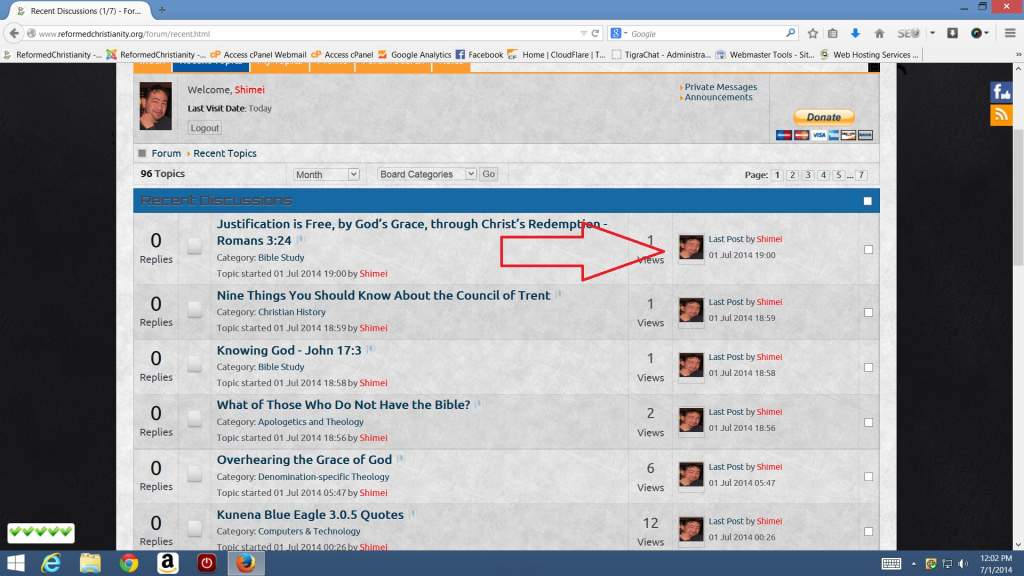
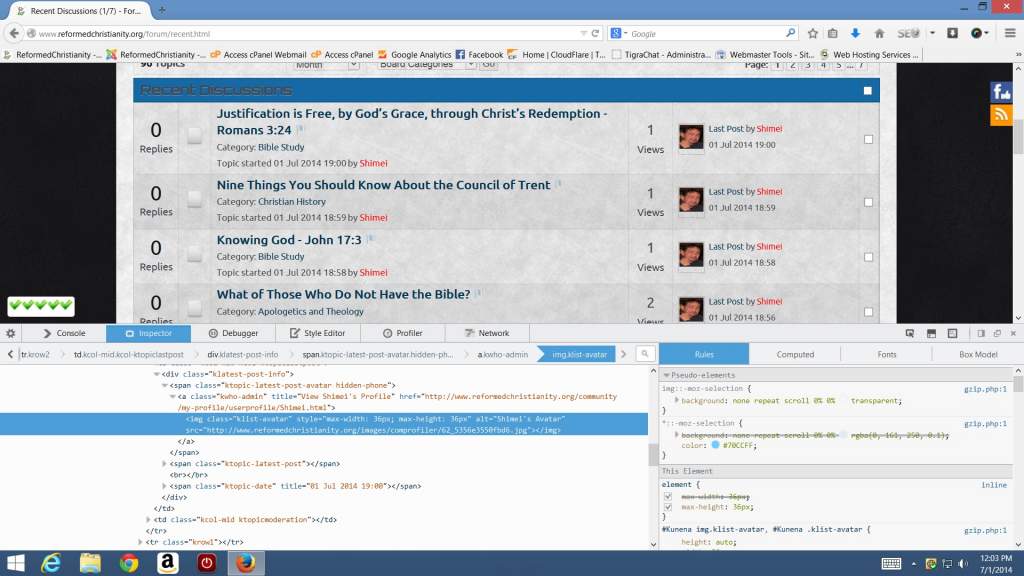
I'm having an issue with avatar heights being too small, therefore making them look rather smushed when viewing the recent topics page.
I tried use Firefox dev. tools to find the file, but it says inline, and I can't seem to find the right file from which to make the change. www.reformedchristianity.org/forum/recent.html
Your help would be much appreciated:
Database collation check: The collation of your table fields are correct
Joomla! SEF: Enabled | Joomla! SEF rewrite: Enabled | FTP layer: Disabled |
This message contains confidential informationhtaccess: Exists | PHP environment: Max execution time: 30 seconds | Max execution memory: 128M | Max file upload: 2M
Kunena menu details:
Warning: Spoiler!
ID Name Menutype Link Path 61 Forum mainmenu view=home&defaultmenu=571 forum 553 Index mainmenu view=category&layout=list&catid=0 forum/index 554 Recent Topics mainmenu view=topics&mode=replies forum/recent 557 My Topics mainmenu view=topics&layout=user&mode=default&modetype= forum/my-topics 555 Profile mainmenu view=user forum/profile 556 Forum Search mainmenu view=search forum/search 653 My Forum Topics mainmenu view=topics&layout=user&mode=default forum/my-forum-topics 571 Forum kunenamenu view=home&defaultmenu=571 forums 572 Index kunenamenu view=category&layout=list&catid=0 forums/index 573 Recent Topics kunenamenu view=topics&mode=replies forums/recent 576 My Topics kunenamenu view=topics&layout=user&mode=default forums/mylatest 575 No Replies kunenamenu view=topics&mode=noreplies forums/noreplies 579 Search kunenamenu view=search forums/search 577 Profile kunenamenu view=user forums/profile 578 Help kunenamenu view=misc forums/help 574 New Topic kunenamenu view=topic&layout=create&catid= newtopic
Joomla default template details : yoo_catalyst | author: YOOtheme | version: 1.0.7 | creationdate: Unknown
Kunena default template details : Blue Eagle | author: Kunena Team | version: 3.0.5 | creationdate: 2014-03-09
Kunena version detailed: Kunena 3.0.5 | 2014-03-09 [ Invecchiato ]
| Kunena detailed configuration:| Kunena integration settings:Warning: Spoiler!
Kunena config settings: board_offline 0 enablerss 1 threads_per_page 15 messages_per_page 10 messages_per_page_search 15 showhistory 1 historylimit 6 shownew 1 disemoticons 0 template blue_eagle showannouncement 0 avataroncat 1 catimagepath category_images/ showchildcaticon 1 rtewidth 450 rteheight 600 enableforumjump 1 reportmsg 1 username 1 askemail 0 showemail 0 showuserstats 1 showkarma 0 useredit 1 useredittime 0 useredittimegrace 600 editmarkup 0 allowsubscriptions 1 subscriptionschecked 1 allowfavorites 1 maxsubject 110 maxsig 300 regonly 0 pubwrite 0 floodprotection 15 mailmod 0 mailadmin 0 captcha 0 mailfull 1 allowavatarupload 1 allowavatargallery 1 avatarquality 100 avatarsize 2048 imageheight 800 imagewidth 800 imagesize 150 filetypes txt,rtf,pdf,zip,tar.gz,tgz,tar.bz2 filesize 500 showranking 1 rankimages 1 userlist_rows 30 userlist_online 1 userlist_avatar 1 userlist_name 0 userlist_posts 1 userlist_karma 0 userlist_email 0 userlist_joindate 1 userlist_lastvisitdate 1 userlist_userhits 0 latestcategory 0 showstats 1 showwhoisonline 1 showgenstats 1 showpopuserstats 1 popusercount 10 showpopsubjectstats 1 popsubjectcount 10 usernamechange 0 showspoilertag 1 showvideotag 0 showebaytag 0 trimlongurls 1 trimlongurlsfront 40 trimlongurlsback 20 autoembedyoutube 1 autoembedebay 0 ebaylanguagecode en-us sessiontimeout 1800 highlightcode 0 rss_type topic rss_timelimit month rss_limit 100 rss_included_categories rss_excluded_categories rss_specification rss2.0 rss_allow_html 1 rss_author_format name rss_author_in_title 1 rss_word_count 0 rss_old_titles 1 rss_cache 900 defaultpage recent default_sort asc sef 1 showimgforguest 1 showfileforguest 1 pollnboptions 4 pollallowvoteone 1 pollenabled 1 poppollscount 5 showpoppollstats 0 polltimebtvotes 00:15:00 pollnbvotesbyuser 100 pollresultsuserslist 1 maxpersotext 50 ordering_system mesid post_dateformat datetime post_dateformat_hover datetime hide_ip 1 imagetypes jpg,jpeg,gif,png checkmimetypes 1 imagemimetypes image/jpeg,image/jpg,image/gif,image/png imagequality 50 thumbheight 32 thumbwidth 32 hideuserprofileinfo put_empty boxghostmessage 0 userdeletetmessage 0 latestcategory_in 1 topicicons 1 debug 0 catsautosubscribed 0 showbannedreason 1 version_check 0 showthankyou 1 showpopthankyoustats 0 popthankscount 5 mod_see_deleted 2 bbcode_img_secure text listcat_show_moderators 0 lightbox 1 show_list_time 720 show_session_type 0 show_session_starttime 0 userlist_allowed 0 userlist_count_users 1 enable_threaded_layouts 0 category_subscriptions post topic_subscriptions every pubprofile 1 thankyou_max 10 email_recipient_count 0 email_recipient_privacy bcc captcha_post_limit 0 keywords 0 userkeywords 0 image_upload registered file_upload everybody topic_layout flat time_to_create_page 0 show_imgfiles_manage_profile 1 hold_newusers_posts 0 hold_guest_posts 0 attachment_limit 10 pickup_category 0 article_display intro send_emails 1 fallback_english 1 cache 1 cache_time 60 iptracking 0 rss_feedburner_url autolink 1 access_component 1 statslink_allowed 1 userlist_usertype 1 sefutf8 0 changename 0 enablepdf 0 jmambot 0 annmodid 62 userlist_username 1 rules_infb 1 help_infb 1 onlineusers 1 | Joomla! detailed language files installed:Warning: Spoiler!Kunena - AlphaUserPoints Disabled
Kunena - Community Builder Enabled: access=1 login=1 activity=1 avatar=1 profile=1 private=1
Kunena - Gravatar Disabled
Kunena - JomSocial Disabled
Kunena - Joomla Enabled: access=1 login=1
Kunena - Kunena Enabled: avatar=1 profile=1
Kunena - UddeIM Enabled: private=1
Warning: Spoiler!
Joomla! languages installed: en-GB English (United Kingdom)
Third-party components: CommunityBuilder 1.9.1 | UddeIM 3.4
Third-party SEF components: None
Plugins: Search - Kunena Search 3.0.1 | Content - Kunena Discuss 3.0.1 | JomSocial - My Kunena Forum Menu 2.0.3 | JomSocial - My Kunena Forum Posts 2.0.3 | JomSocial - Kunena Groups 2.0.3
Modules: Kunena Latest 3.0.1 | Kunena Login 3.0.1
Please Log in or Create an account to join the conversation.
- 9themestore
-

- Offline
- Premium Member
-

Open the template.css file in the current joomla template and add below CSS rule to the bottom of file.
I test on Firebug add-on and it's working fine.
Hope this hepls
- Please provide your site url if it has been lived.
- Please share tip if it worked fine with you.
- Don't be shy about using the "Thanks" button below if you found my comment helpful

Please Log in or Create an account to join the conversation.


- Posts: 12299
- Thank you received: 2545
You can make a bit smaller the avatars. This should work.
Important! Always create a backup before you make any changes to your website!
Please Log in or Create an account to join the conversation.