Kunena 7.0.9 & Kunena 6.4.14 – Security Updates Released

The Kunena team has announce the arrival of Kunena 7.0.9 [K 7.0.9] in stable which is now available for download as a native Joomla extension for J! 5.4.x/6.0.x./6.1.x. This version addresses most of the issues that were discovered in K 6.2 / K 6.3 / K 6.4 and issues discovered during the last development stages of K 7.0

This category contains miscellaneous, uncategorised user contributions, (templates, modules, plugins and hacks) relating to older versions of Kunena that are no longer supported.

The topics in this category are for historical interest only. Owing to the structural changes that occurred in K 2.0, many of the ideas in these topics will not work with later versions and, for that reason, the topics are locked.

Question Changing the display of Category Header text in Kunena 2.0.1
More
14 years 2 months ago - 14 years 1 month ago #130641 by Mike-XS
Here's a quick hack for changing the default text for all forum Category Header text in Kunena 2.0.1.

In this example we are editing the Kunena template files to make the category headers more dynamic, by using the category name instead of the default hardcoded 'Category Header' text.

I'm editing a copy of the default Blue Eagle template, not the original template itself.

--

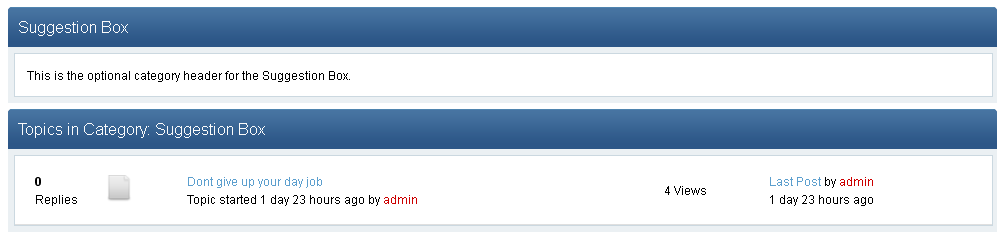
By default, the forum category header text looks like this:


The default text for the forum category headers is set in the language file.
Code:
\components\com_kunena\language\en-GB\en-GB.com_kunena.tpl_blue_eagle.ini
Code:
COM_KUNENA_FORUM_HEADER="Category Header"

My test template is named Dark Eagle, so the language file is located here with the same name as the template:
Code:
\components\com_kunena\language\en-GB\en-GB.com_kunena.tpl_dark_eagle.ini

You can edit the text here in the language file but it can only ever be one value. That means this text will be used for all your forum categories.

Instead of using the hardcoded value from the language file, I've chosen to display the actual category name.

Note: Forum category names are set in the Admin backend, Kunena forum configuration.
Code:
/administrator/index.php?option=com_kunena&view=categories

--

In my own template's \category\default.php file:
Code:
\components\com_kunena\template\dark_eagle\html\category\default.php

On line 19:
Code:
<h2><span><?php echo JText::_('COM_KUNENA_FORUM_HEADER'); ?></span></h2>

I've changed the display code to this :
Code:
<h2><span><?php echo $this->escape($this->category->name); ?></span></h2>

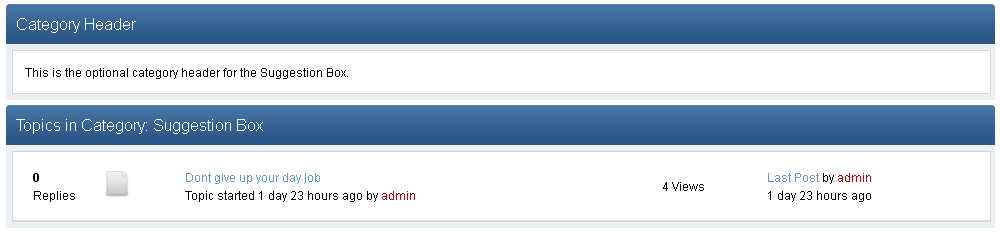
With this change the category header will now look like :


--

Another option, further down in the same file I've also changed the 'header text' to a h3. This is the 'Topics in Category : ' text
Code:
\html\category\default.php
Code:
<h3><span><?php echo $this->escape($this->headerText); ?></span></h3>

--

Remove Category Headers

To not show the forum category headers at all, go to the Kunena Cateory Manager and select the forum you want to edit.

In the first tab for 'basic information', simply remove any text from the category header text box and save.

--

You can find a lot more information about Kunena templates in the Docs here:

docs.kunena.org/index.php/Category:Templates
docs.kunena.org/index.php/Updating_exist...plates_to_Kunena_2.0

--
Last edit: 14 years 1 month ago by Mike-XS.
The following user(s) said Thank You: Voice4Vision, Winuser, chils41, videomax

Please Log in or Create an account to join the conversation.

More
14 years 3 weeks ago #132899 by Winuser
I like this. It's simple and smart.

Please Log in or Create an account to join the conversation.

Time to create page: 0.214 seconds