With a newly installed Kunena 1.7.x forum, you may encounter problems if you have sh404sef installed too.
Indication of errors:
Solution:
- Update sh404SEF + plugin
- ask support from them
Alternative:
- Go to Joomla backend of your site (/administrator/) and log in.
- Go to Menu - Kunena menu - delete all menu items (both published and unpublished) and empty the trash.
- Afterwards delete the Kunena menu itself.
- Go to Modules and delete any installed kunena_menu module(s) (both published and unpublished).
- Go to Components -> Kunena -> click "Create menu".
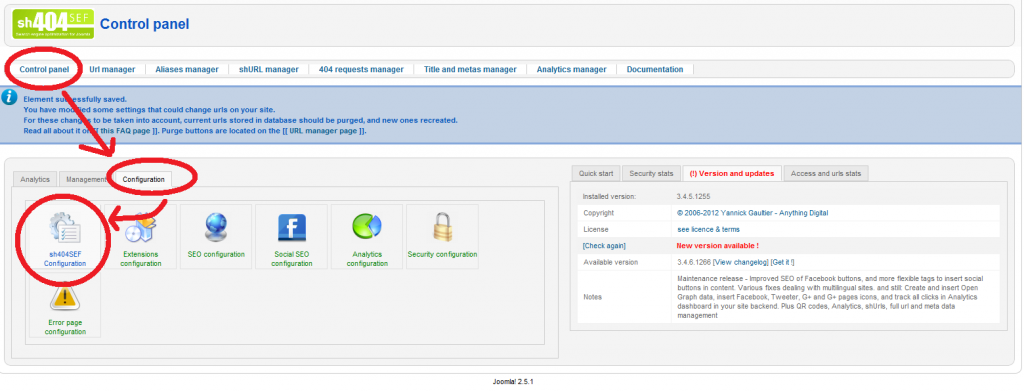
- Go to Components -> Sh404sef -> Control panel -> click the "Configuration" tab -> click "Sh404sef Configuration" button -> click "By component" tab.
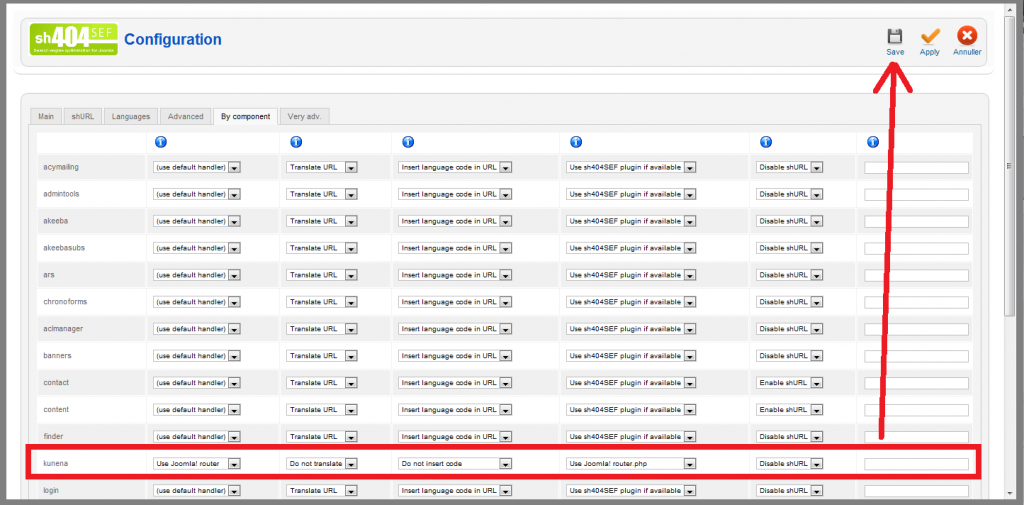
- Locate Kunena and set all values to: "Use Joomla Router" / "Do not translate" / "Do not insert code" / "Use Joomla Router" / "Disable shUrl".
- Click "Save" and test.
This way you simply tell sh404sef not to mess with the links to your forum component.
Of course this also means you loose some functionality of sh404sef, so please consider this solution as an alternative if nothing else works.
We at Kunena is always working hard to solve problems like these, but we cant be responsible for - nor fix - every problem that may come when urls and inputs are rewritten and rerouted by 3rd party extensions - even though we often try to anyway.