
- Posts: 41
- Thank you received: 1
Kunena 7.0.9 & Kunena 6.4.14 – Security Updates Released
The Kunena team has announce the arrival of Kunena 7.0.9 [K 7.0.9] in stable which is now available for download as a native Joomla extension for J! 5.4.x/6.0.x./6.1.x. This version addresses most of the issues that were discovered in K 6.2 / K 6.3 / K 6.4 and issues discovered during the last development stages of K 7.0
This section is for questions directly related to the procedure for installing Kunena for the first time or upgrading from an older version of Kunena.
Use this category:
Use a different category to ask questions about problems that you may be having after you successfully installed or upgraded the currently supported version. If you are unsure what is the current supported version of Kunena, please go to the download page.
Use this category:
- to ask how to install or upgrade; or
- if you encountered problems during the installation or upgrade procedure.
Use a different category to ask questions about problems that you may be having after you successfully installed or upgraded the currently supported version. If you are unsure what is the current supported version of Kunena, please go to the download page.
Solved updating from 5.2.2 to 5.2.3 said missing openssl
- micheldu42
-
 Topic Author
- Offline
- Junior Member
-

Less
More
5 years 6 months ago #216310
by micheldu42
updating from 5.2.2 to 5.2.3 said missing openssl was created by micheldu42
Dear xillibit
In my case , Updating my 5.2.2. release gives an other error if I try to update to 5.2.3 :
"Required PHP extension 'openssl" is missing. Please install it on your system.
Part of the 5.2.2 is overwritten with 5.2.3 modules, so the forum does not work any more.
I have checked on C:\wamp\bin\php\php7.4.13\phpForApache.ini and I see on line 932 extension=openssl
Any help please,
BR
Michel
In my case , Updating my 5.2.2. release gives an other error if I try to update to 5.2.3 :
"Required PHP extension 'openssl" is missing. Please install it on your system.
Part of the 5.2.2 is overwritten with 5.2.3 modules, so the forum does not work any more.
I have checked on C:\wamp\bin\php\php7.4.13\phpForApache.ini and I see on line 932 extension=openssl
Any help please,
BR
Michel
Please Log in or Create an account to join the conversation.


5 years 6 months ago #216311
by xillibit
I don't provide support by PM, because this can be useful for someone else.
Replied by xillibit on topic updating from 5.2.2 to 5.2.3 said missing openssl
Hello,
Do-you have looked in your phpinfo and do-you see openssl loaded ?
Do-you have looked in your phpinfo and do-you see openssl loaded ?
I don't provide support by PM, because this can be useful for someone else.
Please Log in or Create an account to join the conversation.
- micheldu42
-
Topic Author
- Offline
- Junior Member
-
Less
More
- Posts: 41
- Thank you received: 1
5 years 6 months ago #216312
by micheldu42
Replied by micheldu42 on topic updating from 5.2.2 to 5.2.3 said missing openssl
You're right in PHP 7.4.13 - phpinfo I see extension_dir but not extension_openssl
Please Log in or Create an account to join the conversation.
5 years 6 months ago #216313
by xillibit
I don't provide support by PM, because this can be useful for someone else.
Replied by xillibit on topic updating from 5.2.2 to 5.2.3 said missing openssl
If openssl if right enabled ou should see that in your phpinfo :
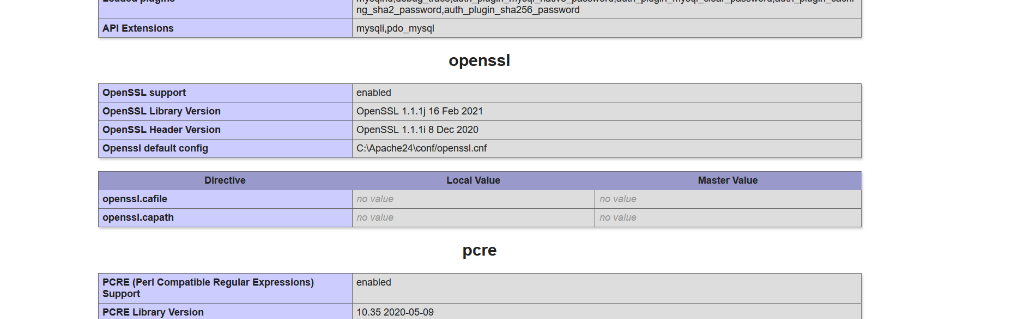
I don't provide support by PM, because this can be useful for someone else.
Please Log in or Create an account to join the conversation.
- micheldu42
-
Topic Author
- Offline
- Junior Member
-
Less
More
- Posts: 41
- Thank you received: 1
5 years 6 months ago #216315
by micheldu42
Replied by micheldu42 on topic updating from 5.2.2 to 5.2.3 said missing openssl
I do not see this openssl table.
Could you drve me to activate it ?
Could you drve me to activate it ?
Please Log in or Create an account to join the conversation.
5 years 6 months ago #216316
by xillibit
I don't provide support by PM, because this can be useful for someone else.
Replied by xillibit on topic updating from 5.2.2 to 5.2.3 said missing openssl
That's is out of scope of Kunena, but you can modify the following file in Kunena install package to be able to install Kunena :
github.com/Kunena/Kunena-Forum/commit/8c...51035c599ea685b85c04
I don't provide support by PM, because this can be useful for someone else.
Please Log in or Create an account to join the conversation.
Time to create page: 0.250 seconds