
- Posts: 18
- Thank you received: 0
Kunena 7.0.9 & Kunena 6.4.14 – Security Updates Released
The Kunena team has announce the arrival of Kunena 7.0.9 [K 7.0.9] in stable which is now available for download as a native Joomla extension for J! 5.4.x/6.0.x./6.1.x. This version addresses most of the issues that were discovered in K 6.2 / K 6.3 / K 6.4 and issues discovered during the last development stages of K 7.0
This section is for questions directly related to the procedure for installing Kunena for the first time or upgrading from an older version of Kunena.
Use this category:
Use a different category to ask questions about problems that you may be having after you successfully installed or upgraded the currently supported version. If you are unsure what is the current supported version of Kunena, please go to the download page.
Use this category:
- to ask how to install or upgrade; or
- if you encountered problems during the installation or upgrade procedure.
Use a different category to ask questions about problems that you may be having after you successfully installed or upgraded the currently supported version. If you are unsure what is the current supported version of Kunena, please go to the download page.
Solved Blue Eagle 5
- AnandGIBES001
-
 Topic Author
- Offline
- Junior Member
-

Less
More
8 years 3 weeks ago #204115
by AnandGIBES001
Replied by AnandGIBES001 on topic Blue Eagle 5
Hi,
As per the screenshot www.kunena.org/media/kunena/attachments/...nainstaltemplate.JPG
I tried to install the template - but in my templates - there is NO NEW Template option - www.awesomescreenshot.com/image/3598904/...089926f5ec44f04aff27
As there is No NEW TEMPLATE option - I could not install the template.
Now its been many days since I am trying to install the template, so I request you to install the temple and I could provide you my Joomla admin details - superuser id and password and you would please install it.
Also, let me know where to provide my Joomla admin credentials so that it is visible only to the moderators.
Regards.
As per the screenshot www.kunena.org/media/kunena/attachments/...nainstaltemplate.JPG
I tried to install the template - but in my templates - there is NO NEW Template option - www.awesomescreenshot.com/image/3598904/...089926f5ec44f04aff27
As there is No NEW TEMPLATE option - I could not install the template.
Now its been many days since I am trying to install the template, so I request you to install the temple and I could provide you my Joomla admin details - superuser id and password and you would please install it.
Also, let me know where to provide my Joomla admin credentials so that it is visible only to the moderators.
Regards.
Please Log in or Create an account to join the conversation.


8 years 3 weeks ago #204117
by Leen
With kind regards
Leen
Replied by Leen on topic Blue Eagle 5
Hey,
you look in the wrong part.
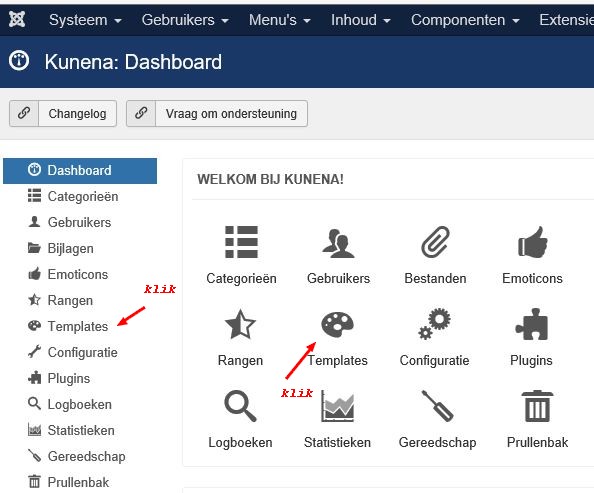
administrator menu> Components> Kunena
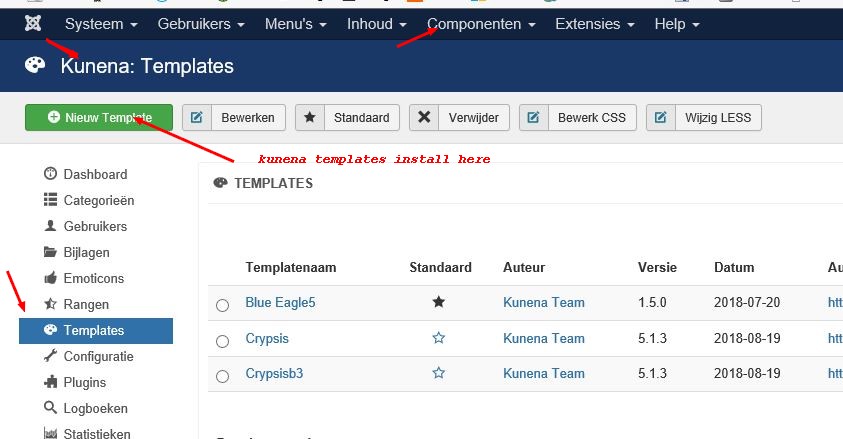
then you see Kunena: Dashboard click on menu template
or the picture with template.
then that screen opens what you are looking for with the installation button
good luck
you look in the wrong part.
administrator menu> Components> Kunena
then you see Kunena: Dashboard click on menu template
or the picture with template.
then that screen opens what you are looking for with the installation button
good luck
With kind regards
Leen
Please Log in or Create an account to join the conversation.
- AnandGIBES001
-
Topic Author
- Offline
- Junior Member
-
Less
More
- Posts: 18
- Thank you received: 0
8 years 3 weeks ago #204120
by AnandGIBES001
Replied by AnandGIBES001 on topic Blue Eagle 5
Hi,
THERE IS NO KUNENA DASHBOARD IN MY JOOMLA ADMIN - as per your screenshot - prntscr.com/krrh6q
Regards.
THERE IS NO KUNENA DASHBOARD IN MY JOOMLA ADMIN - as per your screenshot - prntscr.com/krrh6q
Regards.
Please Log in or Create an account to join the conversation.


Less
More
- Posts: 1020
- Thank you received: 165
8 years 3 weeks ago #204121
by Pinkeltje
Replied by Pinkeltje on topic Blue Eagle 5
If you don't have a Kunena dashboard then either you haven't installed Kunena at all or something went wrong with your Kunena installation.
Please Log in or Create an account to join the conversation.
8 years 3 weeks ago #204124
by Leen
With kind regards
Leen
Replied by Leen on topic Blue Eagle 5
Then maybe something wrong with installing Kunena.
Or check out the administrator section
menu Extensions> manage> discover click above left
discover the button and if any kunena appears, check it and press the other Install button.
otherwise Download kunena again and then install it again.
Or check out the administrator section
menu Extensions> manage> discover click above left
discover the button and if any kunena appears, check it and press the other Install button.
otherwise Download kunena again and then install it again.
With kind regards
Leen
Please Log in or Create an account to join the conversation.
- AnandGIBES001
-
Topic Author
- Offline
- Junior Member
-
Less
More
- Posts: 18
- Thank you received: 0
8 years 3 weeks ago #204132
by AnandGIBES001
Replied by AnandGIBES001 on topic Blue Eagle 5
Hi,
This is the same thing I have been trying to convey it to you and have tried all possible ways to install the template but haven't been able to install the template.
I have taken the following steps to install kunena template:
1. Downloaded template - www.awesomescreenshot.com/image/3599845/...bac531620ae6cb4ded19
and then tried to install but it is not installing and showing an error.
2. Then again I downloaded from www.awesomescreenshot.com/image/3599847/...ad67ab42db59b7b10695
and tried to install but it is not installing and showing an error.
3. Then again I have been through www.kunena.org/docs/en/manual/backend/templates/add-template
but as THERE IS NO KUNENA DASHBOARD IN MY JOOMLA ADMIN - I could not install the template.
So now how to install the template.
Regards.
This is the same thing I have been trying to convey it to you and have tried all possible ways to install the template but haven't been able to install the template.
I have taken the following steps to install kunena template:
1. Downloaded template - www.awesomescreenshot.com/image/3599845/...bac531620ae6cb4ded19
and then tried to install but it is not installing and showing an error.
2. Then again I downloaded from www.awesomescreenshot.com/image/3599847/...ad67ab42db59b7b10695
and tried to install but it is not installing and showing an error.
3. Then again I have been through www.kunena.org/docs/en/manual/backend/templates/add-template
but as THERE IS NO KUNENA DASHBOARD IN MY JOOMLA ADMIN - I could not install the template.
So now how to install the template.
Regards.
Please Log in or Create an account to join the conversation.
Time to create page: 0.253 seconds