
Kunena 7.0.5 & Kunena 6.4.11 – Security Updates Released
The Kunena team has announce the arrival of Kunena 7.0.5 [K 7.0.5] in stable which is now available for download as a native Joomla extension for J! 5.4.x/6.0.x. This version addresses most of the issues that were discovered in K 6.2 / K 6.3 / K 6.4 and issues discovered during the last development stages of K 7.0.
The Kunena team is also pleased to announce the eleventh version of Kunena 6.4, a native Joomla extension for Joomla! 5.0, 5.1, 5.2, 5.3, 5.4 and 6.0.
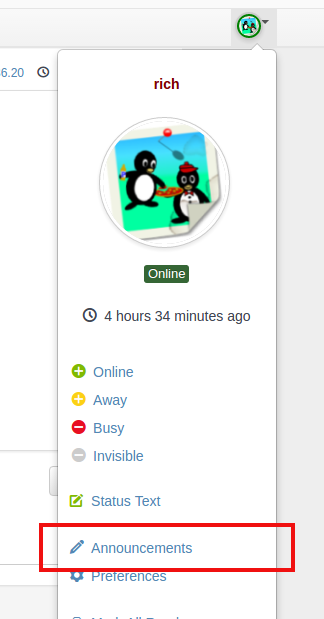
Question help With Announcements (Latest kunera install)


i recently installed the latest version of Kunera on my site
i did the normal config set up turned the announcements to ON
BUT I CAN NOT ADD AN ANNOUNCEMENT
there is no link and no tab Nothing for me to use
(i would hope that i can add an announcement through the backend as well on the control panel if i am there)
i would hope that this simple feature cn be improved upon a little more
Thanks
Please Log in or Create an account to join the conversation.


Important! Always create a backup before you make any changes to your website!
Please Log in or Create an account to join the conversation.
i have community builder also installed on joomla and the profile integrated with the forums...
will that affect me being able to do the announcements for the forums?
i just tried doing the announcements with whehere you pointed me to go, however the tab would not show anything
thanks again
ps it might be a good idea to allow a category (just for announcements to separate and unpublished some announcements for reuse at later dates
 )
) Please Log in or Create an account to join the conversation.
any help greatly appreciated
thanks
Please Log in or Create an account to join the conversation.
hm.. what exactly is the problem? The drop down tab should also be available with CB.the drop down tab wont show
Or try enter the address "your website/forum/announcement/list" in your browser. It's also a possibility to create a announcement.
Important! Always create a backup before you make any changes to your website!
Please Log in or Create an account to join the conversation.