
- Posts: 14
- Thank you received: 0
Kunena 7.0.4 Released
The Kunena team has announce the arrival of Kunena 7.0.4 [K 7.0.4] in stable which is now available for download as a native Joomla extension for J! 5.4.x/6.0.x. This version addresses most of the issues that were discovered in K 6.2 / K 6.3 / K 6.4 and issues discovered during the last development stages of K 7.0
Solved How to modify Kunena user registration form
- sheepstations
-
 Topic Author
- Offline
- New Member
-

Less
More
11 months 3 weeks ago #233378
by sheepstations
How to modify Kunena user registration form was created by sheepstations
Hello, I am using Kunena 6.4.2 on a Joomla 5.3.0 website.
The Kunene registration form can be seen here - channelseafarms.com.au/forum/register-on-forum
Can anybody advise how to customise the form fields?
I'd like to delete some and then add some of my own.
I have searched through the forum without finding a definitive solution. I did see references to Kunena registion form actually using the Joomla reg form but the two forms are completely different. The Kunena reg form has many more fields.
Any help or suggestions would be appreciated.
Thanks,
JR
PS I have started building a new Joomla registration form at channelseafarms.com.au/home/test-form using the Convert Forms extension. (An excellent extension btw).
The problem is this takes the place of the standard Joomla reg form. It doesn't have an option to connect to Kunena in Tasks, like it does for MailChimp for example. It would be problem solved if I could build my Kunena reg form in Convert Forms and it replaced the desfault Kunena reg form.
The Kunene registration form can be seen here - channelseafarms.com.au/forum/register-on-forum
Can anybody advise how to customise the form fields?
I'd like to delete some and then add some of my own.
I have searched through the forum without finding a definitive solution. I did see references to Kunena registion form actually using the Joomla reg form but the two forms are completely different. The Kunena reg form has many more fields.
Any help or suggestions would be appreciated.
Thanks,
JR
PS I have started building a new Joomla registration form at channelseafarms.com.au/home/test-form using the Convert Forms extension. (An excellent extension btw).
The problem is this takes the place of the standard Joomla reg form. It doesn't have an option to connect to Kunena in Tasks, like it does for MailChimp for example. It would be problem solved if I could build my Kunena reg form in Convert Forms and it replaced the desfault Kunena reg form.
Please Log in or Create an account to join the conversation.


Less
More
- Posts: 973
- Thank you received: 153
11 months 3 weeks ago #233379
by Pinkeltje
Replied by Pinkeltje on topic How to modify Kunena user registration form
Kunena uses Joomla registration and it seems you have the plugin user profile enabled, that is were the extra fields come from.
The following user(s) said Thank You: sheepstations
Please Log in or Create an account to join the conversation.
- sheepstations
-
Topic Author
- Offline
- New Member
-
Less
More
- Posts: 14
- Thank you received: 0
11 months 3 weeks ago - 11 months 3 weeks ago #233382
by sheepstations
Replied by sheepstations on topic How to modify Kunena user registration form
Well thank you very much. That was easy.
Can you point me in the direction where to change the title of the field "About Me" to something different? I'd like to change it to something like, "Reason for joining forum" so that I can screen spammers before approving a new user.
Would it require a mod to a .php file? I can do that if I know what file to update.
BTW, I did try a Joomla language over-ride for "About Me" but it didn't work.
Cheers,
JR
Can you point me in the direction where to change the title of the field "About Me" to something different? I'd like to change it to something like, "Reason for joining forum" so that I can screen spammers before approving a new user.
Would it require a mod to a .php file? I can do that if I know what file to update.
BTW, I did try a Joomla language over-ride for "About Me" but it didn't work.
Cheers,
JR
Last edit: 11 months 3 weeks ago by sheepstations.
Please Log in or Create an account to join the conversation.


11 months 3 weeks ago #233383
by rich
Important! Always create a backup before you make any changes to your website!
Replied by rich on topic How to modify Kunena user registration form
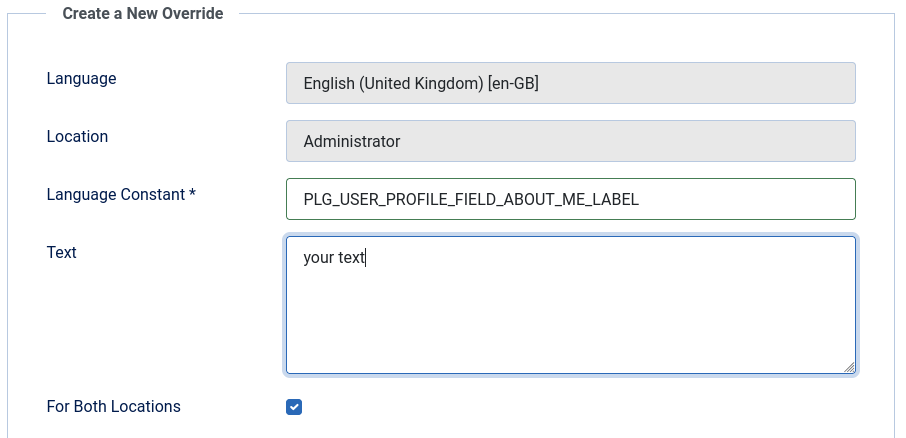
You will find the correct code in the admin language files. The checkbox for both locations must be checked so that it is displayed in the frontend.
.
.
Important! Always create a backup before you make any changes to your website!
Please Log in or Create an account to join the conversation.
- sheepstations
-
Topic Author
- Offline
- New Member
-
Less
More
- Posts: 14
- Thank you received: 0
11 months 3 weeks ago #233384
by sheepstations
Replied by sheepstations on topic How to modify Kunena user registration form
Hello, that's exactly what I have done. Checked the option for both site and admin.
No effect at channelseafarms.com.au/forum/register-on-forum I'm afraid.
Maybe a cache issue?
I did clear my browser cache but still showing "About Me".
This is the over-ride I created.
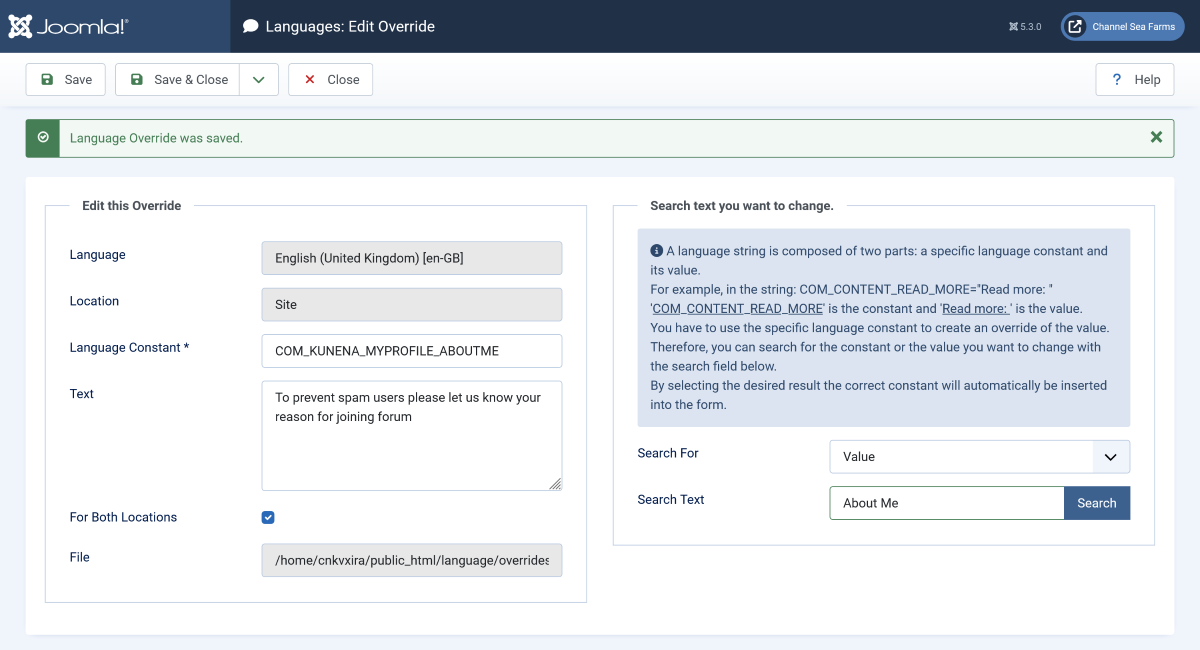
No effect at channelseafarms.com.au/forum/register-on-forum I'm afraid.
Maybe a cache issue?
I did clear my browser cache but still showing "About Me".
This is the over-ride I created.
Please Log in or Create an account to join the conversation.
Less
More
- Posts: 973
- Thank you received: 153
11 months 3 weeks ago #233385
by Pinkeltje
Replied by Pinkeltje on topic How to modify Kunena user registration form
You have the wrong language constant. Check screenshot from @rich
The following user(s) said Thank You: sheepstations
Please Log in or Create an account to join the conversation.
Time to create page: 0.668 seconds