
Kunena 7.0.9 & Kunena 6.4.14 – Security Updates Released
The Kunena team has announce the arrival of Kunena 7.0.9 [K 7.0.9] in stable which is now available for download as a native Joomla extension for J! 5.4.x/6.0.x./6.1.x. This version addresses most of the issues that were discovered in K 6.2 / K 6.3 / K 6.4 and issues discovered during the last development stages of K 7.0
Solved Make the forum visible for public


3 years 5 months ago #228007
by Formidog
Make the forum visible for public was created by Formidog
hello
I am struggling to get the foum visible for everyone.
Can someone help me with the settings
Dick
I am struggling to get the foum visible for everyone.
Can someone help me with the settings
Dick
Please Log in or Create an account to join the conversation.


Less
More
- Posts: 12291
- Thank you received: 2538
3 years 5 months ago #228015
by rich
Important! Always create a backup before you make any changes to your website!
Replied by rich on topic Make the forum visible for public
By default, Kunena is set up so that guests can read everything, but only registered members can write.
To grant guests write access, you must:
1. Kunena Configuration -> tab Security -> Allow Guests to Post/Write = Yes
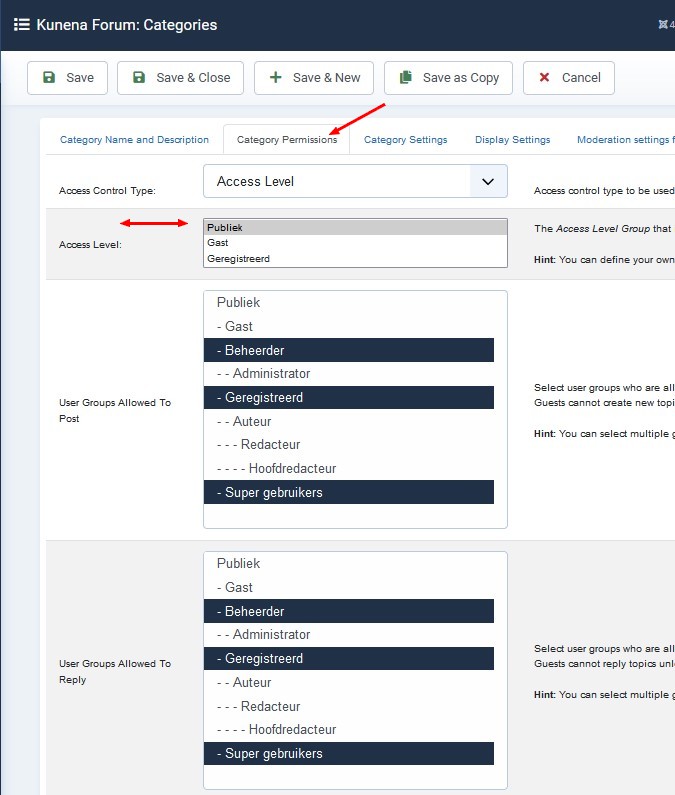
2. additionally give permission in each category (tab Category Permissions) (see picture).
.

To grant guests write access, you must:
1. Kunena Configuration -> tab Security -> Allow Guests to Post/Write = Yes
2. additionally give permission in each category (tab Category Permissions) (see picture).
.
Important! Always create a backup before you make any changes to your website!
Please Log in or Create an account to join the conversation.
3 years 5 months ago - 3 years 5 months ago #228017
by Formidog
Replied by Formidog on topic Make the forum visible for public
I am really sorry but whatever settings
that I try as a public visitor, nothing changes.
What I want is the "normal" situation
Everybody may see the forum, but only registered users may participate.
I am willing to give you admin access to the backend if you want to help me solve this.
Please contact me at
metdick at me dot com
or
info at bordspelwereld dot nl
or
whatsapp +31 6 3400 1872
Dick
that I try as a public visitor, nothing changes.
What I want is the "normal" situation
Everybody may see the forum, but only registered users may participate.
I am willing to give you admin access to the backend if you want to help me solve this.
Please contact me at
metdick at me dot com
or
info at bordspelwereld dot nl
or
whatsapp +31 6 3400 1872
Dick
Last edit: 3 years 5 months ago by Formidog.
Please Log in or Create an account to join the conversation.


3 years 5 months ago #228034
by Leen
With kind regards
Leen
Replied by Leen on topic Make the forum visible for public
Hello,
Take a look at your kunena categories if there is the access to public.
And also look at the category tab category permissions to see if everything is OK.
Take a look at your kunena categories if there is the access to public.
And also look at the category tab category permissions to see if everything is OK.
With kind regards
Leen

Please Log in or Create an account to join the conversation.
Less
More
- Posts: 12291
- Thank you received: 2538
3 years 5 months ago #228036
by rich
Important! Always create a backup before you make any changes to your website!
Replied by rich on topic Make the forum visible for public
Go to the Kunena configuration and click the Restore Default button at the top. If you have not changed anything in the category permissions, it should be sufficient to reset the Kunena configuration to the default settings.
Important! Always create a backup before you make any changes to your website!
The following user(s) said Thank You: Formidog
Please Log in or Create an account to join the conversation.
3 years 5 months ago #228040
by Formidog
Replied by Formidog on topic Make the forum visible for public
YES!
this helped!
Thanks!
this helped!
Thanks!
Please Log in or Create an account to join the conversation.
Time to create page: 0.203 seconds