


- Posts: 14
- Thank you received: 0
Kunena 7.0.9 & Kunena 6.4.14 – Security Updates Released
The Kunena team has announce the arrival of Kunena 7.0.9 [K 7.0.9] in stable which is now available for download as a native Joomla extension for J! 5.4.x/6.0.x./6.1.x. This version addresses most of the issues that were discovered in K 6.2 / K 6.3 / K 6.4 and issues discovered during the last development stages of K 7.0
Solved category icon error: blinking!
7 years 2 months ago - 7 years 2 months ago #210769
by fadege
category icon error: blinking! was created by fadege
I put my new category icon in the crypsisb3's image folder and update the crypsisb3 custom.less with:
.icon-gs {
background-image: url("assets/images/icons8-sex-spanking-60.png");
background-repeat: no-repeat;
width: 60px !important;
height: 60px !important;
}
.icon-gs.knewchar {
background-image: url("assets/images/icons8-sex-spanking-60-red.png");
background-repeat: no-repeat;
width: 60px !important;
height: 60px !important;;
}
I see my new icon but there is a blanking sign on it, with exclamation and question marks !
What's wrong??
.icon-gs {
background-image: url("assets/images/icons8-sex-spanking-60.png");
background-repeat: no-repeat;
width: 60px !important;
height: 60px !important;
}
.icon-gs.knewchar {
background-image: url("assets/images/icons8-sex-spanking-60-red.png");
background-repeat: no-repeat;
width: 60px !important;
height: 60px !important;;
}
I see my new icon but there is a blanking sign on it, with exclamation and question marks !
This message contains confidential information
What's wrong??
Last edit: 7 years 2 months ago by rich. Reason: Confidential codes added
Please Log in or Create an account to join the conversation.


Less
More
- Posts: 12291
- Thank you received: 2538
7 years 2 months ago #210772
by rich
Important! Always create a backup before you make any changes to your website!
Replied by rich on topic category icon error: blinking!
Add this to your code:
Code:
color: transparent;
Important! Always create a backup before you make any changes to your website!
Please Log in or Create an account to join the conversation.
7 years 2 months ago #210775
by fadege
Replied by fadege on topic category icon error: blinking!
Thanks.. but is fine only for the anonimous category. On the other... it still blink!

you can login with
ID: utenteTEST
PW: utenteTEST
you can login with
ID: utenteTEST
PW: utenteTEST
Please Log in or Create an account to join the conversation.
Less
More
- Posts: 12291
- Thank you received: 2538
7 years 2 months ago #210777
by rich
Important! Always create a backup before you make any changes to your website!
Replied by rich on topic category icon error: blinking!
Try this:
Code:
#kunena.layout svg.svg-inline--fa.fa-w-16.icon-gs.fa-3x.knewchar {
color: transparent !important;
}
Important! Always create a backup before you make any changes to your website!
Please Log in or Create an account to join the conversation.
7 years 2 months ago #210779
by fadege
Replied by fadege on topic category icon error: blinking!
Nothing...
Please Log in or Create an account to join the conversation.
Less
More
- Posts: 12291
- Thank you received: 2538
7 years 2 months ago - 7 years 2 months ago #210780
by rich
Important! Always create a backup before you make any changes to your website!
Replied by rich on topic category icon error: blinking!
I can't see this code in your custom.css
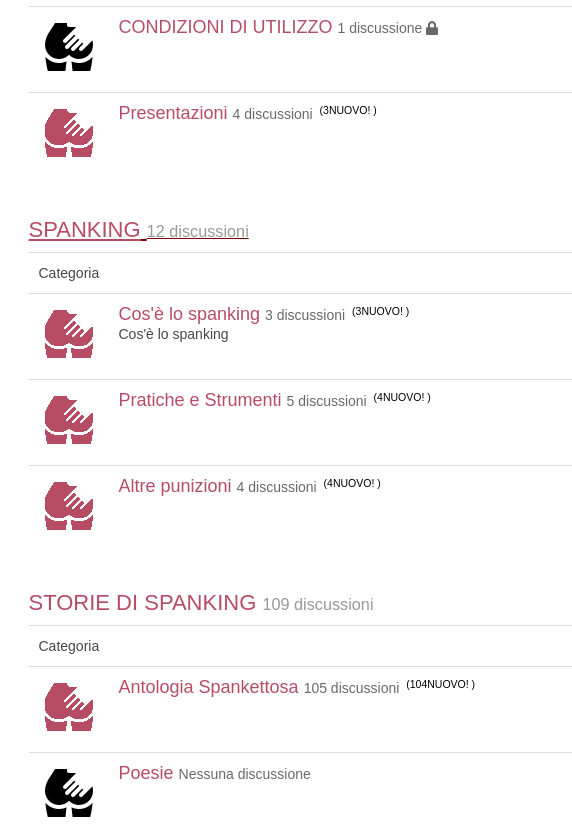
Nothing blinks when i add this code with my browser tool in the custom.css
Maybe you must empty the cache afterwards.
Red are unread and black readed categories.
Nothing blinks when i add this code with my browser tool in the custom.css
Maybe you must empty the cache afterwards.
Red are unread and black readed categories.
Important! Always create a backup before you make any changes to your website!
Last edit: 7 years 2 months ago by rich.
Please Log in or Create an account to join the conversation.
Time to create page: 0.221 seconds