
Kunena 7.1.1 & Kunena 6.4.17 – Security Updates Released
The Kunena team has announce the arrival of Kunena 7.1.1 [K 7.1.1] in stable which is now available for download as a native Joomla extension for J! 5.4.x/6.0.x./6.1.x./6.2.x This version addresses most of the issues that were discovered in K 6.2 / K 6.3 / K 6.4 / K7.0 and issues discovered during the last development stages of K 7.1
Just a reminder: K6.4.17 receives only securities fixes until end of 2026, so it's advised for users to upgrade to K7.1.
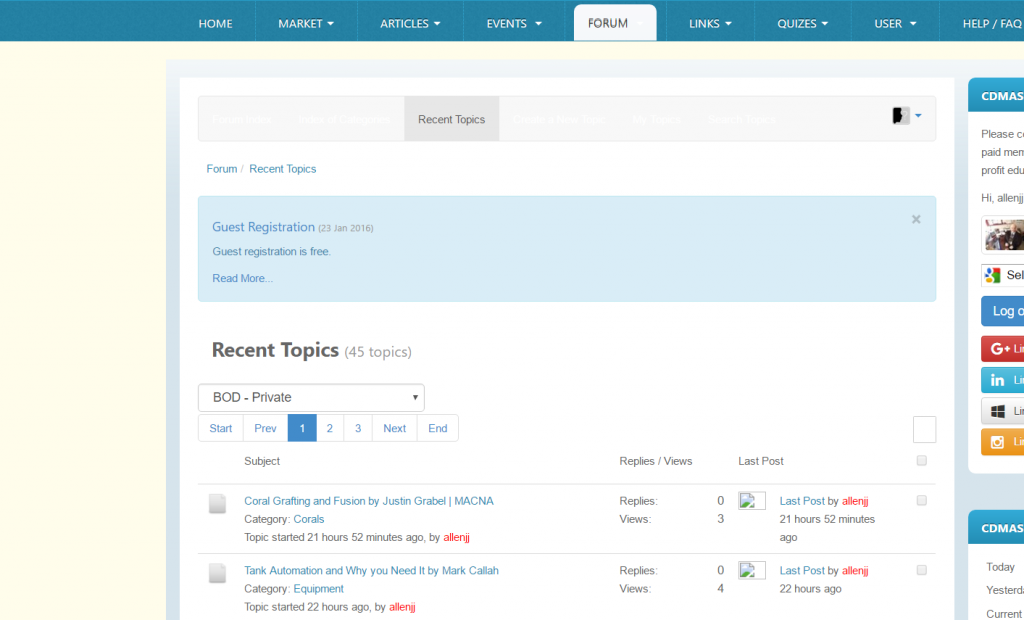
Solved Kunena 5.03 Menu Background Color


Database collation check: The collation of your table fields are correct
Joomla! SEF: Enabled | Joomla! SEF rewrite: Enabled | FTP layer: Disabled |
This message contains confidential informationhtaccess: Exists | PHP environment: Max execution time: 660 seconds | Max execution memory: 512M | Max file upload: 360M
Kunena menu details:
Warning: Spoiler!
ID Name Menutype Link Path In trash 317 Forum mainmenu view=home&defaultmenu=255 forums No 140 Forum Index mainmenu Itemid=131 forums/kunena-2014-08-14 No 313 Index of Categories mainmenu view=category&layout=list&catid=0 forums/index-of-categories No 314 Recent Topics mainmenu view=topics&mode=replies forums/recent-topics No 315 Create a New Topic mainmenu view=topic&layout=create forums/create-a-new-topic No 316 My Topics mainmenu view=topics&layout=user&mode=default forums/my-topics No 318 Search Topics mainmenu view=search forums/search-topics No 131 Forum kunenamenu view=home&defaultmenu=133 forum No 132 Index kunenamenu view=category&layout=list forum/index No 133 Recent Topics kunenamenu view=topics&mode=replies forum/recent No 134 New Topic kunenamenu view=topic&layout=create forum/newtopic No 135 No Replies kunenamenu view=topics&mode=noreplies forum/noreplies No
Joomla default template details : t3_bs3_blank | author: JoomlArt.com | version: 2.2.3 | creationdate: July 22 2016
Kunena default template details : Crypsisb3 | author: Kunena Team | version: 5.0.3 | creationdate: 2016-10-23
Kunena version detailed: Kunena 5.0.3 | 2016-10-23 [ Dibatag ]
| Kunena detailed configuration:| Kunena integration settings:Warning: Spoiler!
Kunena config settings: board_offline 0 enablerss 1 threads_per_page 15 messages_per_page 5 messages_per_page_search 10 showhistory 1 historylimit 5 shownew 1 disemoticons 0 template crypsisb3 showannouncement 1 avataroncat 1 catimagepath category_images showchildcaticon 1 rtewidth 450 rteheight 300 enableforumjump 1 reportmsg 1 username 1 askemail 0 showemail 0 showuserstats 1 showkarma 1 useredit 1 useredittime 300 useredittimegrace 600 editmarkup 1 allowsubscriptions 1 subscriptionschecked 0 allowfavorites 1 maxsubject 50 maxsig 300 regonly 0 pubwrite 0 floodprotection 0 mailmod 0 mailadmin 0 captcha 0 mailfull 0 allowavatarupload 1 allowavatargallery 1 avatarquality 75 avatarsize 2048 imageheight 480 imagewidth 640 imagesize 4096 filetypes txt,rtf,pdf filesize 4096 showranking 1 rankimages 1 userlist_rows 30 userlist_online 1 userlist_avatar 1 userlist_posts 1 userlist_karma 1 userlist_email 0 userlist_joindate 1 userlist_lastvisitdate 1 userlist_userhits 1 latestcategory 65,73,104,156,75,78,61,162,66,77,176,74,85,138,165,139,86,164,167,166,98,125,127,89,91,94,96,140,112,128,95,130,129,108,126,161,151,147,148,149,150,152,153,194,124,135,136,76,137,132,134,144,133,103,142,141,177,184,183,182,181,180,179,178,157,158,143,159,174,175 showstats 1 showwhoisonline 1 showgenstats 1 showpopuserstats 1 popusercount 8 showpopsubjectstats 1 popsubjectcount 8 showspoilertag 1 showvideotag 1 showebaytag 1 trimlongurls 1 trimlongurlsfront 40 trimlongurlsback 20 autoembedyoutube 1 autoembedebay 1 ebaylanguagecode en-us sessiontimeout 1800 highlightcode 0 rss_type topic rss_timelimit month rss_limit 100 rss_included_categories rss_excluded_categories rss_specification rss2.0 rss_allow_html 1 rss_author_format name rss_author_in_title 1 rss_word_count 0 rss_old_titles 1 rss_cache 900 defaultpage recent default_sort asc sef 1 showimgforguest 1 showfileforguest 1 pollnboptions 6 pollallowvoteone 1 pollenabled 1 poppollscount 5 showpoppollstats 1 polltimebtvotes 00:15:00 pollnbvotesbyuser 100 pollresultsuserslist 1 maxpersotext 50 ordering_system mesid post_dateformat ago post_dateformat_hover datetime hide_ip 1 imagetypes jpg,jpeg,gif,png checkmimetypes 1 imagemimetypes image/jpeg,image/jpg,image/gif,image/png imagequality 50 thumbheight 32 thumbwidth 32 hideuserprofileinfo put_empty boxghostmessage 0 userdeletetmessage 0 latestcategory_in 0 topicicons 1 debug 0 catsautosubscribed 0 showbannedreason 0 showthankyou 1 showpopthankyoustats 1 popthankscount 8 mod_see_deleted 0 bbcode_img_secure text listcat_show_moderators 1 lightbox 1 show_list_time 720 show_session_type 0 show_session_starttime 1500 userlist_allowed 0 userlist_count_users 1 enable_threaded_layouts 0 category_subscriptions post topic_subscriptions every pubprofile 1 thankyou_max 10 email_recipient_count 0 email_recipient_privacy bcc captcha_post_limit 0 image_upload registered file_upload registered topic_layout flat time_to_create_page 1 show_imgfiles_manage_profile 1 hold_newusers_posts 0 hold_guest_posts 0 attachment_limit 8 pickup_category 0 article_display intro send_emails 1 fallback_english 1 cache 1 cache_time 60 iptracking 1 rss_feedburner_url autolink 1 access_component 0 statslink_allowed 1 superadmin_userlist 0 legacy_urls 0 attachment_protection 0 categoryicons 1 avatarresizemethod 0 avatarcrop 0 user_report 1 searchtime 365 teaser 0 ebay_language 0 twitter_consumer_key twitter_consumer_secret allow_change_subject 1 max_links 8 read_only 0 ratingenabled 0 url_subject_topic 0 log_moderation 0 attach_start 0 attach_end 14 google_map_api_key attachment_utf8 1 autoembedsoundcloud 1 emailheader /media/kunena/email/hero-wide.png user_status 1 keywords 0 userkeywords 0 userlist_name 1 usernamechange 0 version_check 1 | Joomla! detailed language files installed:Warning: Spoiler!Kunena - AlphaUserPoints Disabled
Kunena - AltaUserPoints Enabled: activity=1 activity_points_limit=0
Kunena - Community Builder Enabled: access=0 login=1 activity=1 avatar=1 profile=1 private=0
Kunena - Easyblog Disabled
Kunena - Easyprofile Disabled
Kunena - Easysocial Disabled
Kunena - Gravatar Disabled
Kunena - JomSocial Disabled
Kunena - Joomla Enabled: access=1 login=0
Kunena - Kunena Enabled: avatar=0 profile=0
Kunena - UddeIM Enabled: private=1
Warning: Spoiler!
Joomla! languages installed: en-CA English (Canada) en-AU English (Australia) en-GB English (en-GB) en-US English (USA)
Third-party components: AltaUserPoints 1.1.5 | CommunityBuilder 2.0.15 | UddeIM 3.9
Third-party SEF components: None
Plugins: Search - Kunena Search 5.0.1 | Content - Kunena Discuss 5.0.1
Modules: Kunena Latest 5.0.1 | Kunena Stats 5.0.1 | Kunena Login 5.0.1 | Kunena Search 5.0.1
Please Log in or Create an account to join the conversation.


Please Log in or Create an account to join the conversation.
Please Log in or Create an account to join the conversation.
Please Log in or Create an account to join the conversation.
Please Log in or Create an account to join the conversation.
Please Log in or Create an account to join the conversation.