
Kunena 7.1.1 & Kunena 6.4.17 – Security Updates Released
The Kunena team has announce the arrival of Kunena 7.1.1 [K 7.1.1] in stable which is now available for download as a native Joomla extension for J! 5.4.x/6.0.x./6.1.x./6.2.x This version addresses most of the issues that were discovered in K 6.2 / K 6.3 / K 6.4 / K7.0 and issues discovered during the last development stages of K 7.1
Just a reminder: K6.4.17 receives only securities fixes until end of 2026, so it's advised for users to upgrade to K7.1.
Question Userlist displays for Blue Eagle and not Crypsis?


K 4.0 Blue Eagle has the feature to show the userlist. (The link is inactive if you use the setting Security » Security Settings » Allow Guests to see Userlist = No)
K 4.0 Crypsis does not appear to have this feature?
I have tested this a couple of sites. If I select the Blue Eagle template, the feature is there. If I change to the Crypsis template, I cannot find the feature. Has this feature been removed?
Blue Eagle vs. Crypsis reference guide
Read my blog and

Please Log in or Create an account to join the conversation.


So when you click on members you go to the userlist?
Please Log in or Create an account to join the conversation.
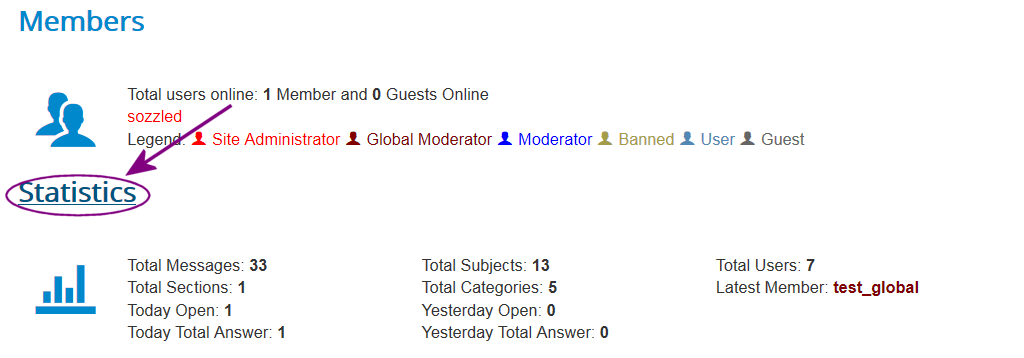
On the main Index or Recent Topics menu, go to the bottom of the page and click the Statistics link (as shown below):
On the next page, go to the bottom and find the number of users—the number is the link—as shown below:
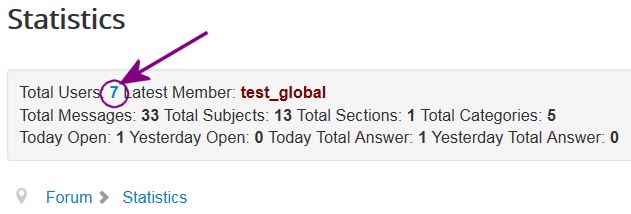
Not very intuitive, but it does work.

Blue Eagle vs. Crypsis reference guide
Read my blog and
Please Log in or Create an account to join the conversation.
Please Log in or Create an account to join the conversation.
Oops, sorry, it was as easy as that? :blush:810 wrote: So when you click on members you go to the userlist?
Might be an idea to have a tooltip that says "Display user list". Even for people like me who have good vision, extra accessibility features like this would be helpful.
I must have spent about an hour trying to find it.
Blue Eagle vs. Crypsis reference guide
Read my blog and
Please Log in or Create an account to join the conversation.
And hand icon stands for a link.
Please Log in or Create an account to join the conversation.