
- Posts: 116
- Thank you received: 2
Kunena 7.0.9 & Kunena 6.4.14 – Security Updates Released
The Kunena team has announce the arrival of Kunena 7.0.9 [K 7.0.9] in stable which is now available for download as a native Joomla extension for J! 5.4.x/6.0.x./6.1.x. This version addresses most of the issues that were discovered in K 6.2 / K 6.3 / K 6.4 and issues discovered during the last development stages of K 7.0
Solved media folder (icons) overrides
- afterburner
-
 Topic Author
- Offline
- Senior Member
-

Less
More
10 years 11 months ago #169398
by afterburner
media folder (icons) overrides was created by afterburner
hi !
it's possible to creat override folder for kunena ?
i want to replace media > kunena > icons adn add custom icons.
thx
it's possible to creat override folder for kunena ?
i want to replace media > kunena > icons adn add custom icons.
thx
Please Log in or Create an account to join the conversation.


10 years 11 months ago #169403
by 810
Replied by 810 on topic media folder (icons) overrides
Please Log in or Create an account to join the conversation.
- afterburner
-
Topic Author
- Offline
- Senior Member
-
Less
More
- Posts: 116
- Thank you received: 2
10 years 11 months ago #169404
by afterburner
Replied by afterburner on topic media folder (icons) overrides
there
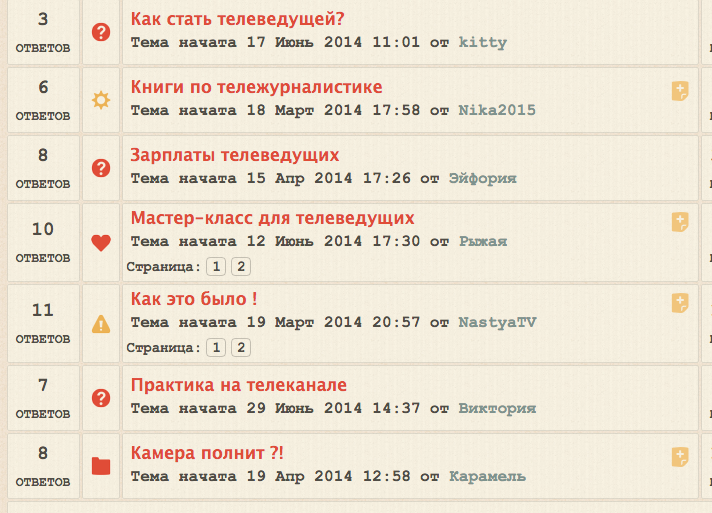
Please Log in or Create an account to join the conversation.
10 years 11 months ago - 10 years 11 months ago #169406
by 810
Replied by 810 on topic media folder (icons) overrides
In K 4.0, Blue Eagle based
• /components/com_kunena/template/your_template/images/topicicons/system
• /components/com_kunena/template/your_template/images/topicicons/user
In K 4.0,HMVC
• /media/kunena/topic_icons/your_icons/system
• /media/kunena/topic_icons/your_icons/user
• /components/com_kunena/template/your_template/images/topicicons/system
• /components/com_kunena/template/your_template/images/topicicons/user
In K 4.0,HMVC
• /media/kunena/topic_icons/your_icons/system
• /media/kunena/topic_icons/your_icons/user
Last edit: 10 years 11 months ago by 810.
Please Log in or Create an account to join the conversation.
- afterburner
-
Topic Author
- Offline
- Senior Member
-
Less
More
- Posts: 116
- Thank you received: 2
10 years 11 months ago #169408
by afterburner
Replied by afterburner on topic media folder (icons) overrides
i know - but after updating the Kunena I have to do it again
Please Log in or Create an account to join the conversation.
10 years 11 months ago - 10 years 11 months ago #169409
by 810
Replied by 810 on topic media folder (icons) overrides
That's why we changed it in K4.0
create a custom dir like:
/media/kunena/topic_icons/your_icons/
You can put the system icons there, and the user icons.
Then put the xml there, to load the correct icons
system = "No selectable topic icons"
user = "Topic icons"
See:
www.kunena.org/forum/kunena-4-0-support-...n-k-4-0?limitstart=0
we are working on new docs, to get it more simple todo.
create a custom dir like:
/media/kunena/topic_icons/your_icons/
You can put the system icons there, and the user icons.
Then put the xml there, to load the correct icons
system = "No selectable topic icons"
user = "Topic icons"
See:
www.kunena.org/forum/kunena-4-0-support-...n-k-4-0?limitstart=0
we are working on new docs, to get it more simple todo.
Last edit: 10 years 11 months ago by 810.
Please Log in or Create an account to join the conversation.
Time to create page: 0.214 seconds