


- Posts: 1014
- Thank you received: 162
Kunena 7.0.9 & Kunena 6.4.14 – Security Updates Released
The Kunena team has announce the arrival of Kunena 7.0.9 [K 7.0.9] in stable which is now available for download as a native Joomla extension for J! 5.4.x/6.0.x./6.1.x. This version addresses most of the issues that were discovered in K 6.2 / K 6.3 / K 6.4 and issues discovered during the last development stages of K 7.0
Topics must relate to a currently supported version of Kunena. If you are unsure what is the current supported version of Kunena, please go to the
download
page.
If you are having problems then, for your own benefit, it would save us all a lot of time if you would kindly post your configuration report when you ask for help from this forum. If you do not post your configuration report we will not ask you for it but you will probably not get your problem solved, either.
If you are having problems then, for your own benefit, it would save us all a lot of time if you would kindly post your configuration report when you ask for help from this forum. If you do not post your configuration report we will not ask you for it but you will probably not get your problem solved, either.
Question Cannot leave comments.
Less
More
1 year 8 months ago - 1 year 8 months ago #232640
by Pinkeltje
Replied by Pinkeltje on topic How do I invoke the Kunena Discuss Plugin show it will show up in an article?
Redirect to your homepage or to either one of those menu-items

And you should hide your menu-item on the tab Link type

And remove Redirection Login Module
And you should hide your menu-item on the tab Link type
And remove Redirection Login Module
Last edit: 1 year 8 months ago by Pinkeltje.
Please Log in or Create an account to join the conversation.

Less
More
- Posts: 12291
- Thank you received: 2538
1 year 8 months ago - 1 year 8 months ago #232641
by rich
Important! Always create a backup before you make any changes to your website!
Replied by rich on topic How do I invoke the Kunena Discuss Plugin show it will show up in an article?
== Posts moved to the current topic ==
The easiest way, as @Pinkeltje has already suggested, is to disable the Discuss login.
Use these Discuss settings:
1. Create Topic on first visit
2. Show login button for public users = No
If you now go to this article as a guest, the discussion will be created automatically (if it has not already been created).
Now you have 2 buttons bellow to the article (see picture 1). If you click on one of them, you will be directed to this discussion in the forum.
Log in via the Kunena login (image 2) and you can reply directly.
.

.

.
The easiest way, as @Pinkeltje has already suggested, is to disable the Discuss login.
Use these Discuss settings:
1. Create Topic on first visit
2. Show login button for public users = No
If you now go to this article as a guest, the discussion will be created automatically (if it has not already been created).
Now you have 2 buttons bellow to the article (see picture 1). If you click on one of them, you will be directed to this discussion in the forum.
Log in via the Kunena login (image 2) and you can reply directly.
.
.
.
Important! Always create a backup before you make any changes to your website!
Last edit: 1 year 8 months ago by rich.
Please Log in or Create an account to join the conversation.
- OldCharlie
-
 Topic Author
- Offline
- Senior Member
-

Less
More
- Posts: 127
- Thank you received: 0
1 year 8 months ago #232643
by OldCharlie
Replied by OldCharlie on topic How do I invoke the Kunena Discuss Plugin show it will show up in an article?
Please see this video. I'm not sure how to do a redirect so that when someone wants to make a comment, they get a space to type their comment. Is there a instruction manual on how to do this? See video below:
billcory-pictures.s3.us-west-2.amazonaws...rect-loginmodule.mp4
billcory-pictures.s3.us-west-2.amazonaws...rect-loginmodule.mp4
Please Log in or Create an account to join the conversation.
- OldCharlie
-
Topic Author
- Offline
- Senior Member
-
Less
More
- Posts: 127
- Thank you received: 0
1 year 8 months ago #232644
by OldCharlie
Please Log in or Create an account to join the conversation.
Less
More
- Posts: 12291
- Thank you received: 2538
1 year 8 months ago - 1 year 8 months ago #232645
by rich
Important! Always create a backup before you make any changes to your website!
Replied by rich on topic How do I invoke the Kunena Discuss Plugin show it will show up in an article?
I don't know why you are not being redirected to the forum when you disable the Discuss login and click the button 'Posts in discussion'.
.
It won't work the way you want it to, unless your Joomla articles are all in the same category.
You can only create a single redirection with the user login. This means that if you create a redirect to a category in which the article is located, you would have the comment field.
But the redirection will always go to this one category.
Example:
If you create a redirect to Joomla category 1, you will always be redirected to category 1, even if you click the login button for an article in category 2. So you have to go back to category 2 manually if you want to comment an article in category 2.
Possibilities to create a redirection:
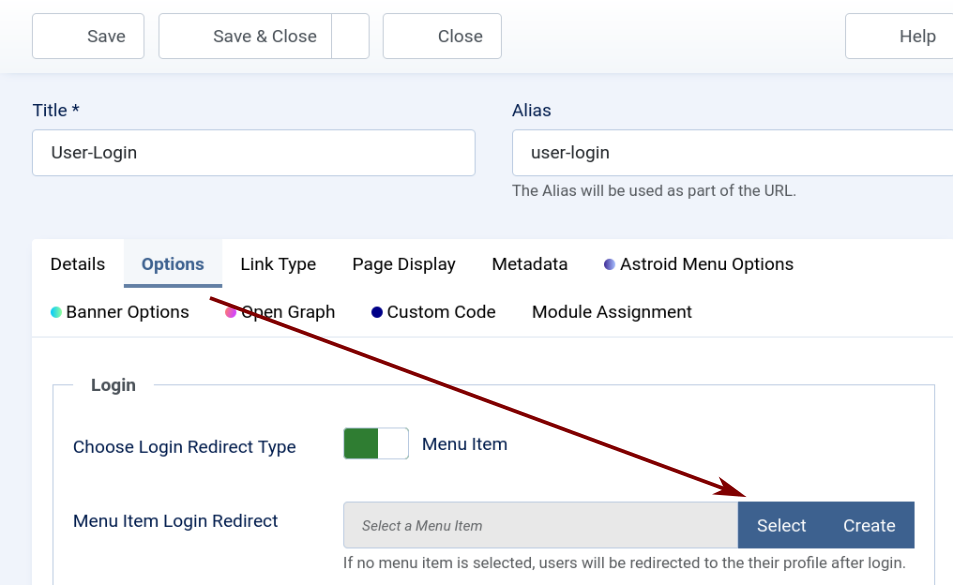
Redirect to a menu item.
Click on ‘Select’, a window opens and select a menu item e.g. Home
Then you will always land on Home when you log in via Discuss (image 1) Or you create a Category list menu item and redirect the login via discuss to this menu item. But then you still have to navigate to the correct category first.
.
.
.
.
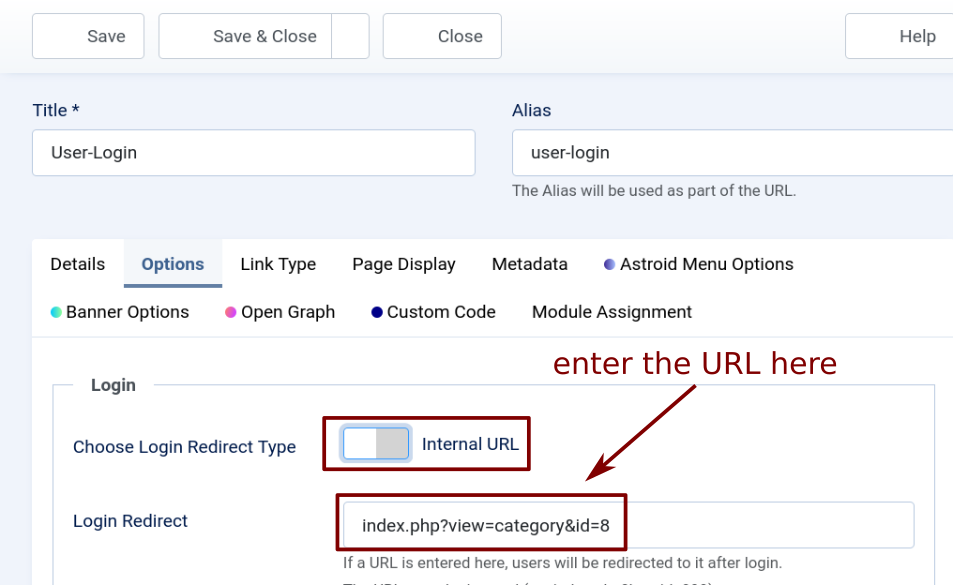
Redirect to a category.
Enter the URL to the category which contain the articles (instead 8 your category ID). Then you will always end up in this one category (image 2).
.
.
You can disable the redirect plugin again, you don't need it for this redirect.I'm not sure how to do a redirect so that when someone wants to make a comment, they get a space to type their comment.
It won't work the way you want it to, unless your Joomla articles are all in the same category.
You can only create a single redirection with the user login. This means that if you create a redirect to a category in which the article is located, you would have the comment field.
But the redirection will always go to this one category.
Example:
If you create a redirect to Joomla category 1, you will always be redirected to category 1, even if you click the login button for an article in category 2. So you have to go back to category 2 manually if you want to comment an article in category 2.
Possibilities to create a redirection:
Redirect to a menu item.
Click on ‘Select’, a window opens and select a menu item e.g. Home
Then you will always land on Home when you log in via Discuss (image 1) Or you create a Category list menu item and redirect the login via discuss to this menu item. But then you still have to navigate to the correct category first.
.
.
.
.
Redirect to a category.
Enter the URL to the category which contain the articles (instead 8 your category ID). Then you will always end up in this one category (image 2).
.
Important! Always create a backup before you make any changes to your website!
Last edit: 1 year 8 months ago by rich.
Please Log in or Create an account to join the conversation.
Less
More
- Posts: 1014
- Thank you received: 162
1 year 8 months ago - 1 year 8 months ago #232650
by Pinkeltje
Replied by Pinkeltje on topic Cannot leave comments.
First make sure your Kunena menu works and delete those menu-items from your main menu

www.kunena.org/docs/en/troubleshooting/menu-issues
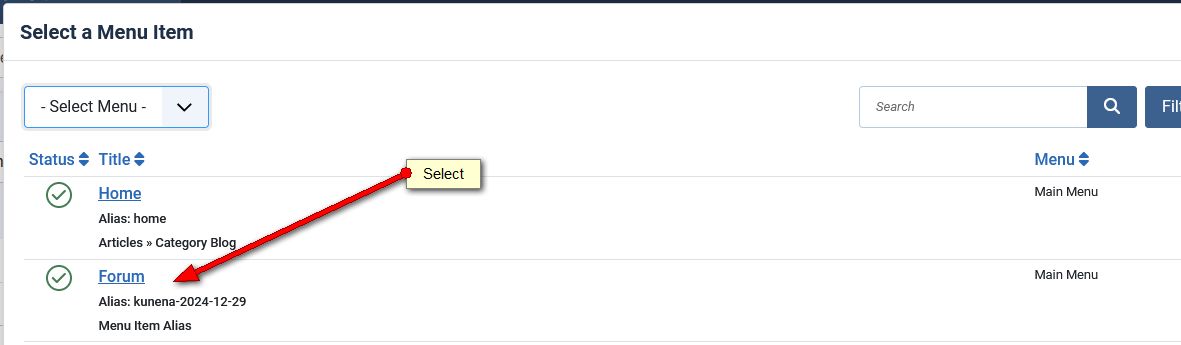
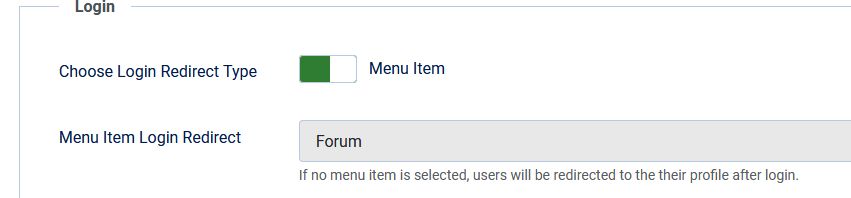
Then make a redirect to your forum by chosing your Kunena menu-item in the field Menu Item Login Redirect (your alias will be different from my screenshot)
www.kunena.org/docs/en/troubleshooting/menu-issues
Then make a redirect to your forum by chosing your Kunena menu-item in the field Menu Item Login Redirect (your alias will be different from my screenshot)
Last edit: 1 year 8 months ago by Pinkeltje.
Please Log in or Create an account to join the conversation.
Time to create page: 0.241 seconds