


- Posts: 9
- Thank you received: 0
Kunena 7.0.9 & Kunena 6.4.14 – Security Updates Released
The Kunena team has announce the arrival of Kunena 7.0.9 [K 7.0.9] in stable which is now available for download as a native Joomla extension for J! 5.4.x/6.0.x./6.1.x. This version addresses most of the issues that were discovered in K 6.2 / K 6.3 / K 6.4 and issues discovered during the last development stages of K 7.0
Topics must relate to a currently supported version of Kunena. If you are unsure what is the current supported version of Kunena, please go to the
download
page.
If you are having problems then, for your own benefit, it would save us all a lot of time if you would kindly post your configuration report when you ask for help from this forum. If you do not post your configuration report we will not ask you for it but you will probably not get your problem solved, either.
If you are having problems then, for your own benefit, it would save us all a lot of time if you would kindly post your configuration report when you ask for help from this forum. If you do not post your configuration report we will not ask you for it but you will probably not get your problem solved, either.
Question Integrating Shape5 Forte to work with Kunena
2 years 11 months ago #229716
by Josh65
Integrating Shape5 Forte to work with Kunena was created by Josh65
Hi
UserLeen has helped in customizing css so as to get Kunena 6 to operatewith Kunena.
So far have been extremely valuable.
Issue I haveat the moment, is that the post topic is not showing its text area.
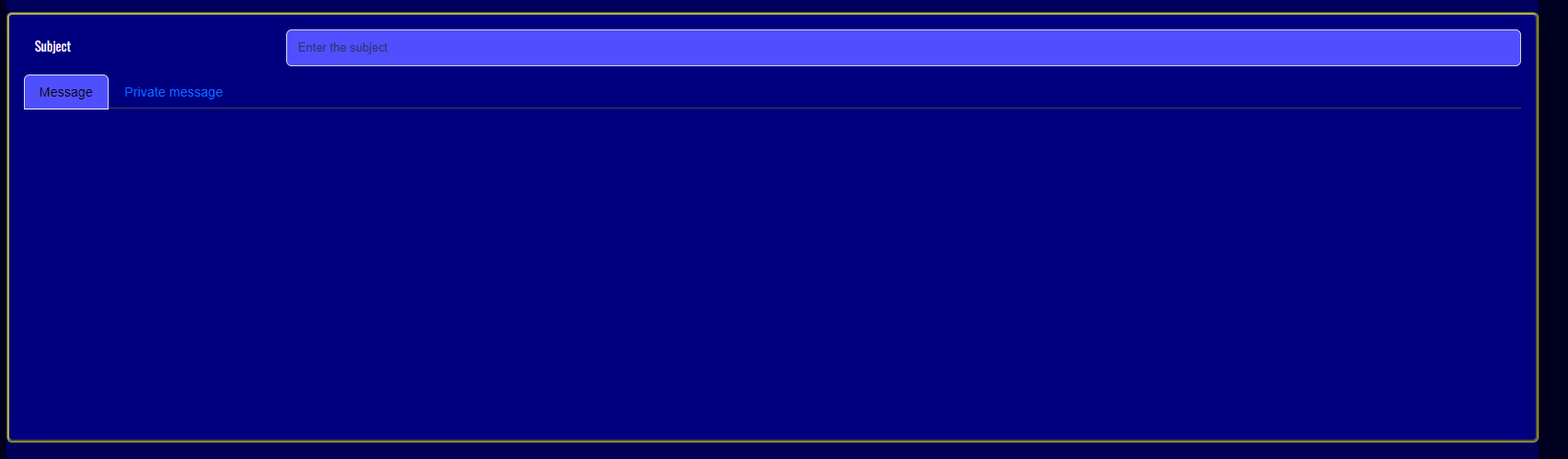
I have similar issueswhen trying to update/edit profile
Any ideas how to correct.
UserLeen has helped in customizing css so as to get Kunena 6 to operatewith Kunena.
So far have been extremely valuable.
Issue I haveat the moment, is that the post topic is not showing its text area.
I have similar issueswhen trying to update/edit profile
Any ideas how to correct.
Please Log in or Create an account to join the conversation.


2 years 11 months ago #229720
by Leen
With kind regards
Leen
Replied by Leen on topic Integrating Shape5 Forte to work with Kunena
Hi,
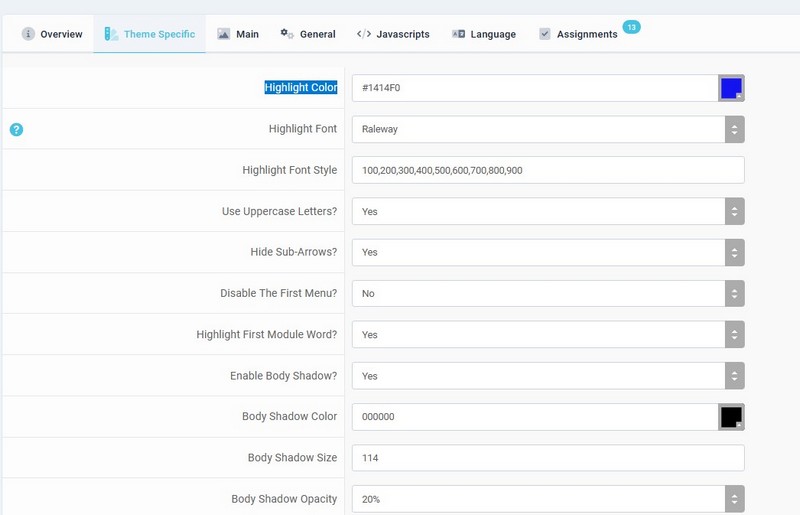
This is really difficult, can you also tell us which colors you have set?
in your Forte template or screenshot like mine
And also if you have created something in custom.css from template and/or kunena Aurelia template
I can then test something
I have this template for the test >> forte Site Template 1.0.7
This is really difficult, can you also tell us which colors you have set?
in your Forte template or screenshot like mine
And also if you have created something in custom.css from template and/or kunena Aurelia template
I can then test something
I have this template for the test >> forte Site Template 1.0.7
With kind regards
Leen
Please Log in or Create an account to join the conversation.


2 years 11 months ago #229722
by ruud
sharing = caring
Replied by ruud on topic Integrating Shape5 Forte to work with Kunena
Hi, just on a side note: Shape5 is discontinued for Joomla5 so if you are having plans to upgrade to J5 (who doesn't / hasn't already) then you are going to have an issue:
www.joomlart.com/blog/news-updates/annou...updates-for-joomla-5
sharing = caring
The following user(s) said Thank You: Leen
Please Log in or Create an account to join the conversation.
2 years 11 months ago #229723
by Josh65
Replied by Josh65 on topic Integrating Shape5 Forte to work with Kunena
Hi Leen,
kunena, custom.css
I get the same ifi use the default forte style, aswell as my custom one.
custom.css for forte
kunena, custom.css
Code:
.list-unstyled {
color: white;
}
#kunena.layout {
background-color: #00005f !important;
}
.navbar {
overflow: visible;
margin-bottom: 20px;
background-color: #00007f !important;
}
.shadow-lg {
box-shadow: var(--bs-box-shadow-lg)!important;
background-color: #0000a0 !important;
}
.rounded {
border-radius: var(--bs-border-radius)!important;
background-color: #00007f !important;
}
.dropdown-menu {
border-style: groove !important;
border-color: #7f7f2f;
border-width: medium !important;
}
#kunena.layout .tab-content {
display: flex;
border-style: groove;
border-color: #afaf4f;
border-width: medium;
}
.form-select {
--bs-form-select-bg-img: url("data:image/svg+xml,%3csvg xmlns='http://www.w3.org/2000/svg' viewBox='0 0 16 16'%3e%3cpath fill='none' stroke='%23343a40' stroke-linecap='round' stroke-linejoin='round' stroke-width='2' d='m2 5 6 6 6-6'/%3e%3c/svg%3e");
display: block;
width: 100%;
padding: .375rem 2.25rem .375rem .75rem;
font-size: 1rem;
font-weight: 400;
line-height: 1.5;
color: #ffffff;
-webkit-appearance: none;
-moz-appearance: none;
appearance: none;
background-color: var(--bs-body-bg);
background-image: var(--bs-form-select-bg-img),var(--bs-form-select-bg-icon,none);
background-repeat: no-repeat;
background-position: right .75rem center;
background-size: 16px 12px;
border: var(--bs-border-width) solid var(--bs-border-color);
border-radius: var(--bs-border-radius);
transition: border-color .15s ease-in-out,box-shadow .15s ease-in-out;
}
.input-group:not(.has-validation)>.dropdown-toggle:nth-last-child(n+3), .input-group:not(.has-validation)>.form-floating:not(:last-child)>.form-control, .input-group:not(.has-validation)>.form-floating:not(:last-child)>.form-select, .input-group:not(.has-validation)>:not(:last-child):not(.dropdown-toggle):not(.dropdown-menu):not(.form-floating) {
border-top-right-radius: 0;
border-bottom-right-radius: 0;
background-color: #0b24d3;
color: #ffffff !important;
}
.text-muted {
--bs-text-opacity: 1;
color: #FFEB3B!important;
}
#kunena.layout .kmsg {
margin: 20px 0;
font-family: "Segoe UI", "Segoe UI Emoji", "Segoe UI Symbol", Helvetica, Arial, sans-serif;
word-wrap: break-word;
background-color: #00119f !important;
}
.table, .thumbnail {
background: #3c3aa9 !important;
color: #FFFFFF !important;
}
.table.table th {
background: none repeat scroll 0 0 #3643a3 !important;
color: #FFFFFF !important;
}
.table>:not(caption)>*>* {
padding: .5rem .5rem;
color: var(--bs-table-color-state,var(--bs-table-color-type,var(--bs-table-color)));
background-color: #225bc3;
border-bottom-width: var(--bs-border-width);
box-shadow: inset 0 0 0 9999px var(--bs-table-bg-state,var(--bs-table-bg-type,var(--bs-table-accent-bg)));
}
.pagination {
--bs-pagination-padding-x: 0.75rem;
--bs-pagination-padding-y: 0.375rem;
--bs-pagination-font-size: 1rem;
--bs-pagination-color: var(--bs-link-color);
--bs-pagination-bg: var(--bs-body-bg);
--bs-pagination-border-width: var(--bs-border-width);
--bs-pagination-border-color: var(--bs-border-color);
--bs-pagination-border-radius: var(--bs-border-radius);
--bs-pagination-hover-color: var(--bs-link-hover-color);
--bs-pagination-hover-bg: var(--bs-tertiary-bg);
--bs-pagination-hover-border-color: var(--bs-border-color);
--bs-pagination-focus-color: var(--bs-link-hover-color);
--bs-pagination-focus-bg: var(--bs-secondary-bg);
--bs-pagination-focus-box-shadow: 0 0 0 0.25rem rgba(13, 110, 253, 0.25);
--bs-pagination-active-color: #fff;
--bs-pagination-active-bg: #0d6efd;
--bs-pagination-active-border-color: #0d6efd;
--bs-pagination-disabled-color: var(--bs-secondary-color);
--bs-pagination-disabled-bg: #7a838d !important;
--bs-pagination-disabled-border-color: var(--bs-border-color);
display: flex;
padding-left: 0;
list-style: none;
}
.dropdown-menu.show {
display: block;
background-color: #007f8f !important;
color: #ffffff!important;
}
#kunena.layout h3 {
font-size: 18px;
color: #ffffff !important;
}
#kunena.layout #editUser .form-control, #kunena.layout #editUser .custom-select, #kunena.layout #editprofile .form-control, #kunena.layout #editprofile .custom-select, #kunena.layout #editavatar .form-control, #kunena.layout #editavatar .custom-select, #kunena.layout #editsettings .form-control, #kunena.layout #editsettings .custom-select {
width: auto;
background-color: #7f7fff !important;
color: #ffffff!important;
}
.nav-tabs .nav-link.active, .nav-tabs .nav-item.show .nav-link {
color: var(--bs-nav-tabs-link-active-color);
background-color: #4f4fff !important;
border-color: var(--bs-nav-tabs-link-active-border-color);
}
.list-group-flush > .list-group-item {
border-width: 0 0 var(--bs-list-group-border-width);
background-color: #4f4fff !important;
color: #cfcfcf !important;
}
.inputbox, .registration input, .login input, .contact-form input, #jform_contact_message, input, textarea, .validate, select, textarea, input[type="text"], input[type="password"], input[type="datetime"], input[type="datetime-local"], input[type="date"], input[type="month"], input[type="time"], input[type="week"], input[type="number"], input[type="email"], input[type="url"], input[type="search"], input[type="tel"], input[type="color"], .uneditable-input {
border: none;
font-size: 0.9em;
padding: 12px;
background: #4f4fff !important;
color: #ffffff !important;
font-weight: 400;
-moz-box-sizing: border-box;
-webkit-box-sizing: border-box;
box-sizing: border-box;
min-height: 40px;
}
I get the same ifi use the default forte style, aswell as my custom one.
custom.css for forte
Code:
/* Add your own custom css to this file. You may wish to use css !important calls to override css from the template css files.
----------------------------------------------------------- */
.s5_top_row1_area1 {
background: #00002a !important;
}
.result__item>* {
margin-bottom: 0;
color: #cfcfcf !important;
}.form-horizontal .help-inline, .form-horizontal .input-append, .form-horizontal .input-prepend, .form-horizontal .uneditable-input, .form-horizontal input, .form-horizontal select, .form-horizontal textarea, .form-inline .help-inline, .form-inline .input-append, .form-inline .input-prepend, .form-inline .uneditable-input, .form-inline input, .form-inline select, .form-inline textarea, .form-search .help-inline, .form-search .input-append, .form-search .input-prepend, .form-search .uneditable-input, .form-search input, .form-search select, .form-search textarea {
display: inline-block;
margin-bottom: 0;
vertical-align: middle;
background-color: #34347f !important;
color:#efefef !important
}
.finder {
max-width: 100%;
}
.inputbox {
font-family: 'Roboto',Helvetica,Arial,Sans-Serif;
color: #ffffff !important;
background-color: #2c2c7f !important;
}
.well {
background: #4e5eb1;
-webkit-box-shadow: none;
-moz-box-shadow: none;
box-shadow: none;
}
body {
color: #fffdfd;
background: #ffffff;
font-weight: 400;
font-size: 1em;
overflow-x: hidden;
line-height: 170%;
}
h2 {
font-size: 2.1em;
line-height: 130%;
margin-bottom: 20px;
font-weight: normal;
color: #f3ebeb;
}
h5 {
font-size: 1.1em;
line-height: 130%;
font-weight: normal;
color: #ffffff;
}
#s5_component_wrap_inner h2 a, #s5_component_wrap_inner h1 a {
text-decoration: none;
color: #18ef8e!important;
}
h1 small, h2 small, h3 small, h4 small, h5 small, h6 small {
font-weight: 400;
line-height: 1;
color: #FFEB3B!important;
}
#s5_footer_area1 {
background: #000000;
color: #FFFFFF;
font-size: 0.9em;
padding: 40px;
padding-top: 28px;
padding-bottom: 28px;
}
#s5_nav li.active, .button, .readmore a, .readon, .s5_ls_readmore, .dropdown-menu li > a:hover, .dropdown-menu li > a:focus, .dropdown-submenu:hover > a, .dropdown-menu .active > a, .dropdown-menu .active > a:hover, .nav-list > .active > a, .nav-list > .active > a:hover, .nav-pills > .active > a, .nav-pills > .active > a:hover, .btn-group.open .btn-primary.dropdown-toggle, .btn-primary, .item-page .dropdown-menu li > a:hover, .blog .dropdown-menu li > a:hover, .item .dropdown-menu li > a:hover, .btn, .pagenav a, .jdGallery .carousel .carouselInner .active, #s5_pos_custom_2, .module_round_box-highlight, .recommended .s5_title, .ac-container label:hover, .ac-container2 label:hover {
background: #b22222 !important;
}
.readon.readon_grey {
color: #ffffff !important;
background: #9195a7 !important;
}
#kunena .dropdown-toggle::after {
display: none;
}
#kunena.layout .collapse {
display: contents !important;
}
tbody, td, tfoot, th, thead, tr {
border-color: inherit;
border-style: solid;
border-width: 0;
color: #ffffff !important;
}
h4 {
font-size: 1.5em;
line-height: 130%;
font-weight: normal;
color: #ffffff !important;
}
.table>:not(caption)>*>* {
padding: .5rem .5rem;
color: var(--bs-table-color-state,var(--bs-table-color-type,var(--bs-table-color)));
background-color: #22304a;
border-bottom-width: var(--bs-border-width);
box-shadow: inset 0 0 0 9999px var(--bs-table-bg-state,var(--bs-table-bg-type,var(--bs-table-accent-bg)));
}
.p-2 {
padding: .5rem!important;
font-size: large;
color: #7fff7f;
}
#s5_component_wrap_inner h2, #s5_component_wrap_inner h1 {
display: none !important;
}
Please Log in or Create an account to join the conversation.
2 years 11 months ago - 2 years 11 months ago #229724
by Leen
With kind regards
Leen
Replied by Leen on topic Integrating Shape5 Forte to work with Kunena
Hello, I don't really understand where you get all those codes in
/kunena/core/css/custom.css
Normally there isn't much in there and it seems to me that a lot of it has nothing to do with Kunena the template.
but I can't see your website structure so I assume it's there for a reason.
but if I put these codes in /kunena/core/css/custom.css
Trying this here as a test seems to show me something more
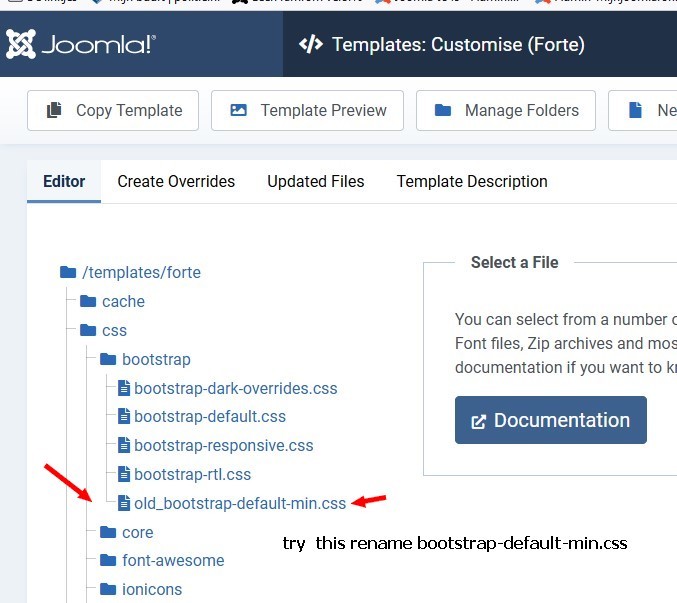
And try the bootstrap-default-min.css
to be restored to old_bootstrap-default-min.css" in template "forte".
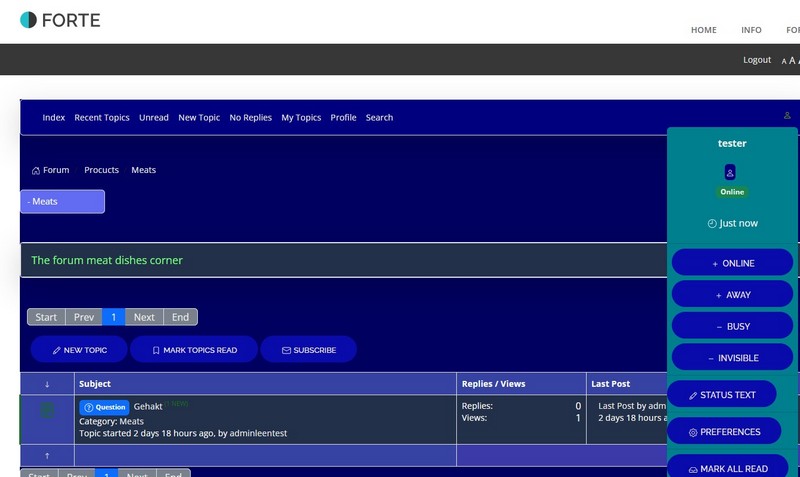
I notice here that it worked against me a lot
and also add .css to the kunena template at .rounded
/kunena/core/css/custom.css
Normally there isn't much in there and it seems to me that a lot of it has nothing to do with Kunena the template.
but I can't see your website structure so I assume it's there for a reason.
but if I put these codes in /kunena/core/css/custom.css
Trying this here as a test seems to show me something more
Code:
/* leen extra */
.s5_h3_first, .btn-link, a, #s5_search_wrap:hover, .s5_icon_search_close:hover, .readon.readon_grey, #subMenusContainer .moduletable a {
color: #EEEEEB !important;
}
#kunena.layout .form-select, #kunena.layout .custom-select {
display: inherit !important;
background: #626cf2 !important;
}
a.btn, table.table th {
color: #f4efef !important;
}
And try the bootstrap-default-min.css
to be restored to old_bootstrap-default-min.css" in template "forte".
I notice here that it worked against me a lot
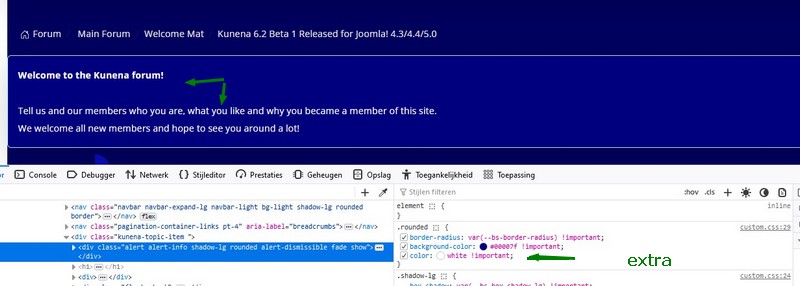
and also add .css to the kunena template at .rounded
Code:
color: white !important;
With kind regards
Leen
Last edit: 2 years 11 months ago by Leen.
Please Log in or Create an account to join the conversation.
Time to create page: 0.246 seconds