
- Posts: 97
- Thank you received: 0
Kunena 7.0.4 Released
The Kunena team has announce the arrival of Kunena 7.0.4 [K 7.0.4] in stable which is now available for download as a native Joomla extension for J! 5.4.x/6.0.x. This version addresses most of the issues that were discovered in K 6.2 / K 6.3 / K 6.4 and issues discovered during the last development stages of K 7.0
Topics must relate to a currently supported version of Kunena. If you are unsure what is the current supported version of Kunena, please go to the
download
page.
If you are having problems then, for your own benefit, it would save us all a lot of time if you would kindly post your configuration report when you ask for help from this forum. If you do not post your configuration report we will not ask you for it but you will probably not get your problem solved, either.
If you are having problems then, for your own benefit, it would save us all a lot of time if you would kindly post your configuration report when you ask for help from this forum. If you do not post your configuration report we will not ask you for it but you will probably not get your problem solved, either.
Question Post to moderate email has wrong url links
- dianaNashif
-
 Topic Author
- Offline
- Senior Member
-

Less
More
8 years 8 months ago #195274
by dianaNashif
Post to moderate email has wrong url links was created by dianaNashif
Hi Techs,
Today I recieved an email about a forum post to moderate but it has the wrong url. Says standupgirl.org instead of standupgirl.com. So if you click the link to moderate the post I get the 401 unauthorized error page.
Any ideas on how to fix it?
standupgirl.com
Thank you,
Diana
Today I recieved an email about a forum post to moderate but it has the wrong url. Says standupgirl.org instead of standupgirl.com. So if you click the link to moderate the post I get the 401 unauthorized error page.
Any ideas on how to fix it?
standupgirl.com
Thank you,
Diana
This message contains confidential information
Please Log in or Create an account to join the conversation.


8 years 8 months ago #195281
by 810
Replied by 810 on topic Post to moderate email has wrong url links
check the kunena configuration option:: Forum E-mail Address
Please Log in or Create an account to join the conversation.
- dianaNashif
-
Topic Author
- Offline
- Senior Member
-
Less
More
- Posts: 97
- Thank you received: 0
8 years 8 months ago #195293
by dianaNashif
Replied by dianaNashif on topic Post to moderate email has wrong url links
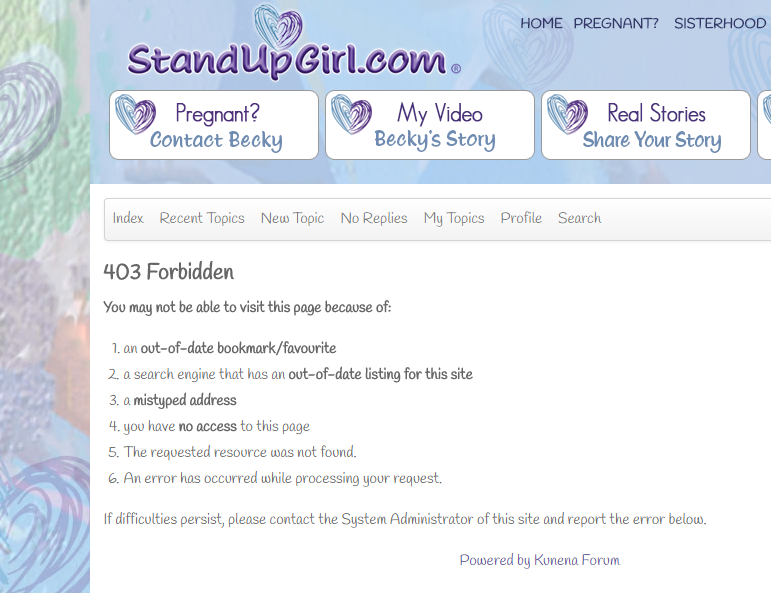
I added a new email address of [email protected]. Email is correct but I am still getting the error page from the link.
Any other fixes for me? This happened after the last Kunena update that I did last week.
Here is the email:
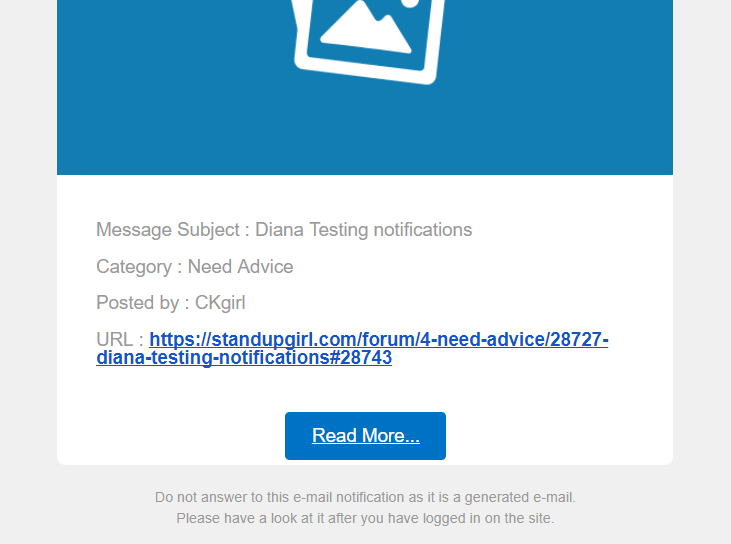
Here is the error:
Any other fixes for me? This happened after the last Kunena update that I did last week.
Here is the email:
Here is the error:
Please Log in or Create an account to join the conversation.
8 years 8 months ago #195294
by 810
Replied by 810 on topic Post to moderate email has wrong url links
what is the correct link.
and what is the link from the email.
and what is the link from the email.
Please Log in or Create an account to join the conversation.
- dianaNashif
-
Topic Author
- Offline
- Senior Member
-
Less
More
- Posts: 97
- Thank you received: 0
8 years 8 months ago - 8 years 8 months ago #195295
by dianaNashif
Replied by dianaNashif on topic Post to moderate email has wrong url links
Here is the link in the email:
standupgirl.com/forum/6-a-guy-says/28731...tify-again-444#28747
It is the same to the message on the frontend to moderate
It is the same to the message on the frontend to moderate
Last edit: 8 years 8 months ago by dianaNashif. Reason: wrong url
Please Log in or Create an account to join the conversation.


8 years 7 months ago #195689
by rich
Important! Always create a backup before you make any changes to your website!
Replied by rich on topic Post to moderate email has wrong url links
Are you logged in as Global Moderator or Admin in the forum when you click on the e-mail link? When the same link in the forum works, it can only be a access problem.It is the same to the message on the frontend to moderate
Important! Always create a backup before you make any changes to your website!
Please Log in or Create an account to join the conversation.
Time to create page: 0.288 seconds