


- Posts: 117
- Thank you received: 2
Kunena 7.0.8 Released
The Kunena team has announce the arrival of Kunena 7.0.8 [K 7.0.8] in stable which is now available for download as a native Joomla extension for J! 5.4.x/6.0.x./6.1.x. This version addresses most of the issues that were discovered in K 6.2 / K 6.3 / K 6.4 and issues discovered during the last development stages of K 7.0
Topics that are moved into this category are generally considered to be closed. Users may want to add additional information but these topics should not be resurrected in order to discuss new problems or unrelated matters.
Solved Changing mouse hover colours in K 2.0 Blue Eagle template
13 years 6 months ago #139933
by applehc
Changing mouse hover colours in K 2.0 Blue Eagle template was created by applehc
Hello,
I'm editing the template but can not find to change:
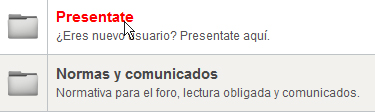
The color of the category name to click
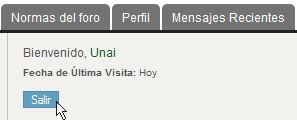
The background color by clicking above.
I need help finding the code to change it.
Thanks
I'm editing the template but can not find to change:
The color of the category name to click
The background color by clicking above.
I need help finding the code to change it.
Thanks
Please Log in or Create an account to join the conversation.
- 9themestore
-

- Offline
- Premium Member
-

13 years 6 months ago #139935
by 9themestore
- Please provide your site url if it has been lived.
- Please share tip if it worked fine with you.
- Don't be shy about using the "Thanks" button below if you found my comment helpful
Replied by 9themestore on topic Changing mouse hover colours in K 2.0 Blue Eagle template
Hi applehc,
You can use the Firebug addon to preview the HTML code. After that you add the css style for it to the css file of the joomla template.
Regards.
You can use the Firebug addon to preview the HTML code. After that you add the css style for it to the css file of the joomla template.
Regards.
- Please provide your site url if it has been lived.
- Please share tip if it worked fine with you.
- Don't be shy about using the "Thanks" button below if you found my comment helpful
Please Log in or Create an account to join the conversation.
13 years 6 months ago #139950
by applehc
Replied by applehc on topic Changing mouse hover colours in K 2.0 Blue Eagle template
Yes, I am using firebug.
Only find the button code inactive. When I point it out, and open the firebug is like not having it pointed out and can not find it.
Only find the button code inactive. When I point it out, and open the firebug is like not having it pointed out and can not find it.
Please Log in or Create an account to join the conversation.
- 9themestore
-
- Offline
- Premium Member
-
13 years 6 months ago - 13 years 6 months ago #139958
by 9themestore
- Please provide your site url if it has been lived.
- Please share tip if it worked fine with you.
- Don't be shy about using the "Thanks" button below if you found my comment helpful
Replied by 9themestore on topic Changing mouse hover colours in K 2.0 Blue Eagle template
Hi,
Add four css code section to the template.css of the joomla template.
1. CSS for button.
2. CSS code for category name:
After that save and back-to front-end refresh your site.
Regards
Add four css code section to the template.css of the joomla template.
1. CSS for button.
Code:
#Kunena td.kprofileboxcnt ul.kprofilebox-welcome li input.kbutton {
background-color: #??????; /* Fill your color code */
color: #??????; /* Your color code */
}
#Kunena td.kprofileboxcnt ul.kprofilebox-welcome li input.kbutton:hover {
background-color: #??????; /* Fill your color code */
color: #??????; /* Your color code */
cursor: pointer;
}
2. CSS code for category name:
Code:
#Kunena table.kblocktable a.ktopic-title {
color: #??????;
}
#Kunena table.kblocktable a.ktopic-title:hover,
#Kunena table.kblocktable a.ktopic-title:focus,
#Kunena table.kblocktable a.ktopic-title:active {
color: #??????;
}
After that save and back-to front-end refresh your site.
Regards
- Please provide your site url if it has been lived.
- Please share tip if it worked fine with you.
- Don't be shy about using the "Thanks" button below if you found my comment helpful
Last edit: 13 years 6 months ago by 9themestore.
Please Log in or Create an account to join the conversation.
13 years 4 months ago #142429
by applehc
Replied by applehc on topic Changing mouse hover colours in K 2.0 Blue Eagle template
Thank you 9themestore but no change... 
Please Log in or Create an account to join the conversation.
- 9themestore
-
- Offline
- Premium Member
-
13 years 4 months ago - 13 years 4 months ago #142430
by 9themestore
- Please provide your site url if it has been lived.
- Please share tip if it worked fine with you.
- Don't be shy about using the "Thanks" button below if you found my comment helpful
Replied by 9themestore on topic Changing mouse hover colours in K 2.0 Blue Eagle template
Hi applehc,
Can you provide the url link of your site? I think, i'll give you a perfect solution after view your site.
Regads
Can you provide the url link of your site? I think, i'll give you a perfect solution after view your site.
Regads
- Please provide your site url if it has been lived.
- Please share tip if it worked fine with you.
- Don't be shy about using the "Thanks" button below if you found my comment helpful
Last edit: 13 years 4 months ago by 9themestore.
Please Log in or Create an account to join the conversation.
Time to create page: 0.251 seconds