


- Posts: 337
- Thank you received: 6
Kunena 7.0.2 Released
The Kunena team has announce the arrival of Kunena 7.0.2 [K 7.0.2] in stable which is now available for download as a native Joomla extension for J! 5.3.x/5.4.x/6.0.x. This version addresses most of the issues that were discovered in K 6.2 / K 6.3 / K 6.4 and issues discovered during the last development stages of K 7.0
Topics that are moved into this category are generally considered to be closed. Users may want to add additional information but these topics should not be resurrected in order to discuss new problems or unrelated matters.
Solved Site Layout defect
13 years 2 months ago - 13 years 2 months ago #138784
by roland76
Replied by roland76 on topic Site Layout defect
Hello 810,
it looks a little bit better now... But sometimes is also wrong. But I know the cause now.
It depends on the size of the ad's on the right side:
If the ad's shorter then Kunena, then everything is ok like here:
simple-quality.de/forum/stellenangebote/...t-gesucht.html#15329
If it's longer then Kunene then it get's wrong:
simple-quality.de/forum/homepage-simple-...der-seite.html#15307
Here one more example with one threed in the middle:
simple-quality.de/forum/homepage-simple-...ihnachten.html#15300
But I can also not understand why this only happens by direct call off the thread. Without the thread-no on the end of the link everything looks fine
simple-quality.de/forum/homepage-simple-...s-auf-der-seite.html
@Philip: If I click on the link in our post, the file opens...
Greetings, Roland
it looks a little bit better now... But sometimes is also wrong. But I know the cause now.
It depends on the size of the ad's on the right side:
If the ad's shorter then Kunena, then everything is ok like here:
simple-quality.de/forum/stellenangebote/...t-gesucht.html#15329
If it's longer then Kunene then it get's wrong:
simple-quality.de/forum/homepage-simple-...der-seite.html#15307
Here one more example with one threed in the middle:
simple-quality.de/forum/homepage-simple-...ihnachten.html#15300
But I can also not understand why this only happens by direct call off the thread. Without the thread-no on the end of the link everything looks fine
simple-quality.de/forum/homepage-simple-...s-auf-der-seite.html
@Philip: If I click on the link in our post, the file opens...
Greetings, Roland
Last edit: 13 years 2 months ago by roland76.
Please Log in or Create an account to join the conversation.


13 years 2 months ago #138793
by rich
Important! Always create a backup before you make any changes to your website!
Replied by rich on topic Site Layout defect
Hello Roland,
try the following: Change in your template css the code (line 267)
from
try the following: Change in your template css the code (line 267)
from
todiv#sq_werbung {
float: left;
margin-left: 20px;
position: relative;
top: 160px;
width: 191px;
}
div#sq_werbung {
float: left;
margin-left: 20px;
/* position: relative; */
margin-top: 160px;
width: 191px;
}
Important! Always create a backup before you make any changes to your website!
The following user(s) said Thank You: roland76
Please Log in or Create an account to join the conversation.
- Philip Bainbridge
-

- Offline
- Junior Member
-

13 years 2 months ago - 13 years 2 months ago #138794
by Philip Bainbridge
Replied by Philip Bainbridge on topic Site Layout defect
When looking at your site without the post number at the end the footer sites directly below your last side ad..
"
But when looking with the post numver it sits wrong as you say but i see some text "Your advertisement here
now at lower rates!"
Should this not be seen on all pages and not just the ~post pages?
I can get the top laying out perfect with just a css tweaks.. Im just having a little gander at the bottom now
I aint no expert but i have had similar problems my self which i have been able to rectify easily
"
But when looking with the post numver it sits wrong as you say but i see some text "Your advertisement here
now at lower rates!"
Should this not be seen on all pages and not just the ~post pages?
I can get the top laying out perfect with just a css tweaks.. Im just having a little gander at the bottom now
I aint no expert but i have had similar problems my self which i have been able to rectify easily
Last edit: 13 years 2 months ago by Philip Bainbridge.
Please Log in or Create an account to join the conversation.
- Philip Bainbridge
-
- Offline
- Junior Member
-
13 years 2 months ago #138795
by Philip Bainbridge
Replied by Philip Bainbridge on topic Site Layout defect
Doing this would it be needed to add a margin-top?
Please Log in or Create an account to join the conversation.
- Philip Bainbridge
-
- Offline
- Junior Member
-
13 years 2 months ago #138796
by Philip Bainbridge
Replied by Philip Bainbridge on topic Site Layout defect
I removed the position relative and added a margin-top of 100px and this makes the site sit perfect with the bottom text showing also
The following user(s) said Thank You: roland76
Please Log in or Create an account to join the conversation.
- Philip Bainbridge
-
- Offline
- Junior Member
-
13 years 2 months ago #138797
by Philip Bainbridge
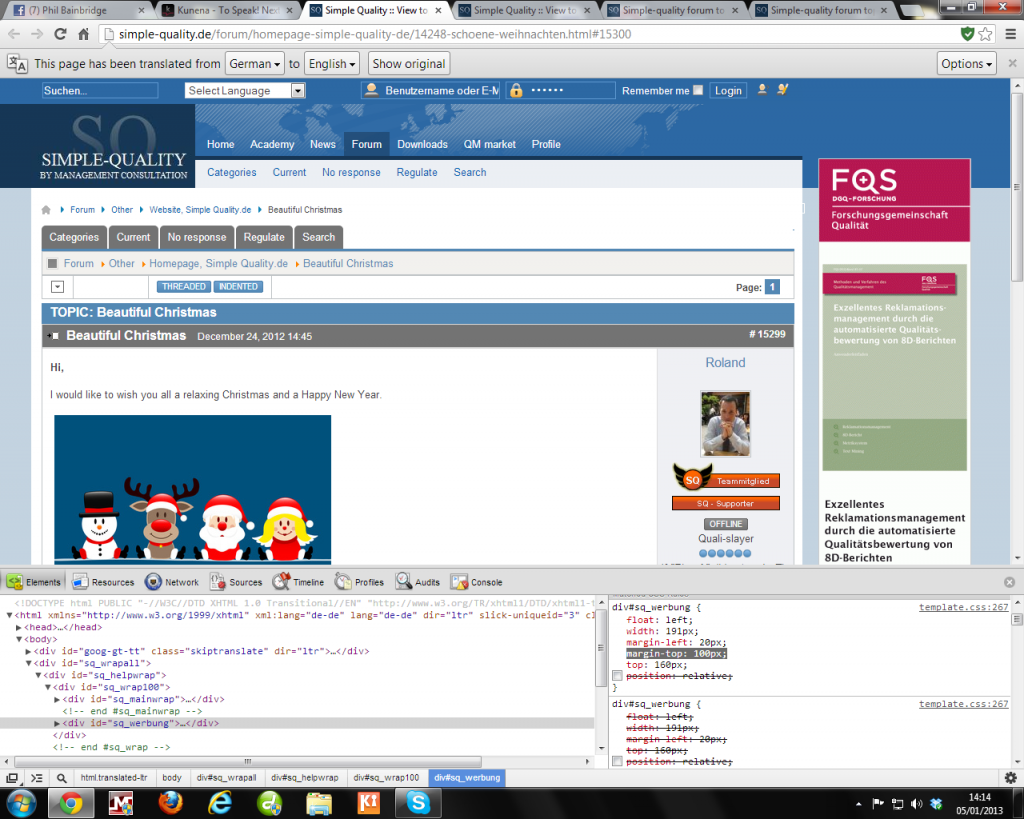
Replied by Philip Bainbridge on topic Site Layout defect
The following user(s) said Thank You: roland76
Please Log in or Create an account to join the conversation.
Time to create page: 0.313 seconds