Kunena 7.0.4 Released

The Kunena team has announce the arrival of Kunena 7.0.4 [K 7.0.4] in stable which is now available for download as a native Joomla extension for J! 5.4.x/6.0.x. This version addresses most of the issues that were discovered in K 6.2 / K 6.3 / K 6.4 and issues discovered during the last development stages of K 7.0

Topics that are moved into this category are generally considered to be closed. Users may want to add additional information but these topics should not be resurrected in order to discuss new problems or unrelated matters.

Solved Edit Forum Width
More
13 years 8 months ago #131838 by VDRhino
Edit Forum Width was created by VDRhino
Hi,

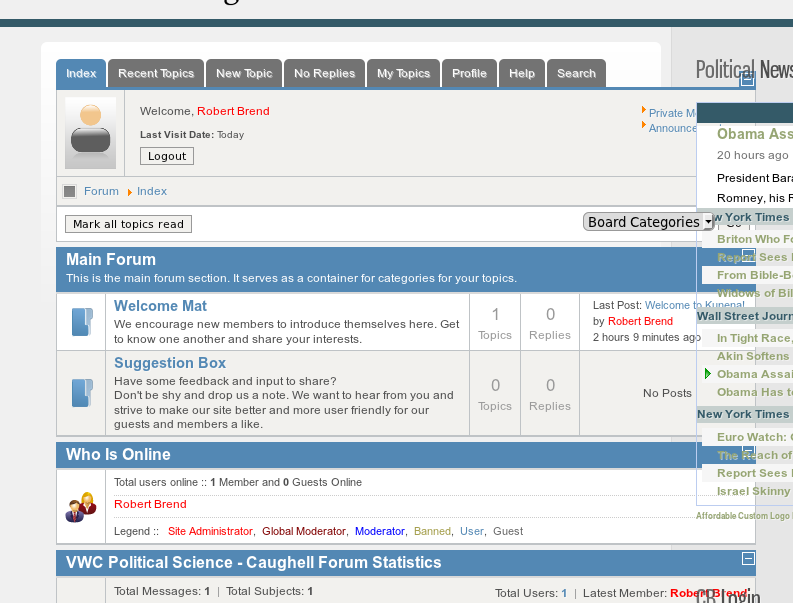
I have looked through the forum and through Google but I have not been able to find the solution. I would like to change the width of the forum. It defaults to a width of 700px, which I have found in the kunena.forum.css file, but changing this value or changin the value and adding !important does not seem to change the width of the forum. I need a width of 590px to fit my template I and I cannot get it to shrink. I have attached a screenshot of what is happening. Can someone please tell me what files and lines I need to change (maybe CSS, maybe the actual div code <div id="Kunena" class="layout"> to shrink the forum width? Thanks.

Kunena 2.0.1 | 2012-07-07 [ Balozi ], J! 2.5.6

Please Log in or Create an account to join the conversation.

More
13 years 8 months ago #131860 by sozzled
Replied by sozzled on topic Edit Forum Width
G'day, VDRhino, and welcome to Kunena.

The problem is caused by your Joomla site template. Please read My Joomla site template makes a mess of Kunena for various options that you have.

Please Log in or Create an account to join the conversation.

More
13 years 8 months ago - 13 years 8 months ago #131862 by VDRhino
Replied by VDRhino on topic Edit Forum Width
[Solved]

I went through the RocketTheme forums and found a solution. I am not certain that this will work for all RocketThemes but it did the trick for me and I found the response in the thread for another template of theirs.

Henning wrote: it has nothing to do with template ... kuena seems to have a min-width of 700px ... wider than the main-column.

add this to your template.css and clear your cache ...

div#Kunena {min-width: 650px;}


I hope this helps someone else with the same issue. I am sure that it will come up again. The template.css file is in your themes folder, not within Kunena.
Last edit: 13 years 8 months ago by VDRhino.

Please Log in or Create an account to join the conversation.

Time to create page: 0.217 seconds