


- Posts: 22
- Thank you received: 0
Kunena 7.0.9 & Kunena 6.4.14 – Security Updates Released
The Kunena team has announce the arrival of Kunena 7.0.9 [K 7.0.9] in stable which is now available for download as a native Joomla extension for J! 5.4.x/6.0.x./6.1.x. This version addresses most of the issues that were discovered in K 6.2 / K 6.3 / K 6.4 and issues discovered during the last development stages of K 7.0
Topics that are moved into this category are generally considered to be closed. Users may want to add additional information but these topics should not be resurrected in order to discuss new problems or unrelated matters.
Solved Kunena user profile: font colour
14 years 1 month ago #130913
by PCFlip
Kunena user profile: font colour was created by PCFlip
I looked at the FAQ and read the tutorials but Im still a bit unclear so any help would be greatly appreciated.
I noticed when I go to edit my profiles information that the text that describes each field is the same color as the background so it cant be read unless you highlight, I would like to know how I can change the color for this to say black?
Thanks.
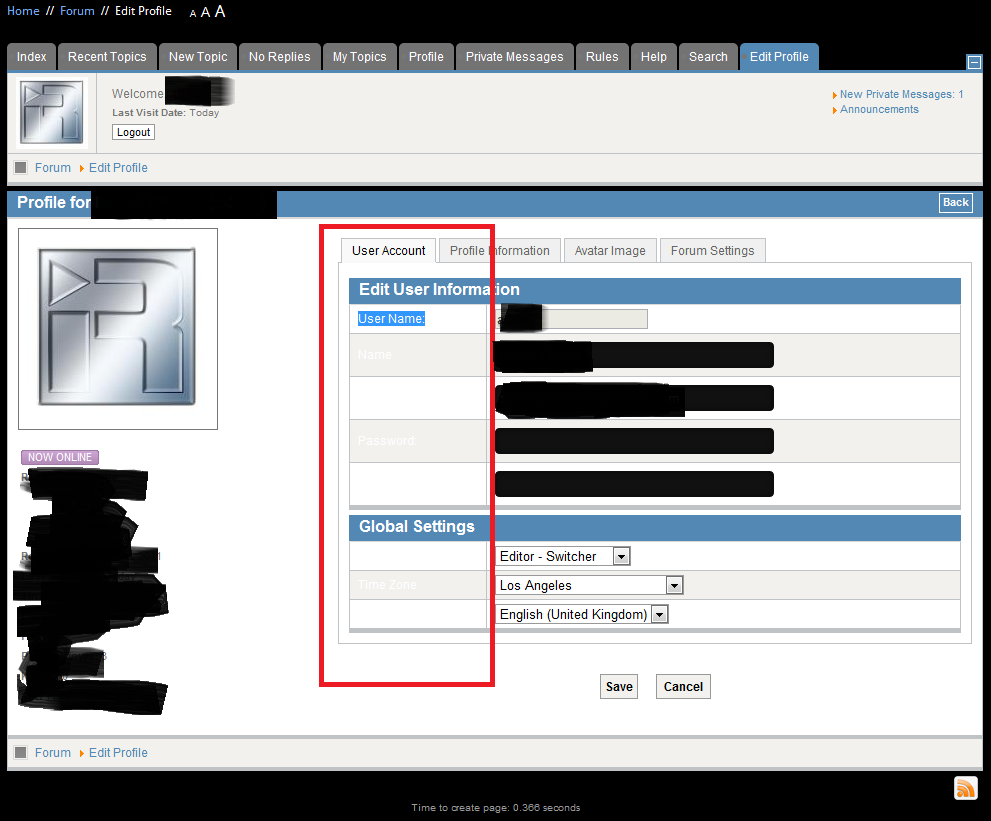
I noticed when I go to edit my profiles information that the text that describes each field is the same color as the background so it cant be read unless you highlight, I would like to know how I can change the color for this to say black?
Thanks.
Please Log in or Create an account to join the conversation.


14 years 1 month ago - 14 years 1 month ago #130914
by sozzled
Blue Eagle vs. Crypsis reference guide
Read my blog and

Replied by sozzled on topic Kunena user profile: font colour
The reason that your font color is "invisible" is because the font colour is defined by your Joomla site template CSS. Please read
My Joomla site template makes a mess of Kunena
for advice on what you can do in your current situation. I hope that clears up any confusion you may have. 
Blue Eagle vs. Crypsis reference guide
Read my blog and
Last edit: 14 years 1 month ago by sozzled.
Please Log in or Create an account to join the conversation.
14 years 1 month ago #130916
by PCFlip
Replied by PCFlip on topic Kunena user profile: font colour
yeah I came across that and well it comes down to both being important to me, thus why I posted my girrr help me here
Please Log in or Create an account to join the conversation.
14 years 1 month ago - 14 years 1 month ago #130920
by sozzled
Blue Eagle vs. Crypsis reference guide
Read my blog and
Replied by sozzled on topic Kunena user profile: font colour
It is not the Kunena project team's responsibility fix up issues cause by the Joomla site template that you have chosen. However, as we know nothing about the several million Joomla site templates that people may have chosen (or the one, in particular that you may be using) then, really, the best advice is to consider the options given in
My Joomla site template makes a mess of Kunena
. These kinds of things are usually solved with a single mouse-click when you use a web design tool like
Firebug
; that's what we keep telling people, anyway. 
Blue Eagle vs. Crypsis reference guide
Read my blog and
Last edit: 14 years 1 month ago by sozzled.
Please Log in or Create an account to join the conversation.
14 years 1 month ago #130923
by PCFlip
Replied by PCFlip on topic Kunena user profile: font colour
well actually I dont see how its joomla responsibility considering its the core and Kunena is an extension to it so it would lay more on your guys end to make a more compatible extension versus expecting a larger entity to change itself to work better with you guys.
Im not a programmer so Im still figuring out what all the raw code does but doing what you said I see its stating Kunena.forum.ie7.css so its kunena issue unless that css then pulls info from other css? if thats how all that works I dont know.
I get that you dont want to help or your just burned out from all the question and thats fine, Im just looking at other forums members putting in their two cents.
Okay so anyhow Im not using the blend option in Kunena so Im using the default blue template and I would just like to know where kunena is pulling its information for the color of that font in that particular portion of the profile so that I can go to wherever that piece of code is located whether its Kunena side of joomla side and see about making a change.
Im not a programmer so Im still figuring out what all the raw code does but doing what you said I see its stating Kunena.forum.ie7.css so its kunena issue unless that css then pulls info from other css? if thats how all that works I dont know.
I get that you dont want to help or your just burned out from all the question and thats fine, Im just looking at other forums members putting in their two cents.
Okay so anyhow Im not using the blend option in Kunena so Im using the default blue template and I would just like to know where kunena is pulling its information for the color of that font in that particular portion of the profile so that I can go to wherever that piece of code is located whether its Kunena side of joomla side and see about making a change.
Please Log in or Create an account to join the conversation.
14 years 1 month ago #130924
by sozzled
So, actually, it is a Joomla thing. Anyway it's irrelevant because, like I wrote, we don't know anything about your site or the template you're using (and you haven't given us anything to work with) so all of this discussion is academic. The whole problem is solved with a single-mouseclick if you're prepared to invest a little bit of your time to learn CSS. If you're not prepared to invest your time to learn CSS then there are other remedies discussed in My Joomla site template makes a mess of Kunena .
We have this same discussion every day but, unfortunately, it doesn't change the current facts. Your Joomla site template CSS is ultimately responsible for everything on your website, including how Kunena is rendered, too. Therefore, even if I explained theoretically which particular web element may need restyling, if your Joomla site template CSS has a different rule then anything I wrote here would be a waste of my time and your time.
Blue Eagle vs. Crypsis reference guide
Read my blog and
Replied by sozzled on topic Kunena user profile: font colour
If you understand how CSS works, whatever is the last piece of CSS loaded by the website will define and override any previously-defined CSS. The Kunena template CSS is loaded very early in the process. The Joomla site template CSS is the second-last thing to be loaded - there's also the advanced concept known as template overrides, too.PCFlip wrote: well actually I dont see how its joomla responsibility considering its the core and Kunena is an extension ...
So, actually, it is a Joomla thing. Anyway it's irrelevant because, like I wrote, we don't know anything about your site or the template you're using (and you haven't given us anything to work with) so all of this discussion is academic. The whole problem is solved with a single-mouseclick if you're prepared to invest a little bit of your time to learn CSS. If you're not prepared to invest your time to learn CSS then there are other remedies discussed in My Joomla site template makes a mess of Kunena .
We have this same discussion every day but, unfortunately, it doesn't change the current facts. Your Joomla site template CSS is ultimately responsible for everything on your website, including how Kunena is rendered, too. Therefore, even if I explained theoretically which particular web element may need restyling, if your Joomla site template CSS has a different rule then anything I wrote here would be a waste of my time and your time.
Blue Eagle vs. Crypsis reference guide
Read my blog and
Please Log in or Create an account to join the conversation.
Time to create page: 0.270 seconds