


- Posts: 127
- Thank you received: 4
Kunena 7.0.4 Released
The Kunena team has announce the arrival of Kunena 7.0.4 [K 7.0.4] in stable which is now available for download as a native Joomla extension for J! 5.4.x/6.0.x. This version addresses most of the issues that were discovered in K 6.2 / K 6.3 / K 6.4 and issues discovered during the last development stages of K 7.0
Topics that are moved into this category are generally considered to be closed. Users may want to add additional information but these topics should not be resurrected in order to discuss new problems or unrelated matters.
Merged Moderate screen gives error message: Invalid argument - moderate.php line 44
13 years 8 months ago #132787
by nemmar
Hi,
I have a J2.5.6 site with a Kunena 2.0.2 forum. I am getting an error message in the posts when I try to moderate them. I have attached a screenshot.
... Invalid argument... moderate.php on line 44
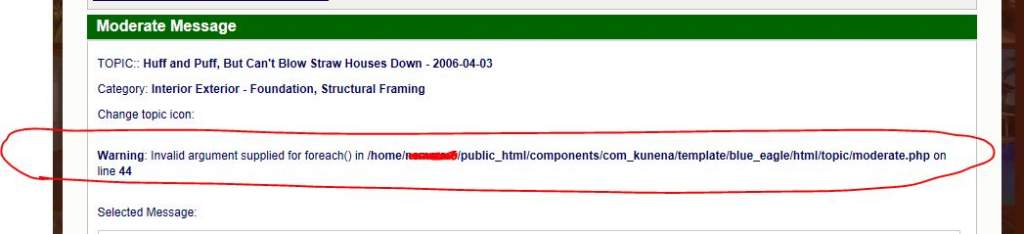
Thanks for any advice on how to fix this!
I have a J2.5.6 site with a Kunena 2.0.2 forum. I am getting an error message in the posts when I try to moderate them. I have attached a screenshot.
... Invalid argument... moderate.php on line 44
Thanks for any advice on how to fix this!
Please Log in or Create an account to join the conversation.


13 years 8 months ago #132796
by sozzled
Blue Eagle vs. Crypsis reference guide
Read my blog and

Replied by sozzled on topic Moderate screen gives error message: Invalid argument - moderate.php line 44
It may help to read
What information should I include when I ask for help (including how to post my configuration report)?
We have not seen this problem reported before with the standard installation of K 2.0.x
We have not seen this problem reported before with the standard installation of K 2.0.x
Blue Eagle vs. Crypsis reference guide
Read my blog and
Please Log in or Create an account to join the conversation.
13 years 8 months ago #132806
by nemmar
Replied by nemmar on topic Moderate screen gives error message: Invalid argument - moderate.php line 44
Hi sozzled,
Here is my Kunena Forum configuration report. Since you wrote you haven't seen this problem before, I should mention that I have the Admin Tools Pro extension installed on my site and I have SuperUser login blocked in the site frontend. So I have a Registered user setup as the Kunena forum moderator. I don't know if that security restriction could be what is conflicting with the Kunena moderator issue.
Here is my Kunena Forum configuration report. Since you wrote you haven't seen this problem before, I should mention that I have the Admin Tools Pro extension installed on my site and I have SuperUser login blocked in the site frontend. So I have a Registered user setup as the Kunena forum moderator. I don't know if that security restriction could be what is conflicting with the Kunena moderator issue.
This message contains confidential information
Database collation check: The collation of your table fields are correct
Legacy mode: Disabled | Joomla! SEF: Enabled | Joomla! SEF rewrite: Disabled | FTP layer: Disabled |
This message contains confidential informationhtaccess: Exists | PHP environment: Max execution time: 30 seconds | Max execution memory: 512M | Max file upload: 128M
Kunena menu details:
Warning: Spoiler!
ID Name Menutype Link Path 632 Forum Profile usermenu view=user forum-profile 635 Forum kunenamenu view=home&defaultmenu=635 forum 636 Forum Home kunenamenu view=category&layout=list&catid=0 forum/index 637 Recent Topics kunenamenu view=topics&layout=default&mode=replies forum/recent 638 New Topic kunenamenu view=topic&catid=0&layout=create forum/newtopic 639 No Replies kunenamenu view=topics&layout=default&mode=noreplies forum/noreplies 640 My Topics kunenamenu view=topics&layout=user&mode=default forum/mylatest 644 Search kunenamenu view=search forum/search 641 Profile kunenamenu view=user forum/profile 642 Rules kunenamenu view=misc forum/rules 643 Help kunenamenu view=misc forum/help
Joomla default template details : rt_reflex | author: RocketTheme, LLC | version: 1.6.4 | creationdate: February 16, 2012
Kunena default template details : Blue Eagle 2.0 | author: Kunena Team | version: 2.0.2 | creationdate: 2012-09-02
Kunena version detailed: Kunena 2.0.2 | 2012-09-02 [ Botschafter ]
| Kunena detailed configuration:| Kunena integration settings:Warning: Spoiler!
Kunena config settings: board_offline 0 enablerss 0 threads_per_page 20 messages_per_page 10 messages_per_page_search 20 showhistory 1 historylimit 6 shownew 1 disemoticons 0 template blue_eagle showannouncement 1 avataroncat 1 catimagepath category_images/ showchildcaticon 1 rtewidth 450 rteheight 300 enableforumjump 1 reportmsg 1 username 1 askemail 0 showemail 0 showuserstats 1 showkarma 1 useredit 1 useredittime 0 useredittimegrace 600 editmarkup 1 allowsubscriptions 1 subscriptionschecked 1 allowfavorites 1 maxsubject 50 maxsig 150 regonly 0 pubwrite 1 floodprotection 0 mailmod 1 mailadmin 1 captcha 1 mailfull 0 allowavatarupload 1 allowavatargallery 0 avatarquality 75 avatarsize 150 imageheight 800 imagewidth 800 imagesize 1000 filetypes txt,rtf,pdf,zip,tar.gz,tgz,tar.bz2 filesize 1000 showranking 1 rankimages 1 userlist_rows 30 userlist_online 1 userlist_avatar 1 userlist_name 0 userlist_posts 1 userlist_karma 1 userlist_email 0 userlist_usertype 0 userlist_joindate 1 userlist_lastvisitdate 1 userlist_userhits 1 latestcategory 0 showstats 1 showwhoisonline 1 showgenstats 1 showpopuserstats 1 popusercount 5 showpopsubjectstats 1 popsubjectcount 5 usernamechange 0 showspoilertag 1 showvideotag 1 showebaytag 0 trimlongurls 1 trimlongurlsfront 40 trimlongurlsback 20 autoembedyoutube 1 autoembedebay 0 ebaylanguagecode en-us sessiontimeout 1800 highlightcode 0 rss_type topic rss_timelimit month rss_limit 50 rss_included_categories rss_excluded_categories rss_specification rss2.0 rss_allow_html 1 rss_author_format name rss_author_in_title 1 rss_word_count 0 rss_old_titles 1 rss_cache 900 defaultpage recent default_sort asc sef 1 sefutf8 0 showimgforguest 1 showfileforguest 1 pollnboptions 10 pollallowvoteone 1 pollenabled 1 poppollscount 5 showpoppollstats 1 polltimebtvotes 00:15:00 pollnbvotesbyuser 100 pollresultsuserslist 1 maxpersotext 50 ordering_system mesid post_dateformat none post_dateformat_hover datetime hide_ip 0 imagetypes jpg,jpeg,gif,png checkmimetypes 1 imagemimetypes image/jpeg,image/jpg,image/gif,image/png imagequality 50 thumbheight 32 thumbwidth 32 hideuserprofileinfo put_empty boxghostmessage 0 userdeletetmessage 0 latestcategory_in 1 topicicons 0 debug 0 catsautosubscribed 0 showbannedreason 1 version_check 1 showthankyou 1 showpopthankyoustats 1 popthankscount 5 mod_see_deleted 0 bbcode_img_secure text listcat_show_moderators 1 lightbox 1 show_list_time 720 show_session_type 0 show_session_starttime 60 userlist_allowed 1 userlist_count_users 0 enable_threaded_layouts 0 category_subscriptions post topic_subscriptions every pubprofile 0 thankyou_max 10 email_recipient_count 0 email_recipient_privacy bcc captcha_post_limit 5 keywords 0 userkeywords 0 image_upload registered file_upload registered topic_layout flat time_to_create_page 1 show_imgfiles_manage_profile 1 hold_newusers_posts 0 hold_guest_posts 0 attachment_limit 8 pickup_category 0 article_display intro send_emails 1 fallback_english 1 cache 1 cache_time 60 iptracking 1 changename 1 enablepdf 0 jmambot 0 annmodid 42 userlist_username 1 rules_infb 1 help_infb 1 onlineusers 1 plugins Array | Joomla! detailed language files installed:Warning: Spoiler!Kunena - AlphaUserPoints Disabled
Kunena - Community Builder Disabled
Kunena - Gravatar Disabled
Kunena - JomSocial Disabled
Kunena - Joomla Enabled: access=1 login=1
Kunena - Kunena Enabled: avatar=1 profile=1
Kunena - UddeIM Disabled
Warning: Spoiler!
Joomla! languages installed: en-GB English (United Kingdom)
Third-party components: None
Third-party SEF components: None
Plugins: Content - Kunena Discuss 2.0.2
Modules: Kunena Latest 2.0.2 | Kunena Stats 2.0.2 | Kunena Login 2.0.2 | Kunena Search 2.0.2
Please Log in or Create an account to join the conversation.
13 years 8 months ago #132808
by sozzled
Blue Eagle vs. Crypsis reference guide
Read my blog and
Replied by sozzled on topic Moderate screen gives error message: Invalid argument - moderate.php line 44
Thank you for the additional information.
I'm also not sure if some other extension(s) you may have added will cause the kind of error you are getting. Although, for the most part, K 2.0.2 should work quite well with K 2.5 we are aware that some issues mean that it would be more reasonable to write that K 2.0.x is not necessarily 100% J! 2.5 compatible in all cases.
If you have made modifications to the Joomla ACL settings (and applied custom Joomla ACL settings to how your users access the component) then this may add a further layer of complications to the case. Under those circumstances, it may be advisable to set your Joomla ACL settings - as they apply to the Kunena component - in a more "standard" (or default-like) way and see if this overcomes the problem.
It's also possible that some other extension included with your Rockettheme template may be the cause of the problem and that's something you may need to discuss with the Rockettheme people to see if they are aware of the issue.
One thing is evident from your config report: your Kunena forum is not setup in the way we recommend that it might be done (see The Kunena Menu for further information).
Perhaps other members of the community have see this error message, too, and may like to contribute their thoughts on the matter?
I'm also not sure if some other extension(s) you may have added will cause the kind of error you are getting. Although, for the most part, K 2.0.2 should work quite well with K 2.5 we are aware that some issues mean that it would be more reasonable to write that K 2.0.x is not necessarily 100% J! 2.5 compatible in all cases.
If you have made modifications to the Joomla ACL settings (and applied custom Joomla ACL settings to how your users access the component) then this may add a further layer of complications to the case. Under those circumstances, it may be advisable to set your Joomla ACL settings - as they apply to the Kunena component - in a more "standard" (or default-like) way and see if this overcomes the problem.
It's also possible that some other extension included with your Rockettheme template may be the cause of the problem and that's something you may need to discuss with the Rockettheme people to see if they are aware of the issue.
One thing is evident from your config report: your Kunena forum is not setup in the way we recommend that it might be done (see The Kunena Menu for further information).
Perhaps other members of the community have see this error message, too, and may like to contribute their thoughts on the matter?
Blue Eagle vs. Crypsis reference guide
Read my blog and
Please Log in or Create an account to join the conversation.

13 years 8 months ago #132821
by Winuser
Replied by Winuser on topic Moderate screen gives error message: Invalid argument - moderate.php line 44
It's a PHP warning, not an error. A PHP error will cause a script to terminate. You are seeing it because you have your PHP warning setting enabled.
Anyhoo... the warning is thrown in moderate.php (which belongs to Kunena). Typically you get those warnings when an operation is permitted on an element (i.e., a variable) before that element is initialized. For example, incrementing a loop counter should be done only after the counter is set to integer value zero. Thus, it's technically a coding flaw in the moderate.php script. It's also a very common warning because loops, arrays and other operations are often coded on the assumption that the target element will never be NULL. Eventually you can run into a scenario where the element IS null.
Anyhoo... the warning is thrown in moderate.php (which belongs to Kunena). Typically you get those warnings when an operation is permitted on an element (i.e., a variable) before that element is initialized. For example, incrementing a loop counter should be done only after the counter is set to integer value zero. Thus, it's technically a coding flaw in the moderate.php script. It's also a very common warning because loops, arrays and other operations are often coded on the assumption that the target element will never be NULL. Eventually you can run into a scenario where the element IS null.
Please Log in or Create an account to join the conversation.
13 years 4 months ago #139070
by fifi
Replied by fifi on topic Moderate screen gives error message: Invalid argument - moderate.php line 44
I got the same "invalid argument" when I want to moderate a post and, further more, it is impossible to move a post in another subject :sick:sozzled wrote: Perhaps other members of the community have see this error message, too, and may like to contribute their thoughts on the matter?
Please Log in or Create an account to join the conversation.
Time to create page: 0.258 seconds