Kunena 7.0.5 & Kunena 6.4.11 – Security Updates Released

The Kunena team has announce the arrival of Kunena 7.0.5 [K 7.0.5] in stable which is now available for download as a native Joomla extension for J! 5.4.x/6.0.x. This version addresses most of the issues that were discovered in K 6.2 / K 6.3 / K 6.4 and issues discovered during the last development stages of K 7.0.

The Kunena team is also pleased to announce the eleventh version of Kunena 6.4, a native Joomla extension for Joomla! 5.0, 5.1, 5.2, 5.3, 5.4 and 6.0.

Topics that are moved into this category are generally considered to be closed. Users may want to add additional information but these topics should not be resurrected in order to discuss new problems or unrelated matters.

Question JFolder::create: Could not create directory

More
13 years 9 months ago - 13 years 9 months ago #130160 by odball
I have joomla 2.5.6 and am running kunena 2.0. th eserver has PHP 5.2.9 my local xampp has php 5.2.8.

On my sit everything runs fine except for this. Without loging into the front end as a user. going to the Forum and opening Willkommen and the opening Willkommen bei Kunena! I get the above failur. I have run a path.php to ensure that the configuration.php paths are correct I have also set the correct path to the tmp dir in the admin server area. I have even tried setting the tmp access rights to 777 with not success. What directory is kunena trying to greate and if not which directory needs which permissions? why must the ftp in joomla be turned on?

I am not a code expert, and only know waht I have picked up as I ahve been working on my website.

the site address is Interessengemeisnschaft der Modellbauer Dortmund e.V.

Thank you in advance for any assistance you may be able to provide

odball.
Last edit: 13 years 9 months ago by odball. Reason: web link inserted correctly

Please Log in or Create an account to join the conversation.

More
13 years 9 months ago - 13 years 9 months ago #130332 by MarioMari

why must the ftp in joomla be turned on?

- Definitely not.


Try one of these options:

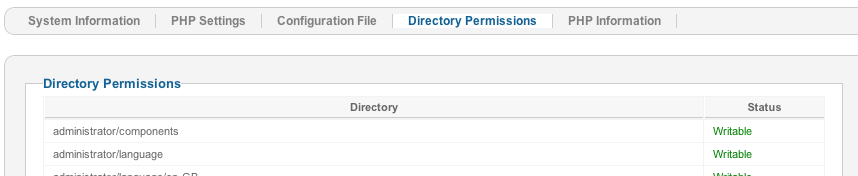
1). All segments have the appropriate legal directories or in green ink?


2). Sometimes the problem is incorrect or incomplete it's called configuration of your host. It has to do with redirecting addresses on your server where you installed Joomla.
It is worth trying to change settings. Then it may help.

In the root directory on your server, Joomla! root, In the file "configuration.php" line that you have completed your domain address? eg. my domain name under which it operates Joomla! it is "mydomain.www".
(Note that when operating on xampp server is here do not have any entries.)

Be sure, before changes make a backup of this file.

"https" or "http" type so I have a real address of your page.


and ON "Search Engine Friendly URLs" and "Use URL rewriting"


Regards!

Joomla 2.5.8, and 3.0 K.2.0.3, default Chrome
Last edit: 13 years 9 months ago by MarioMari.
The following user(s) said Thank You: karynalacerda

Please Log in or Create an account to join the conversation.

Time to create page: 0.917 seconds