
- Posts: 5
- Thank you received: 0
Kunena 7.0.8 Released
The Kunena team has announce the arrival of Kunena 7.0.8 [K 7.0.8] in stable which is now available for download as a native Joomla extension for J! 5.4.x/6.0.x./6.1.x. This version addresses most of the issues that were discovered in K 6.2 / K 6.3 / K 6.4 and issues discovered during the last development stages of K 7.0
Topics that are moved into this category are generally considered to be closed. Users may want to add additional information but these topics should not be resurrected in order to discuss new problems or unrelated matters.
Merged BackEnd Category Manager order disappears
- MarcePCsolution
-
 Topic Author
- Offline
- New Member
-

Less
More
14 years 1 month ago - 14 years 1 month ago #129031
by MarcePCsolution
BackEnd Category Manager order disappears was created by MarcePCsolution
Good day:
Joomla version: 2.5.6 (UK English + Spanish)
Kunena version: 2.0.1 (UK English + Spanish)
Total of categories: 34
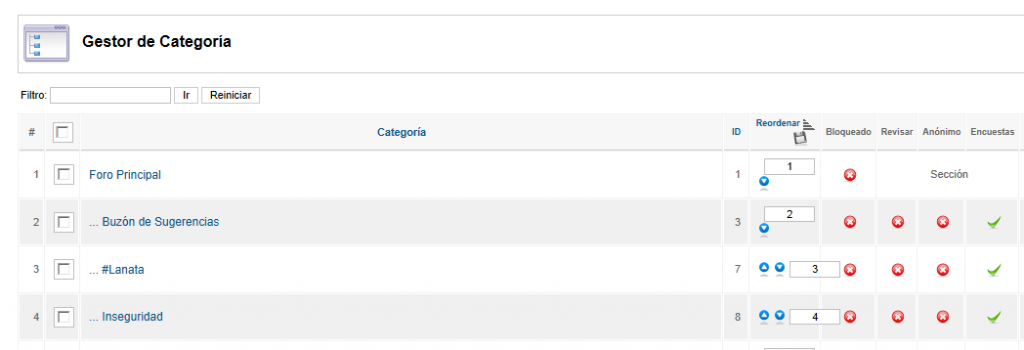
Just log into the backend, I can see the controls to ordering the categories:
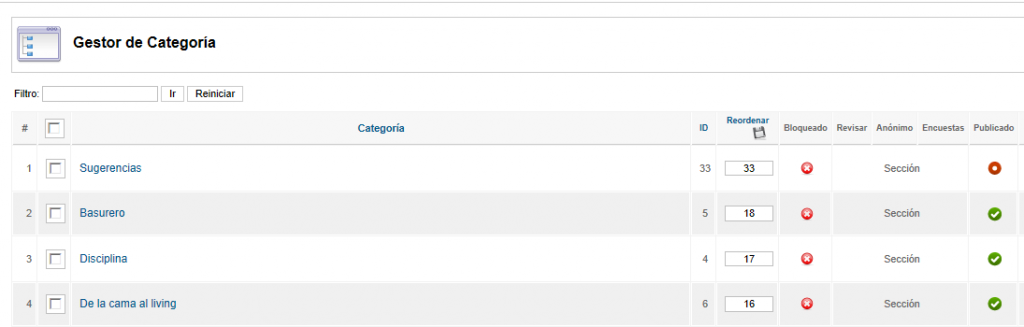
Any thing I try to do, icons disappear and I cannot order the categories:
Configuration Report (txt):
Thanks in advance any help... because I'm desperate... :sick:
Joomla version: 2.5.6 (UK English + Spanish)
Kunena version: 2.0.1 (UK English + Spanish)
Total of categories: 34
Just log into the backend, I can see the controls to ordering the categories:
Any thing I try to do, icons disappear and I cannot order the categories:
Configuration Report (txt):
Thanks in advance any help... because I'm desperate... :sick:
Last edit: 14 years 1 month ago by MarcePCsolution.
Please Log in or Create an account to join the conversation.


14 years 1 month ago #129071
by sozzled
Blue Eagle vs. Crypsis reference guide
Read my blog and

Replied by sozzled on topic BackEnd Category Manager order disappears
Thank you very much for your message. I have been intending for a while to report this issue as a defect in Github (because it affects everyone). It's not very easy to use the category reordering feature at the moment.
Recently, when I moved all the categories around on this website, I, too, had the same problem.
The only way I found I could work around the problem was to click the "reorder" link at the top of the column twice, and then use the "move down" (arrow) to move a category down the list; the "move up" does not always work properly and trying to type a number does not work at all.
I have reported this on Github ( github.com/Kunena/Kunena-2.0/issues/984 )
Recently, when I moved all the categories around on this website, I, too, had the same problem.
The only way I found I could work around the problem was to click the "reorder" link at the top of the column twice, and then use the "move down" (arrow) to move a category down the list; the "move up" does not always work properly and trying to type a number does not work at all.
I have reported this on Github ( github.com/Kunena/Kunena-2.0/issues/984 )
Blue Eagle vs. Crypsis reference guide
Read my blog and
The following user(s) said Thank You: MarcePCsolution
Please Log in or Create an account to join the conversation.
- MarcePCsolution
-
Topic Author
- Offline
- New Member
-
Less
More
- Posts: 5
- Thank you received: 0
14 years 1 month ago - 14 years 1 month ago #129076
by MarcePCsolution
Replied by MarcePCsolution on topic BackEnd Category Manager order disappears
Thanks a lot your very fast reply. Your description about these behaviors is accurate.
In fact I have just apply this solution and I can reorder my few categories.
:whistle: Since you are so amabale, I want to ask how I can move a thread/topic to another SECTION (not to other category in the same section), and..
..if there is any way to recover a "definitely deleted" post.
Thanks again, and Kind Regards from Argentina
In fact I have just apply this solution and I can reorder my few categories.
:whistle: Since you are so amabale, I want to ask how I can move a thread/topic to another SECTION (not to other category in the same section), and..
..if there is any way to recover a "definitely deleted" post.
Thanks again, and Kind Regards from Argentina
Last edit: 14 years 1 month ago by MarcePCsolution.
Please Log in or Create an account to join the conversation.
14 years 1 month ago - 14 years 1 month ago #129081
by sozzled
Blue Eagle vs. Crypsis reference guide
Read my blog and
Replied by sozzled on topic BackEnd Category Manager order disappears
Different question (about moving categories) and, therefore, should be a separate topic for that question.
See Sections, Categories, sub-Categories (Part 1) in the Wiki. You cannot post in a section. Therefore, if you have topics in a category and you want to turn it into a section then you may have a problem doing that. Let's discuss that question separately.
See Sections, Categories, sub-Categories (Part 1) in the Wiki. You cannot post in a section. Therefore, if you have topics in a category and you want to turn it into a section then you may have a problem doing that. Let's discuss that question separately.
Blue Eagle vs. Crypsis reference guide
Read my blog and
Last edit: 14 years 1 month ago by sozzled.
The following user(s) said Thank You: MarcePCsolution
Please Log in or Create an account to join the conversation.


14 years 1 month ago - 14 years 1 month ago #129428
by MarioMari
Joomla 2.5.8, and 3.0 K.2.0.3, default Chrome
Replied by MarioMari on topic BackEnd Category Manager order disappears
Reorder by clicking on the icon "Move Up / Down" works when several times click the icon "Reorder" which turns on and off display of icons sort. After several attempts Reorder starts.
You can also try to unlock the other can move the order of the category or section. Click first on the order of the first category or section by sliding it down. Then change the order is as if unlocked and can be moved and "up" and "down".
P.S.
1.
In my opinion, completely thrown him out the "Reorder" and hide icons move. Reorder icons should be visible at all times.
2.
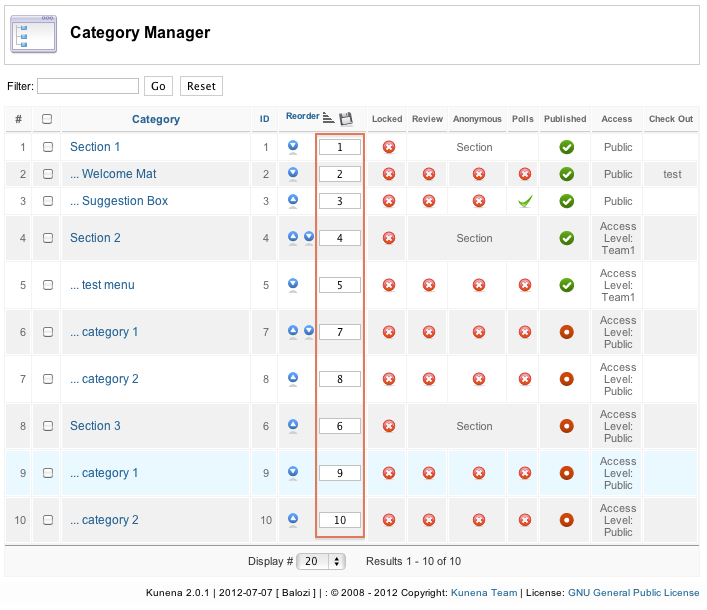
Please think about it. So it is now. Manually change the numbers is a big hassle:
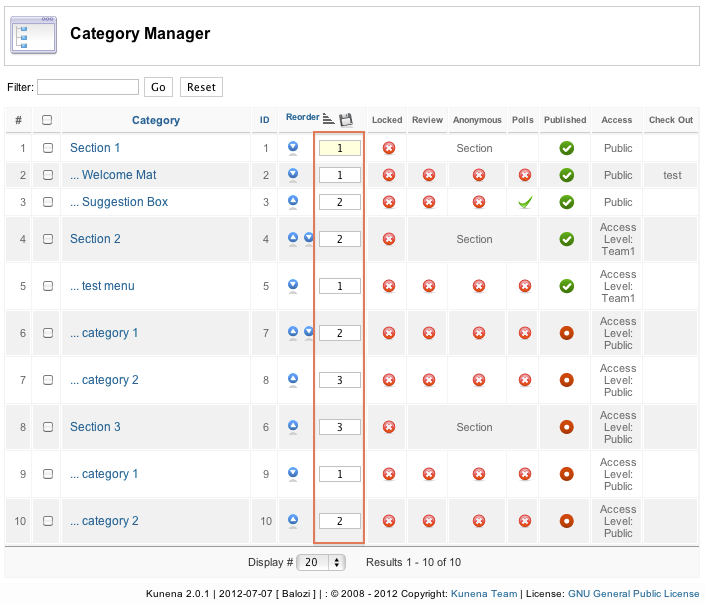
In my opinion, better when it's like in Joomla categories
3.
It also draws attention to the problem of duplicate category names in different sections.
Now, adding to the section of the new category with the same name and alias in another section as an error.
According to me, this situation only interfere with the administrator's Foum and causes confusion. A common situation is where the category names are repeated in different sections. Then the path is correct and there is no error.
Error arises when one section I want to put two of the same categories with the same alias or name.
According mmnie warning about duplicate category names should appear only at the time when I want to transfer it, or create the same category in the same section.
* Subject associated with this application:
www.kunena.org/forum/119-Feature-Request...-actions-to-selected
You can also try to unlock the other can move the order of the category or section. Click first on the order of the first category or section by sliding it down. Then change the order is as if unlocked and can be moved and "up" and "down".
P.S.
1.
In my opinion, completely thrown him out the "Reorder" and hide icons move. Reorder icons should be visible at all times.
2.
Please think about it. So it is now. Manually change the numbers is a big hassle:
In my opinion, better when it's like in Joomla categories
3.
It also draws attention to the problem of duplicate category names in different sections.
Now, adding to the section of the new category with the same name and alias in another section as an error.
According to me, this situation only interfere with the administrator's Foum and causes confusion. A common situation is where the category names are repeated in different sections. Then the path is correct and there is no error.
Error arises when one section I want to put two of the same categories with the same alias or name.
According mmnie warning about duplicate category names should appear only at the time when I want to transfer it, or create the same category in the same section.
* Subject associated with this application:
www.kunena.org/forum/119-Feature-Request...-actions-to-selected
Joomla 2.5.8, and 3.0 K.2.0.3, default Chrome
Last edit: 14 years 1 month ago by MarioMari.
Please Log in or Create an account to join the conversation.
14 years 1 month ago #129460
by sozzled
Blue Eagle vs. Crypsis reference guide
Read my blog and
Replied by sozzled on topic BackEnd Category Manager order disappears
There is a defect in K 2.0.0 and K 2.0.1 and the development team members are trying to fix the problem. Thank you for your suggestions. I am sure that your ideas will be considered at the appropriate time.
Blue Eagle vs. Crypsis reference guide
Read my blog and
Please Log in or Create an account to join the conversation.
Time to create page: 0.255 seconds