


- Posts: 13
- Thank you received: 0
Kunena 7.0.5 & Kunena 6.4.11 – Security Updates Released
The Kunena team has announce the arrival of Kunena 7.0.5 [K 7.0.5] in stable which is now available for download as a native Joomla extension for J! 5.4.x/6.0.x. This version addresses most of the issues that were discovered in K 6.2 / K 6.3 / K 6.4 and issues discovered during the last development stages of K 7.0.
The Kunena team is also pleased to announce the eleventh version of Kunena 6.4, a native Joomla extension for Joomla! 5.0, 5.1, 5.2, 5.3, 5.4 and 6.0.
Topics that are moved into this category are generally considered to be closed. Users may want to add additional information but these topics should not be resurrected in order to discuss new problems or unrelated matters.
Question Must be something obvious
13 years 3 months ago #140494
by Hooligan
Replied by Hooligan on topic Must be something obvious
Please Log in or Create an account to join the conversation.


13 years 3 months ago #140497
by yuzef
Love Simplicty
read...... and learn........
My Joomla Test Site
Replied by yuzef on topic Must be something obvious
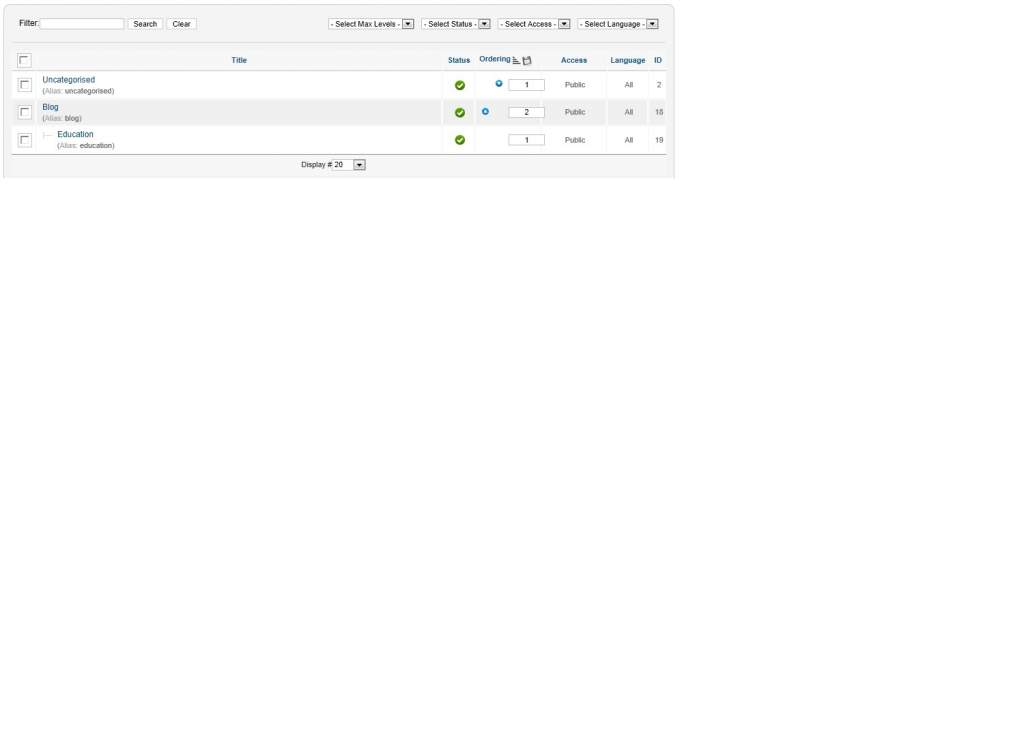
You can use category mapping, (as my experience about kunena discuss plugin) Category mapping never wrong, and always work for me.
And it's okay to use double category for kunena. Like yours here in category mapping should look like this : 2,4;18,4;19,4;
And it's okay to use double category for kunena. Like yours here in category mapping should look like this : 2,4;18,4;19,4;
Love Simplicty
read...... and learn........
My Joomla Test Site
The following user(s) said Thank You: Hooligan
Please Log in or Create an account to join the conversation.
13 years 3 months ago #140514
by Hooligan
Replied by Hooligan on topic Must be something obvious
Thank you. I tried that and it still didn't work, but maybe we are getting closer.
The new debug message is as follows...
The new debug message is as follows...
[KunenaDiscuss debug: Constructor called in com_content ]

[KunenaDiscuss debug: onPrepareContent.Allow: Category 2 is in the category map using Kunena category 4 ]

[KunenaDiscuss debug: onPrepareContent: we are in article/ page. ]

[KunenaDiscuss debug: onPrepareContent: Article 37 ]

[KunenaDiscuss debug: onPrepareContent: Searched for {kunena_discuss:#}: Custom Topic not found. ]

[KunenaDiscuss debug: showPlugin: No topic found ]

[KunenaDiscuss debug: showPlugin: Let's see what we can do.. ]

[KunenaDiscuss debug: showTopic: No messages to render ]

[KunenaDiscuss debug: onAfterDisplayContent: Returning content for article 37 ]
Please Log in or Create an account to join the conversation.
13 years 3 months ago - 13 years 3 months ago #140515
by Hooligan
Replied by Hooligan on topic Must be something obvious
Note the reference to {kunena_discuss:#}.
I am adding that at the bottom of my article literally. Should there actually be a digit where the "#" is?
Is it perhaps a wysiwyg issue. I do toggle the editor off when I do this.
I am adding that at the bottom of my article literally. Should there actually be a digit where the "#" is?
Is it perhaps a wysiwyg issue. I do toggle the editor off when I do this.
Last edit: 13 years 3 months ago by Hooligan.
Please Log in or Create an account to join the conversation.


13 years 3 months ago #140519
by sozzled
Blue Eagle vs. Crypsis reference guide
Read my blog and

Replied by sozzled on topic Must be something obvious
When you write, that something "must be obvious", did you study the quick tutorial on the subject?
www.kunena.org/forum/K-2-0-Kunena-Discus...instructions-for-use
Blue Eagle vs. Crypsis reference guide
Read my blog and
Please Log in or Create an account to join the conversation.
13 years 3 months ago #140522
by Hooligan
Replied by Hooligan on topic Must be something obvious
Thanks for the quick reply. I tried to enter...
{kunena_discuss:4}
Still to no avail. I even tried removing it all together which I think I can do for a non-custom topic). Still no luck.
I suspect that plugins in general are not being handled properly in my article.
For instance, I shouldn't actually see "{kunena_discuss:4}" at the bottom of my article when I read it as a Joomla article (like everyone else does), yet it is there.
I am getting auto inserted <p> tags.
I tried toggling the wysiwyg off and it still inserts them.
I noticed a Joomla article about Text Filters, but mine seem set correctly (Super User = None)
Am I on the right track here you think?
{kunena_discuss:4}
Still to no avail. I even tried removing it all together which I think I can do for a non-custom topic). Still no luck.
I suspect that plugins in general are not being handled properly in my article.
For instance, I shouldn't actually see "{kunena_discuss:4}" at the bottom of my article when I read it as a Joomla article (like everyone else does), yet it is there.
I am getting auto inserted <p> tags.
I tried toggling the wysiwyg off and it still inserts them.
I noticed a Joomla article about Text Filters, but mine seem set correctly (Super User = None)
Am I on the right track here you think?
Please Log in or Create an account to join the conversation.
Time to create page: 0.283 seconds