Kunena 7.0.5 & Kunena 6.4.11 – Security Updates Released

The Kunena team has announce the arrival of Kunena 7.0.5 [K 7.0.5] in stable which is now available for download as a native Joomla extension for J! 5.4.x/6.0.x. This version addresses most of the issues that were discovered in K 6.2 / K 6.3 / K 6.4 and issues discovered during the last development stages of K 7.0.

The Kunena team is also pleased to announce the eleventh version of Kunena 6.4, a native Joomla extension for Joomla! 5.0, 5.1, 5.2, 5.3, 5.4 and 6.0.

If you are having problems then, for your own benefit, it would save us all a lot of time if you would kindly post your configuration report when you ask for help from this forum. If you do not post your configuration report we will not ask you for it but you will probably not get your problem solved, either.

K 2.0 support will cease on 31 August 2013 and this section of the forum will be closed and archived after that time and no further questions will be answered about this version.

Question How to show certain modules on all KUNENA pages?

More
13 years 3 months ago - 13 years 3 months ago #140675 by supayoshi
I'm having an issue, when I use Kunena, and have a few modules. I want these modules to be shown around Kunena, all around the forum board. That means, on every category, on every place you navigate through the forum...

However.. I don't need them to be on the other pages that are not the Kunena board. So my problem is this, when i tell the module to be shown on only the selected pages, it shows on the Kunena board, but as soon as you click a category it won't show the modules any longer on that page... which is really confusing. So what do I do to show the modules on every place of the Kunena forum? Create a menu for every thing to click?

Thanks please helP!

EDIT:

So I found out that creating menu items for every category was a solution to this problem, however... Posts still don't have a module next to them! ;) What's going on? Should I activate something? or? How do I get modules next to my posts, that are not on every page of my website.

Even simpler:

How do I assign a module to all component pages?
Last edit: 13 years 3 months ago by supayoshi.

Please Log in or Create an account to join the conversation.

More
13 years 3 months ago #140677 by sozzled

supayoshi wrote: I found out that creating menu items for every category was a solution to this problem, however posts still don't have a module next to them!]

G'day supayoshi, and welcome to Kunena.

To make a module appear on a Joomla web page you need to assign, for each module that you have, on which pages it will appear. This is done with the Joomla Module Manager. This is not actually a "Kunena" thing. However, before you can assign a module to appear on different views in your forum (e.g. the Index page or Recent Topics page) you need to have these places defined. To define these places, you create and publish menus. When you first install Kunena a menu is automatically created for you. If you do not use the Kunena menu that is automatically created for you, that's OK but then you will have to figure out how you want to make your own custom menu items.

You do not need to create individual menu items for each category. That is a lot of unnecessary work. I suggest you read Kunena menu issues in the Wiki.

I hope this helps.

Please Log in or Create an account to join the conversation.

More
13 years 3 months ago #140684 by supayoshi
I think you may have misunderstood me ;) I want the modules to show next to the kunena forums, and posts etc.

When I do it, in Joomla as you say, that works fine okay. But when I go to a thread, or topic or what so ever, the modules dissapear, except for modules that are on every page

I am going to try doing it with Advanced Modules, but ok? Any suggestions would be good.

Please Log in or Create an account to join the conversation.

More
13 years 3 months ago - 13 years 3 months ago #140687 by rich
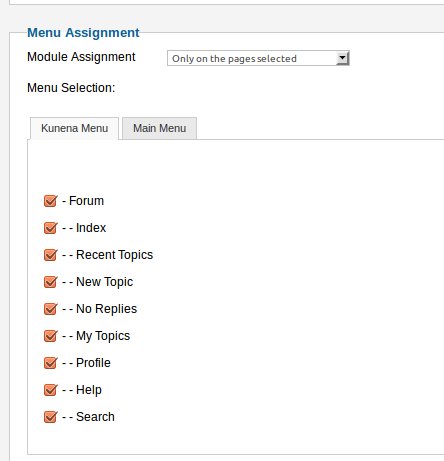
Have you also selected the complete Kunena Menu?
If that doesn't help, then you use wrong Menu Items.


Important! Always create a backup before you make any changes to your website!
Last edit: 13 years 3 months ago by rich.

Please Log in or Create an account to join the conversation.

Time to create page: 0.244 seconds