
- Posts: 20
- Thank you received: 0
Kunena 7.0.9 & Kunena 6.4.14 – Security Updates Released
The Kunena team has announce the arrival of Kunena 7.0.9 [K 7.0.9] in stable which is now available for download as a native Joomla extension for J! 5.4.x/6.0.x./6.1.x. This version addresses most of the issues that were discovered in K 6.2 / K 6.3 / K 6.4 and issues discovered during the last development stages of K 7.0
If you are having problems then, for your own benefit, it would save us all a lot of time if you would kindly post your
configuration report
when you ask for help from this forum. If you do not post your configuration report we will not ask you for it but you will probably not get your problem solved, either.
K 2.0 support will cease on 31 August 2013 and this section of the forum will be closed and archived after that time and no further questions will be answered about this version.
K 2.0 support will cease on 31 August 2013 and this section of the forum will be closed and archived after that time and no further questions will be answered about this version.
Solved Website hacked... how do i do a mass deletion of all their posts?
- joopyjoops
-
 Topic Author
- Offline
- Junior Member
-

Less
More
13 years 10 months ago #136908
by joopyjoops
So looks like some freak has got onto my forum and posted hundreds of spam messages.
Is there a way of deleting them all on mass?
mainlymanly.com.au/
Is there a way of deleting them all on mass?
mainlymanly.com.au/
Please Log in or Create an account to join the conversation.


Less
More
- Posts: 12291
- Thank you received: 2538
13 years 10 months ago #136910
by rich
Important! Always create a backup before you make any changes to your website!
Replied by rich on topic Website hacked... how do i do a mass deletion of all their posts?
Go in "Backend > Kunena Forum > User Manager" and select the checkbox from this user. Afterwards click above on the symbol "Trash all Messages".
Important! Always create a backup before you make any changes to your website!
The following user(s) said Thank You: joopyjoops
Please Log in or Create an account to join the conversation.
- joopyjoops
-
Topic Author
- Offline
- Junior Member
-
Less
More
- Posts: 20
- Thank you received: 0
13 years 10 months ago #136912
by joopyjoops
Replied by joopyjoops on topic Website hacked... how do i do a mass deletion of all their posts?
Thank you!
However, stupidly i deleted the user as soon as i saw what they did (don't know why i didn't just block them), so now they are completely gone. Yet the messages remain.
Is there any way to restore them in Community Builder?
However, stupidly i deleted the user as soon as i saw what they did (don't know why i didn't just block them), so now they are completely gone. Yet the messages remain.
Is there any way to restore them in Community Builder?
Please Log in or Create an account to join the conversation.
Less
More
- Posts: 12291
- Thank you received: 2538
13 years 10 months ago #136914
by rich
Important! Always create a backup before you make any changes to your website!
Replied by rich on topic Website hacked... how do i do a mass deletion of all their posts?
Have you deleted the user? This is not good. Restore deleted users is not possible.
Now, you must delete these posts manually.
Now, you must delete these posts manually.
Important! Always create a backup before you make any changes to your website!
Please Log in or Create an account to join the conversation.
- joopyjoops
-
Topic Author
- Offline
- Junior Member
-
Less
More
- Posts: 20
- Thank you received: 0
13 years 10 months ago #136915
by joopyjoops
Replied by joopyjoops on topic Website hacked... how do i do a mass deletion of all their posts?
Bugger. Right, time to delete manually then!
Please Log in or Create an account to join the conversation.
Less
More
- Posts: 12291
- Thank you received: 2538
13 years 10 months ago - 13 years 10 months ago #136916
by rich
Important! Always create a backup before you make any changes to your website!
Replied by rich on topic Website hacked... how do i do a mass deletion of all their posts?
I have a idea.
They have more spam than regular messages in "Recent Topics".
Delete all topics who have spam (see Image).
Then go in the "Backend > Kunena Forum > Trashmanger".
Search posts by username (spamuser) and delete these permanent. Afterwards restore the topics again.
Previously please create a backup of the database.
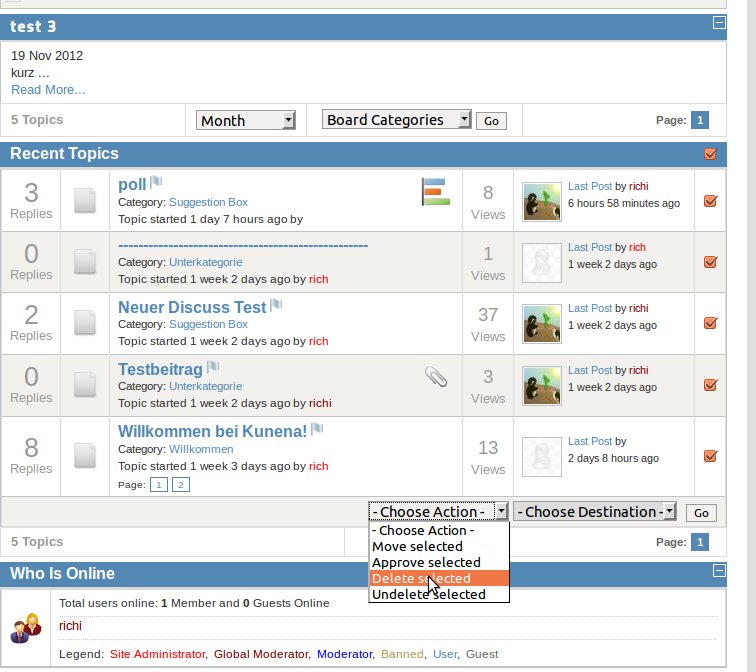
They have more spam than regular messages in "Recent Topics".
Delete all topics who have spam (see Image).
Then go in the "Backend > Kunena Forum > Trashmanger".
Search posts by username (spamuser) and delete these permanent. Afterwards restore the topics again.
Previously please create a backup of the database.
Important! Always create a backup before you make any changes to your website!
Last edit: 13 years 10 months ago by rich.
Please Log in or Create an account to join the conversation.
Time to create page: 0.243 seconds